


Python Articles
Freelancing as a Python Developer: Getting Your First Client
Common Python Mistakes Beginners Make And How to Fix Them
Python Best Practices: Writing Clean, Maintainable Code Like a Pro
How to Build a Python Developer Portfolio That Gets You Hired


Get In Touch For Details! Request More Information

Binary to Decimal Conversion in Python: Complete Tutorial
Jul 27, 2026 4 Min Read 341 Views
(Last Updated)
Many beginners learning number systems and bitwise operations need a reliable way to convert binary to decimal in Python for coding exercises, interview problems, or low-level programming tasks. Python offers multiple approaches, from a single built-in function call to writing the conversion logic manually for deeper understanding. This guide walks through every method step by step with working code.
Table of contents
- TL;DR Summary
- What You Need Before Starting
- Binary to Decimal Conversion in Python
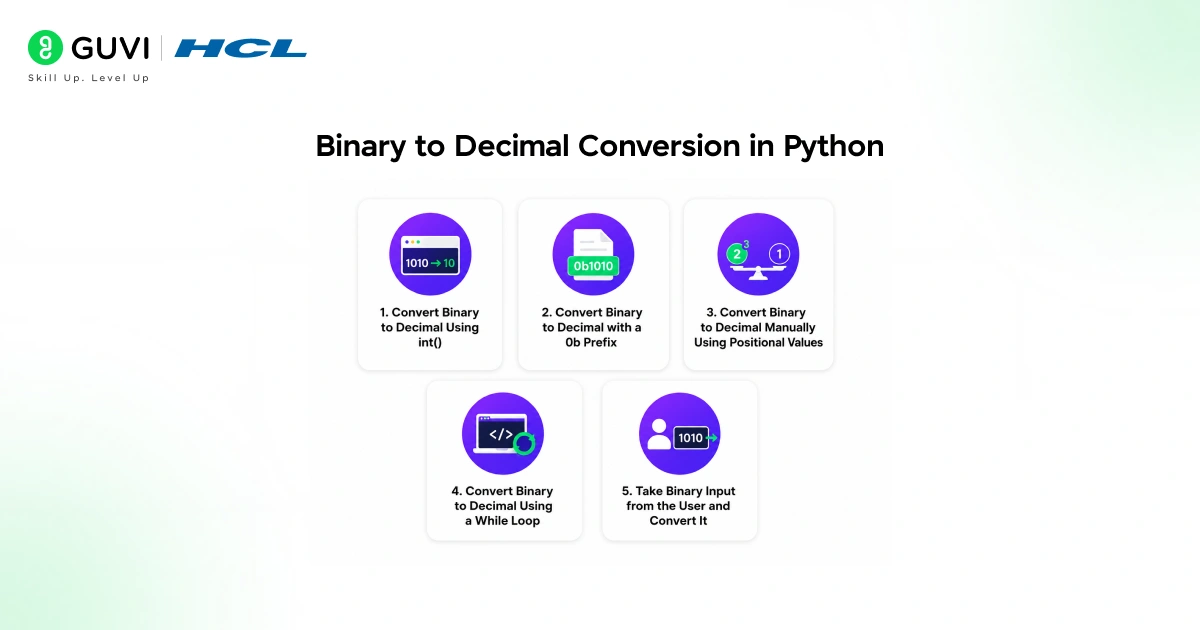
- Step 1: Convert Binary to Decimal Using int()
- Step 2: Convert Binary to Decimal with a 0b Prefix
- Step 3: Convert Binary to Decimal Manually Using Positional Values
- Step 4: Convert Binary to Decimal Using a While Loop
- Step 5: Take Binary Input from the User and Convert It
- Comparing All Conversion Methods
- Real-World Example: Converting Sensor Data in IoT Applications
- Conclusion
- FAQs
- How do I convert binary to decimal in Python?
- Can I convert a binary literal like 0b1010 to decimal?
- What happens if I forget the base argument in int()?
- How do I convert binary to decimal without using int()?
- How do I validate that user input is a valid binary number in Python?
- Can Python's int() function convert other number systems too?
- Why is int(binary_str, 2) better than writing manual conversion logic?
- Is binary to decimal conversion commonly asked in coding interviews?
TL;DR Summary
- To convert binary to decimal in Python, you need to use either the built-in int() function with base 2, or write manual logic using positional value calculation.
- Python’s int(“1010”, 2) instantly converts a binary string to its decimal equivalent.
- This guide covers every method to convert binary to decimal in Python, including built-in functions, manual algorithms, and handling user input, with complete code examples for each approach.
Want to strengthen your Python fundamentals with hands-on coding practice and real projects? Explore HCL GUVI’s Python Programming Course, designed for beginners building a strong foundation in programming logic.
What You Need Before Starting

Before converting binary to decimal in Python, make sure you have:
- Python 3 installed on your system, version 3.6 or above
- A basic understanding of binary numbers and place values
- A code editor or IDE like VS Code, PyCharm, or even the Python shell
No external libraries are required. Every method in this guide uses Python’s standard built-in functionality.
Read More: How to Round Off in Python: A Complete Guide
Binary to Decimal Conversion in Python
Step 1: Convert Binary to Decimal Using int()
The simplest and most reliable way to convert binary to decimal in Python is the built-in int() function with base 2 as the second argument.
binary_string = "1010"

decimal_value = int(binary_string, 2)

print(decimal_value)  # Output: 10
The int() function accepts a string and a base. Passing base 2 tells Python to interpret the string as a binary number rather than decimal.
This method works for any valid binary string:
print(int("1111", 2))   # Output: 15

print(int("100000", 2)) # Output: 32

print(int("0", 2))      # Output: 0
This is the recommended approach for production code because it is fast, reliable, and handles edge cases correctly.
Step 2: Convert Binary to Decimal with a 0b Prefix
Python also recognises binary literals written with a 0b prefix directly in code.
binary_number = 0b1010

print(binary_number)  # Output: 10
This works only when the binary value is written directly as a literal in your code, not as a string. If you have a string with a 0b prefix, int() still handles it correctly using base 0:
binary_str = "0b1010"

decimal_value = int(binary_str, 0)

print(decimal_value)  # Output: 10
Base 0 tells Python to auto-detect the base from the prefix in the string.
Step 3: Convert Binary to Decimal Manually Using Positional Values
Understanding the manual algorithm is valuable for interviews and for situations where you cannot rely on built-in functions.
Binary to decimal conversion works by multiplying each digit by 2 raised to its positional power, starting from the rightmost digit at position 0.
def binary_to_decimal(binary_str):

    decimal_value = 0

    power = 0

    for digit in reversed(binary_str):

        decimal_value += int(digit) * (2 ** power)

        power += 1

    return decimal_value

print(binary_to_decimal("1010"))   # Output: 10

print(binary_to_decimal("1111"))   # Output: 15
The function reverses the string so the rightmost digit is processed first, since it represents 2 to the power of 0.
Step 4: Convert Binary to Decimal Using a While Loop
An alternative manual approach uses a while loop and works directly with the binary number rather than reversing the string.
def binary_to_decimal_loop(binary_str):

    decimal_value = 0

    binary_str = binary_str[::-1]

    for i in range(len(binary_str)):

        if binary_str[i] == "1":

            decimal_value += 2 ** i

    return decimal_value

print(binary_to_decimal_loop("110011"))  # Output: 51
This version only adds to the decimal value when the digit is 1, skipping unnecessary additions for 0 digits.
Step 5: Take Binary Input from the User and Convert It
A complete program that accepts binary input from the user and converts it to decimal:
def convert_user_input():

    binary_input = input("Enter a binary number: ")

    if all(digit in "01" for digit in binary_input):

        decimal_result = int(binary_input, 2)

        print(f"Decimal equivalent: {decimal_result}")

    else:

        print("Invalid binary number. Use only 0s and 1s.")

convert_user_input()

# Sample run:

# Enter a binary number: 11001

# Decimal equivalent: 25
The validation check using all() ensures the input contains only 0s and 1s before attempting conversion, preventing a ValueError on invalid input.

Want to strengthen your Python fundamentals with hands-on coding practice and real projects? Explore HCL GUVI’s Python Programming Course, designed for beginners building a strong foundation in programming logic.
Comparing All Conversion Methods
| Method | Best For | Performance | Readability |
| int(binary_str, 2) | Production code, quick conversion | Fastest | Highest |
| 0b literal | Hardcoded binary values in code | Fastest | High |
| Manual loop (reversed string) | Interviews, learning the algorithm | Slower | Medium |
| Manual loop (while-based) | Interviews, custom logic control | Slower | Medium |
For any real application, always use int(binary_str, 2). Use the manual methods only for learning or when an interview specifically asks you to avoid built-in functions.
Python’s int() function supports a base argument that allows you to convert strings from any numeral system between base 2 and base 36, not just decimal. For example,
int("ff", 16) converts a hexadecimal value to decimal, while int("777", 8) converts an octal value. This built-in flexibility makes Python’s number parsing capabilities more versatile and convenient than many other programming languages.
Real-World Example: Converting Sensor Data in IoT Applications
Consider an IoT system where a temperature sensor sends status flags as binary strings over a serial connection, such as “1011” representing four independent sensor states.
def parse_sensor_flags(binary_flags):

    decimal_status = int(binary_flags, 2)

    flags = {

        "power_on": bool(decimal_status & 0b1000),

        "error": bool(decimal_status & 0b0100),

        "low_battery": bool(decimal_status & 0b0010),

        "connected": bool(decimal_status & 0b0001),

    }

    return flags

sensor_data = "1011"

print(parse_sensor_flags(sensor_data))

# Output: {'power_on': True, 'error': False, 'low_battery': True, 'connected': True}
The binary string is first converted to a decimal integer, then individual bits are checked using bitwise AND operations against each flag position. This pattern is common in embedded systems, networking protocols, and hardware interfacing code written in Python.
According to data from several coding interview platforms, number system conversion problems appear in over 30% of fresher-level technical screening rounds. These questions are often used as warm-up exercises before moving into more complex topics like data structures and algorithms, as they help interviewers quickly assess a candidate’s understanding of fundamentals such as bases, arithmetic operations, and problem-solving approach.
Conclusion
Converting binary to decimal in Python is straightforward once you know that int(binary_str, 2) handles the entire conversion in a single line for any valid binary string.
Understanding the manual algorithm using positional values is valuable for interviews and for building a deeper understanding of how number systems work internally.
FAQs
How do I convert binary to decimal in Python?
Use int(binary_string, 2), where binary_string is your binary number as a string and 2 specifies the base. This returns the decimal equivalent directly.
Can I convert a binary literal like 0b1010 to decimal?
Yes. Writing 0b1010 directly in code is already treated as the decimal integer 10 by Python automatically, no conversion function needed.
What happens if I forget the base argument in int()?
Python interprets the string as a decimal number instead of binary, returning an incorrect result like 1010 instead of the intended value 10.
How do I convert binary to decimal without using int()?
Use a manual loop that multiplies each binary digit by 2 raised to its positional power, summing the results from right to left.
How do I validate that user input is a valid binary number in Python?
Use all(digit in “01” for digit in input_string) to confirm every character is either 0 or 1 before attempting conversion.
Can Python’s int() function convert other number systems too?
Yes. int() supports any base from 2 to 36, including hexadecimal with base 16 and octal with base 8, using the same syntax.
Why is int(binary_str, 2) better than writing manual conversion logic?
It is faster, less error-prone, and handles edge cases like leading zeros and large binary numbers correctly without additional code.
Is binary to decimal conversion commonly asked in coding interviews?
Yes. It frequently appears in entry-level technical interviews in India as a foundational question testing understanding of number systems and basic programming logic.
Success Stories

About the Author
Vishalini Devarajan
An Aerospace Engineer turned content writer, I focus on making complex concepts easy to understand through well-structured, reader-friendly blogs. Whether it’s a technical topic or a non-technical one, I love creating content that is clear, engaging, and impactful.
View all posts by Vishalini Devarajan
Connect with me @













Did you enjoy this article?