


Artificial Intelligence and Machine Learning Articles
Finance Manager to Data Analytics: Career Growth, Salary and Seniority
How to Evaluate LLM Outputs in Production Deployments
AI/ML Skills Gap 2026: Why Companies Can't Find Job-Ready Talent
20 AI/ML Interview Questions Recruiters Can Use Without a Tech Background - Best Guide


Get In Touch For Details! Request More Information

Multiple Linear Regression Using Python: A Beginner’s Guide
Jul 18, 2026 6 Min Read 804 Views
(Last Updated)
When you want to predict a house price, you consider many factors: size, rooms, location, age, and more. Multiple linear regression models how several input variables together influence a single continuous outcome by fitting a linear relationship between the dependent variable and multiple independent variables. It’s a foundational predictive method that gives intuitive, interpretable results and is an essential starting point for anyone learning supervised learning.
Simple linear regression uses one predictor to estimate an outcome; multiple linear regression generalizes this to two or more predictors. Geometrically, the best-fit solution is a plane (or hyperplane) in multidimensional feature space, found by minimizing overall prediction error. This approach balances simplicity and power, making it widely used across fields for forecasting and explanatory analysis.
In this article, we will walk through exactly what multiple linear regression is, the mathematical equation behind it, the four key assumptions you must verify before trusting your model, how to handle categorical data, how to detect and address multicollinearity, a complete step-by-step Python implementation using the California Housing dataset, and how to evaluate your model’s performance using R-squared and adjusted R-squared.
Table of contents
- TL;DR
- Impact Of Multiple Linear Regression in Python
- The Four Assumptions of Multiple Linear Regression
- Handling Categorical Variables: Dummy Variables and One-Hot Encoding
- Understanding Multicollinearity and How to Detect It
- Complete Python Implementation Step by Step
- Evaluating Model Performance: R-Squared and Adjusted R-Squared
- Checking Multicollinearity with VIF in Python
- Visualizing the Regression Plane in 3D
- Final Thoughts
- FAQ
- When should I prefer multiple linear regression over non‑linear models?
- How do I choose the reference category for dummy encoding?
- What VIF threshold should I use to act on multicollinearity?
- If adjusted R² decreases after adding a feature, should I remove it?
- What practical steps ensure reproducible encoding and VIF checks in Python?
TL;DR
- Multiple linear regression models a continuous outcome using several predictors by fitting a hyperplane y = β0 + β1X1 + … + βnXn and estimating coefficients with ordinary least squares.
- Verify four core assumptions before trusting coefficients: linearity, homoscedasticity, normality of residuals, and no multicollinearity.
- Handle categorical features via dummy (one‑hot) encoding with K−1 columns to avoid the dummy variable trap; use pipelines and consistent train/test transforms.
- Detect multicollinearity with a correlation matrix and Variance Inflation Factor (VIF); fix it by dropping/combining features, using PCA, or applying regularization (Ridge/Elastic Net).
- Evaluate fit with R‑squared for explained variance and adjusted R‑squared to penalize useless predictors; always prefer adjusted R² when comparing models with different numbers of features.
What Is Multiple Linear Regression in Python?
Multiple Linear Regression in Python is a supervised machine learning technique used to model the relationship between one dependent variable and two or more independent variables using a linear equation. The algorithm learns how changes in multiple input features influence the target variable and uses this relationship to make predictions. In Python, it is commonly implemented using the LinearRegression class from the scikit-learn library, making it a popular choice for predictive analytics and regression tasks.
Impact Of Multiple Linear Regression in Python
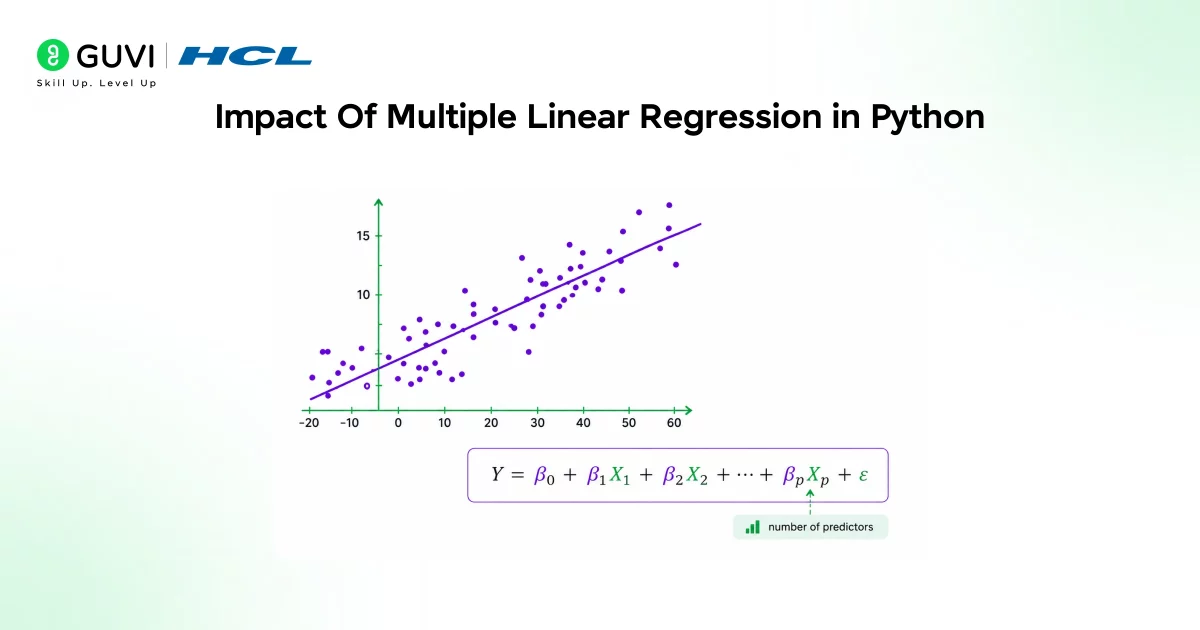
- The equation for multiple linear regression is y = β₀ + β₁X₁ + β₂X₂ + ⋯ + βₙXₙ, where y is the dependent variable, X₁, X₂, … Xₙ are the independent variables, β₀ is the intercept, and β₁, β₂, … βₙ are the slopes. The goal of the algorithm is to find the best-fit line equation that can predict the values based on the independent variables.
- Each slope coefficient tells you how much y changes when that specific feature increases by one unit, while all other features are held constant.
The Four Assumptions of Multiple Linear Regression

- Linearity
The relationship between the dependent and each independent variable should be approximately linear. Check by plotting each predictor against the response and look for a straight-line pattern; strong curvature suggests you need transformations or polynomial terms.
- Homoscedasticity
The variance of the errors should be constant across all levels of the predictors. Check by plotting predicted values versus residuals; you want a random scatter with no funnel or systematic pattern; heteroscedasticity may require weighted regression or variance-stabilizing transforms.
- Multivariate normality (of residuals)
Residuals should be approximately normally distributed. Check with a Q–Q plot (residuals should fall near the diagonal) or a normality test; substantial departure affects inference (confidence intervals and p-values) and may call for transformations or robust methods.
- No multicollinearity
Independent variables should not be highly correlated with each other. Check pairwise correlations and compute Variance Inflation Factors (VIF); high VIFs indicate multicollinearity, which inflates coefficient variance and complicates interpretation, address by removing, combining, or regularizing features.
Handling Categorical Variables: Dummy Variables and One-Hot Encoding

1. Why dummy variables are needed: Regression models require numerical inputs, but many real-world features are categorical (gender, country, product category). Dummy variables convert each category into binary indicators (0/1), allowing the model to learn separate effects for different categories while preserving the categorical information.
2. How to create them correctly: For a categorical variable with K categories, create K−1 dummy variables and use the omitted category as the reference level.
This avoids perfect multicollinearity (the dummy-variable trap) and yields interpretable coefficients: each dummy variable’s coefficient measures the effect of that category relative to the reference category. Example: for City = {London, Paris, Berlin}, create d_London and d_Paris; Berlin is represented when both dummies are 0. If you mistakenly include all K dummies, the design matrix is singular and ordinary least squares cannot compute unique coefficients.
3. Practical tips and variations (Python)
- Use pandas. get_dummies(df[‘City’], drop_first=True) to drop one category automatically. With scikit-learn pipelines, use sklearn.preprocessing—oneHotEncoder (drop=’first’) to integrate encoding into cross-validation properly.
- Choose the reference category deliberately (common, baseline, or meaningful control group) because coefficients are interpreted relative to it.
- For high-cardinality features (many categories), consider alternatives: target encoding, hashing, or grouping rare categories to avoid too many dummy columns.
- Remember to apply the same encoding to train and test sets (fit on training data, transform both) to prevent mismatched columns.
One reason Support Vector Regression (SVR) is so effective is that only data points lying on or outside the epsilon-insensitive tube influence the final model. These critical observations, known as support vectors, create a sparse representation that can improve efficiency and robustness. A similar principle appears in linear regression, where feature selection and regularization techniques help produce simpler, more interpretable models without sacrificing predictive power. Interestingly, when using dummy variables for categorical features, changing the reference category alters how coefficients are interpreted but leaves the model’s predictions unchanged. Choosing a meaningful baseline, such as a control group, makes results much easier to communicate to stakeholders and decision-makers.
Understanding Multicollinearity and How to Detect It

Step 1: What multicollinearity is
Multicollinearity occurs when two or more independent variables are highly correlated with each other (not necessarily with the dependent variable). This redundancy makes it hard to separate each predictor’s unique contribution to the response.
Step 2: Why it matters practically
High multicollinearity destabilizes coefficient estimates: small changes in the data can produce large swings in coefficients, confidence intervals widen, p-values become unreliable, and interpretability suffers even if overall predictive performance remains acceptable.
Step 3: Detecting multicollinearity in the correlation matrix
Compute a correlation matrix for the predictors. Pairwise correlations near +1 or −1 signal potential multicollinearity and identify which variables are strongly related.
Step 4: Detecting multicollinearity VIF
Calculate the Variance Inflation Factor (VIF) for each predictor. VIF quantifies how much a coefficient’s variance is inflated due to correlation with other predictors; rule-of-thumb: VIF > 10 (or sometimes > 5) indicates problematic multicollinearity.
Step 5: Remedies and solutions
- Remove or combine correlated variables (drop one, create an index, or average related features).
- Use dimensionality reduction (PCA) to produce orthogonal components.
- Apply regularization (Ridge reduces coefficient variance; Elastic Net combines Ridge and Lasso).
- Re-express variables or collect more data if feasible.
Choose the fix based on whether interpretability or predictive accuracy is the priority.
Complete Python Implementation Step by Step
Here is a full implementation of multiple linear regression using Python’s scikit-learn library on the California Housing dataset. Each step maps directly to the theory discussed above.
import numpy as np
import pandas as pd
import matplotlib.pyplot as plt
from sklearn.model_selection import train_test_split
from sklearn.linear_model import LinearRegression
from sklearn.datasets import fetch_california_housing
from sklearn.metrics import mean_squared_error, r2_score
# Step 1: Load the dataset
california_housing = fetch_california_housing()
X = pd.DataFrame(california_housing.data, columns=california_housing.feature_names)
y = pd.Series(california_housing.target)
# Step 2: Select two features for demonstration
X = X[[‘MedInc’, ‘AveRooms’]]
# Step 3: Train-test split (80% training, 20% testing)
X_train, X_test, y_train, y_test = train_test_split(

X, y, test_size=0.2, random_state=42)
# Step 4: Create and train the model
model = LinearRegression()
model.fit(X_train, y_train)
# Step 5: Inspect the learned coefficients
print(“Intercept:”, model.intercept_)
print(“Coefficients:”, model.coef_)
# Step 6: Make predictions on test data
y_pred = model.predict(X_test)
# Step 7: Evaluate the model
mse = mean_squared_error(y_test, y_pred)
r2 = r2_score(y_test, y_pred)
print(f”Mean Squared Error: {mse:.4f}”)
print(f”R-squared: {r2:.4f}”)
- After training the model, we can access the intercept and coefficients of the regression equation. model.intercept_ gives β₀ (intercept) and model.coef_ gives β₁, β₂ (slopes of MedInc and AveRooms). The output shows: Intercept: 0.5972677793933272 and Coefficients: [0.43626089 -0.04017161].
- Reading these coefficients tells a specific story. The MedInc coefficient of 0.436 means that for every one-unit increase in median income, the predicted house price increases by approximately $43,600, holding average rooms constant.
- The AveRooms coefficient of -0.040 means that more rooms is actually slightly associated with lower prices in this dataset likely because AveRooms is a neighborhood-level average that correlates with lower-cost, denser housing in some markets. This is exactly the kind of non-obvious insight that multiple regression surfaces that simple intuition would miss.
Evaluating Model Performance: R-Squared and Adjusted R-Squared
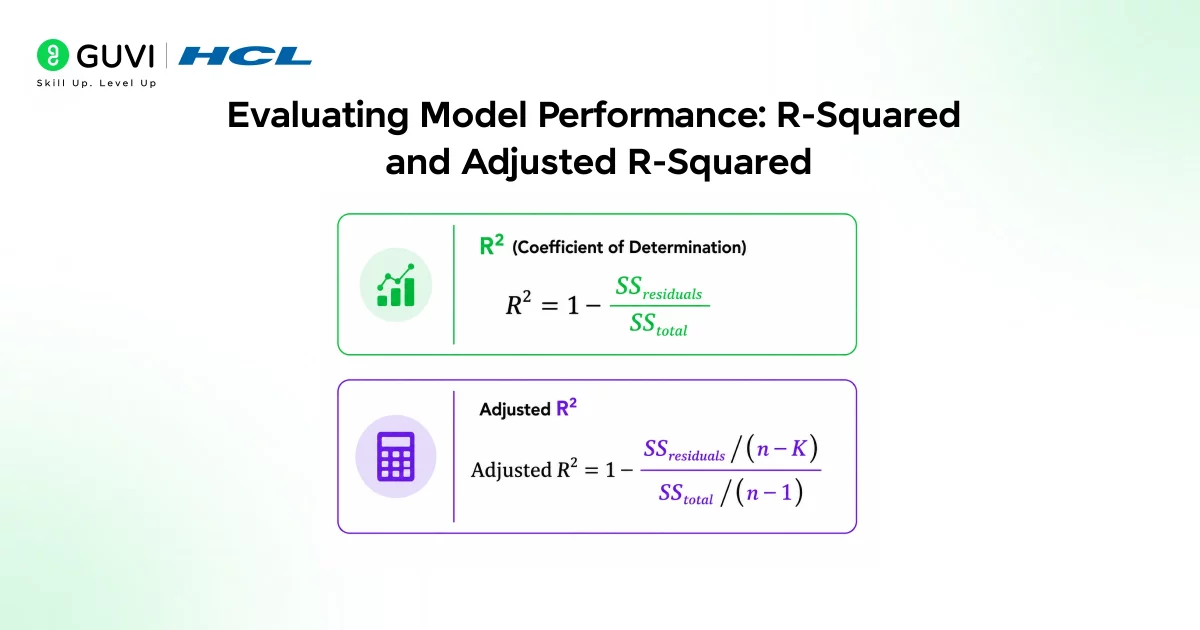
- R-squared (R²)
R-squared measures the proportion of variance in the dependent variable explained by the independent variables. It ranges from 0 to 1: an R² of 0.65 means your model explains 65% of the target’s variability, while the remaining 35% is unexplained by the chosen features. R² is useful for gauging overall fit but rises (or stays the same) whenever you add predictors, even if they add no real value.
- Adjusted R-squared
Adjusted R-squared refines R² for multiple regression by penalizing unnecessary predictors. It adjusts the R² value based on the number of features and sample size, so it will decrease if a new feature does not improve the model enough to justify its inclusion. When comparing models with different numbers of predictors, use adjusted R² rather than R² to decide whether added features genuinely help.
Checking Multicollinearity with VIF in Python
Here is how to calculate the Variance Inflation Factor for each feature in your model using the statsmodels library:
from statsmodels.stats.outliers_influence import variance_inflation_factor
# Load all features for VIF calculation
X_full = pd.DataFrame(california_housing.data, columns=california_housing.feature_names)
# Calculate VIF for each feature
vif_data = pd.DataFrame()
vif_data[“Feature”] = X_full.columns
vif_data[“VIF”] = [variance_inflation_factor(X_full.values, i)
for i in range(len(X_full.columns))]
print(vif_data.sort_values(“VIF”, ascending=False))
- The interpretation is straightforward. A VIF of 1 means no correlation with other features. VIF between 1 and 5 is acceptable. VIF between 5 and 10 warrants attention.
- VIF above 10 indicates severe multicollinearity that needs to be addressed before trusting the coefficients. When you find features with high VIF values, examine the correlation matrix to understand which specific pairs are driving the collinearity, then decide whether to drop one, combine them, or apply regularization.
Visualizing the Regression Plane in 3D
With two independent variables, the model produces a plane rather than a line. This can be visualized in 3D to build intuition for what multiple linear regression is actually doing geometrically.
from mpl_toolkits.mplot3d import Axes3D
fig = plt.figure(figsize=(10, 7))
ax = fig.add_subplot(111, projection=’3d’)
# Plot actual data points
ax.scatter(X_test[‘MedInc’], X_test[‘AveRooms’],
y_test, color=’blue’, label=’Actual Data’, alpha=0.3)
# Create the best-fit plane
x1_range = np.linspace(X_test[‘MedInc’].min(), X_test[‘MedInc’].max(), 100)
x2_range = np.linspace(X_test[‘AveRooms’].min(), X_test[‘AveRooms’].max(), 100)
x1, x2 = np.meshgrid(x1_range, x2_range)
z = model.predict(np.c_[x1.ravel(), x2.ravel()]).reshape(x1.shape)
ax.plot_surface(x1, x2, z, color=’red’, alpha=0.5)
ax.set_xlabel(‘Median Income’)
ax.set_ylabel(‘Average Rooms’)
ax.set_zlabel(‘House Price’)
ax.set_title(‘Multiple Linear Regression Best Fit Plane’)
plt.show()
The blue points represent the actual house prices in the test set. The red surface is what the model predicts across the range of median income and average room values. The distance from each blue point to the red surface represents the prediction error, or the residual for that observation. A good model has these distances small and randomly distributed, not systematically high on one side.
If you’re serious about mastering multiple linear regression using Python, building models with multiple predictors, interpreting coefficients, and using libraries like scikit-learn and statsmodels, don’t miss the chance to enroll in HCL GUVI’s Artificial Intelligence & Machine Learning Course, co-designed by Intel.
Final Thoughts
Multiple linear regression is the natural extension of simple linear regression to real-world problems where outcomes depend on many factors simultaneously. Multiple linear regression effectively captures how several factors together influence a target variable, providing a practical approach for predictive modeling in real-world scenarios.
The workflow for every multiple regression project follows the same sequence: check your assumptions, handle categorical variables with one-hot encoding, detect and address multicollinearity, split your data, train the model, interpret the coefficients, and evaluate with adjusted R² rather than regular R².
Following this sequence consistently will save you from the most common mistakes in regression modeling, overfitting with irrelevant features, misleading coefficient interpretations when multicollinearity is present, and overconfident performance estimates when the four assumptions have not been verified. Start with the California Housing dataset using the full feature set, check VIF for all eight features, and practice removing features with high VIF to see how the adjusted R² responds.
FAQ
1. When should I prefer multiple linear regression over non‑linear models?
Use it when relationships are approximately linear, interpretability matters, data size is moderate, and the four assumptions are reasonably met. If relationships are complex or assumptions fail, consider tree‑based or kernel methods.
2. How do I choose the reference category for dummy encoding?
Pick a meaningful baseline (most common, control group, or policy-relevant category). Coefficients then read as differences relative to that baseline.
3. What VIF threshold should I use to act on multicollinearity?
Common rules of thumb: VIF > 5 warrants attention; VIF > 10 indicates severe multicollinearity. Use context if interpretability matters, address lower VIFs too.
4. If adjusted R² decreases after adding a feature, should I remove it?
Generally, yes if the goal is parsimonious, interpretable modeling. If the feature improves predictive performance on holdout data or has theoretical importance, you may keep it despite a small adjusted R² drop.
5. What practical steps ensure reproducible encoding and VIF checks in Python?
It encoders (OneHotEncoder or pandas.get_dummies) on training data only, save the transformer, and apply it to validation/test sets. Compute VIF on the same processed feature matrix and document any feature removals or transformations.
Success Stories

About the Author
Vishalini Devarajan
An Aerospace Engineer turned content writer, I focus on making complex concepts easy to understand through well-structured, reader-friendly blogs. Whether it’s a technical topic or a non-technical one, I love creating content that is clear, engaging, and impactful.
View all posts by Vishalini Devarajan
Connect with me @


















Did you enjoy this article?