


Artificial Intelligence and Machine Learning Articles
Finance Manager to Data Analytics: Career Growth, Salary and Seniority
How to Evaluate LLM Outputs in Production Deployments
AI/ML Skills Gap 2026: Why Companies Can't Find Job-Ready Talent
20 AI/ML Interview Questions Recruiters Can Use Without a Tech Background - Best Guide


Get In Touch For Details! Request More Information
Best Practices for Coding with Agents
Jun 24, 2026 7 Min Read 1158 Views
(Last Updated)
AI coding agents have moved from novelty to daily workflow for a growing number of developers. They write functions, scaffold projects, fix bugs, generate tests, and run multi-step tasks with increasing autonomy.
The productivity gains are real, but so are the failure modes. Developers who treat agents as infallible produce code that looks correct and behaves incorrectly. Those who micro-manage every output miss the speed advantage agents provide.
Coding with AI agents best practices exist in the space between these two failure modes. They are the habits, workflows, and review patterns that let developers move fast while maintaining control of what gets built and how well it works.
In this article, let us understand what the best practices for coding with AI agents are, why each one matters, how to apply them in a real development workflow, and what to avoid when working with agents on code that reaches production.
Table of contents
- TL;DR
- How Developers Currently Use Coding Agents
- The Real Problem: Speed Without Verification Creates Technical Debt
- The Shift: From Passive Recipient to Active Director
- The Best Practices for Coding with AI Agents
- Practice 1: Be Specific About Scope
- Practice 2: Provide Relevant Context
- Practice 3: Review Output as a Unit Before Accepting
- Practice 4: Write or Require Tests
- Practice 5: Use Version Control at Every Step
- Practice 6: Define Stopping Conditions for Autonomous Runs
- Practice 7: Keep Tasks Small and Sequential
- Practice 8: Verify in the Actual Runtime Environment
- An Example: A Full Best-Practice Agent Coding Session
- Why These Practices Produce Better Outcomes
- Why This Enables Reliable Agent-Assisted Development
- Conclusion
- FAQs
- What are the most important coding with AI agents best practices?
- Why does context matter so much when coding with agents?
- How should tests be used when working with coding agents?
- How do you prevent errors from compounding in autonomous agent runs?
- Is it faster to give agents large tasks or small sequential tasks?
TL;DR
1. Coding with AI agents best practices require developers to be specific about scope, review all output critically, and verify behavior through execution rather than visual inspection.
2. Agents produce better output when given precise context, including the codebase structure, constraints, and the specific problem to solve,e rather than open-ended prompts.
3. Each agent-generated change should be reviewed as a unit before being combined with other changes, preventing compounding errors from reaching the codebase.
4. Tests written before or alongside agent-generated code provide the verification layer that determines whether output is correct rather than merely plausible.
5. Long autonomous agent runs require clear stopping conditions and review checkpoints to prevent errors from accumulating silently across many steps.
What Are Coding with AI Agents Best Practices?
Coding with AI agents best practices are the structured approaches to working with AI-powered coding tools that produce reliable, reviewable, and maintainable output. They cover how to frame tasks, how to review generated code, how to manage context across a session, and how to integrate agent output into a codebase safely.
How Developers Currently Use Coding Agents
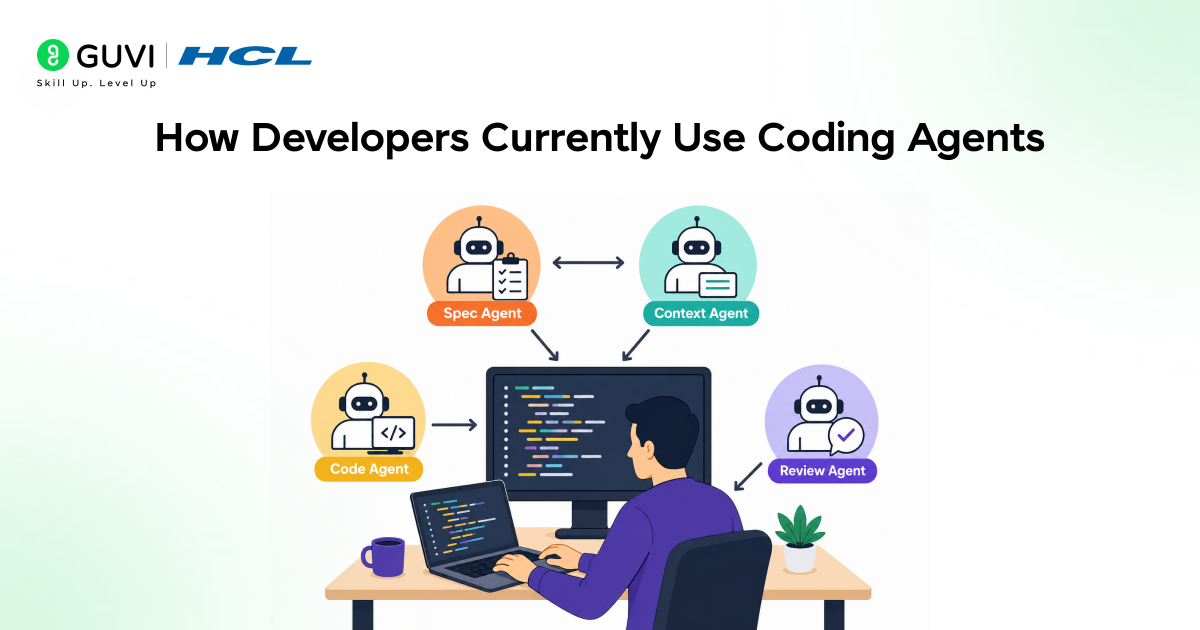
Most developers who use coding agents start with the simplest use case: asking the agent to write a function, explain a piece of code, or suggest a fix for an error message. This works well, and the output quality for contained, well-scoped tasks is generally high.
As developers become more comfortable, they expand the scope of what they ask agents to do. Full feature implementations, multi-file refactors, and autonomous task runs become part of the workflow.
This is where problems start to appear. The agent’s output quality degrades as the scope of the task increases and as the context in which it needs to do the task well becomes harder to provide completely.
Developers who do not adjust their review and verification practices as they expand agent usage start to accumulate code that passed the agent’s generation step but fails in production because the underlying assumptions were wrong.
The Real Problem: Speed Without Verification Creates Technical Debt
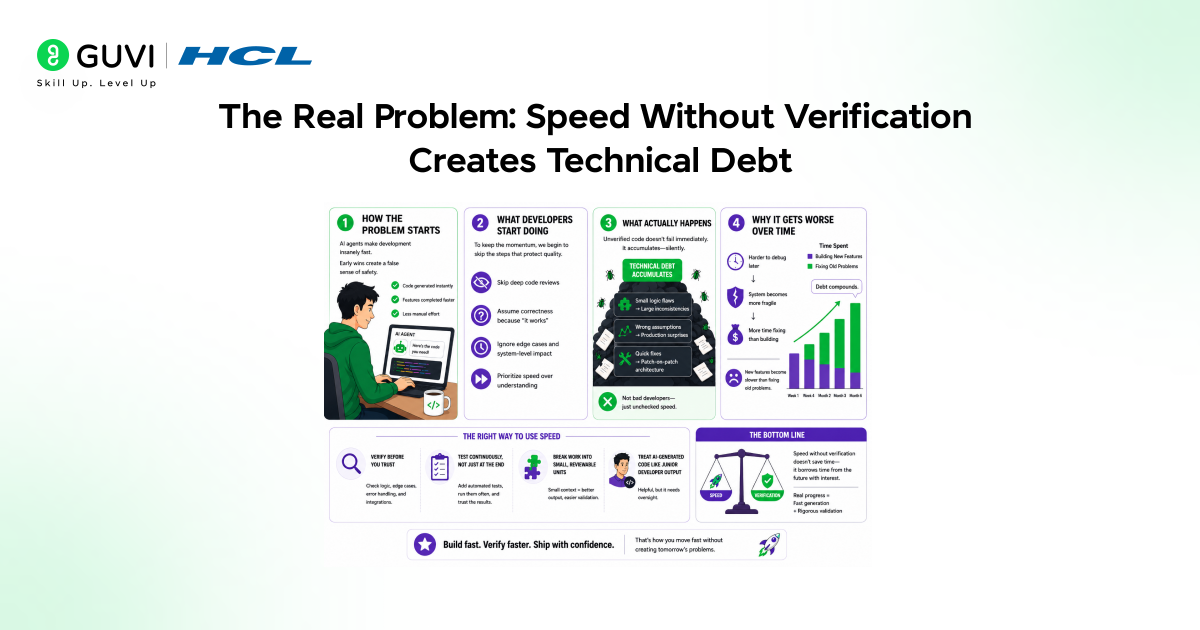
The primary risk in coding with AI agents is not that agents generate bad code. It is that agents generate plausible code quickly, and plausible code that has not been verified accumulates into a codebase that looks complete but breaks in ways that are expensive to debug.
Each unverified piece of agent output is a bet that the agent understood the context correctly, made reasonable implementation choices, and did not introduce subtle logic errors. Some of those bets pay off. Enough of them fail to make an unverified agent output a meaningful source of future bugs.
The technical debt from unreviewed agent code is harder to address than traditional technical debt because it is not obviously wrong. It passed the developer’s initial review because it looked reasonable.
Coding with AI agents’ best practices are designed specifically to interrupt this pattern before it becomes a problem, rather than after it has accumulated across a codebase.
The Shift: From Passive Recipient to Active Director
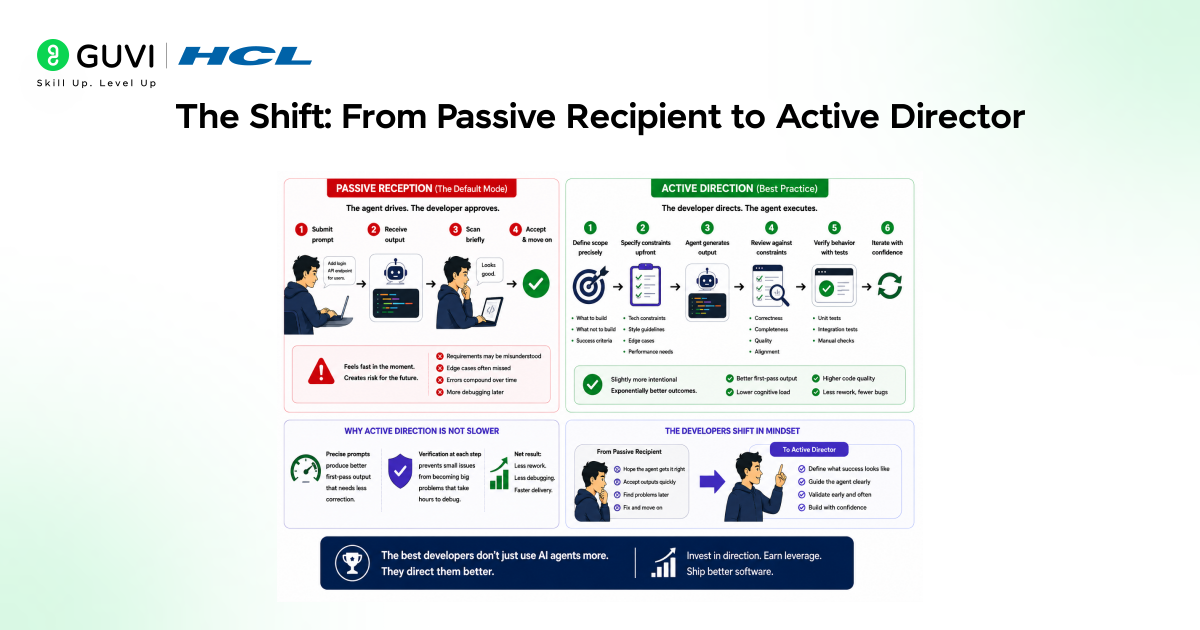
The default mode for most developers new to coding agents is passive reception. The developer submits a prompt, receives output, scans it briefly, and accepts it. The agent drives, and the developer approves.
Coding with AI agents best practices shift this dynamic. The developer becomes the director. They specify the scope precisely, define the constraints upfront, review the output against those constraints, and verify behavior through tests before moving on.
This is not slower than passive reception in practice. Precise prompts produce better first-pass output that requires less correction. Verification at each step prevents compounding errors that would require hours of debugging later.
The developers who get the most from coding agents are those who invest in the direction and review steps rather than those who submit the most prompts and accept the most output without scrutiny.
The Best Practices for Coding with AI Agents
Coding with AI agents best practices group around eight areas that cover the full workflow from task framing through to code review and deployment. Each practice addresses a specific failure mode that appears when agents are used without structure.
Practice 1: Be Specific About Scope
Agents perform better on narrow, well-defined tasks than on broad, open-ended ones. A prompt asking the agent to build a user authentication system will produce output that makes assumptions about the database, the session management approach, the token strategy, and the error handling.
A prompt asking the agent to write a function that validates a JWT token against a secret key using the jsonwebtoken library and returns a decoded payload or throws an AuthenticationError will produce a precise implementation of exactly that.
Specificity reduces the surface area for incorrect assumptions and produces output that is easier to review because the expected behavior is already defined in the prompt.
Practice 2: Provide Relevant Context
Agents generate code in the context of what they know about the project. When that context is incomplete, they fill gaps with assumptions. Those assumptions may not match the actual codebase, the team’s conventions, or the constraints the implementation must satisfy.
Before asking an agent to implement something, provide the relevant context explicitly. Share the file structure, the existing interfaces the new code must work with, the error handling patterns the codebase uses, and any constraints on dependencies or performance.
| // Context-poor promptAdd error handling to the data fetch function. // Context-rich promptAdd error handling to the fetchUserData function in src/api/users.js.The project uses a custom ApiError class from src/errors/ApiError.js.Network errors should be caught and rethrown as ApiError with status 503.404 responses should throw ApiError with status 404 and message ‘User not found’.All errors should be logged using the logger in src/utils/logger.js before throwing.Do not modify the function signature or return type. |
Practice 3: Review Output as a Unit Before Accepting
Each piece of agent-generated code should be reviewed completely before being accepted into the codebase or combined with other agent output. Reading the output line by line with the same scrutiny applied to a colleague’s pull request is the correct standard.
Specific things to check include: whether the logic matches the stated requirements, whether edge cases are handled, whether the error handling is appropriate, whether any security considerations were missed, and whether the code follows the project’s conventions.
Do not defer this review. Code that is accepted without review and then combined with further agent output becomes harder to review because the reviewer loses the boundary between what was written when.
Practice 4: Write or Require Tests
Tests are the mechanism that distinguishes verified agent output from plausible agent output. An agent that generates a function that passes a test suite has produced something with a defined and confirmed behavior.
An agent that generates a function that looks correct but has no test coverage has produced something whose correctness is asserted only by the agent’s own internal consistency, which is not a reliable guarantee.
Either write tests before asking the agent to implement the function, or ask the agent to generate tests alongside the implementation and verify that the tests cover the significant cases before accepting either.
| // Ask the agent to generate tests alongside implementationWrite a function parseCSV(input: string) that parses a CSV stringinto an array of objects using the first row as headers.Also write Jest tests covering: – Standard CSV with multiple rows – Empty input – Single header row with no data rows – Values containing commas wrapped in quotes – Windows line endings (CRLF)Run the tests and confirm they pass before returning the implementation. |
Practice 5: Use Version Control at Every Step
Every agent-generated change should be committed to version control before the next task begins. This creates a clear boundary between each unit of agent work and provides a safe rollback point if a subsequent change produces unexpected behavior.
Developers who allow multiple agent changes to accumulate before committing lose the ability to identify precisely which change introduced a problem. Bisecting a series of uncommitted agent changes is significantly harder than reverting a single clearly labeled commit.
Commit messages for agent-generated code should describe what the change does and note that it was generated, which is useful context for future reviewers who need to understand the history of a file.
Practice 6: Define Stopping Conditions for Autonomous Runs
When using agents for multi-step autonomous tasks, define explicit stopping conditions before the run begins. These are the conditions under which the agent should stop and surface results for human review rather than continuing to the next step.

Stopping conditions include encountering an error that was not anticipated in the original task definition, reaching a decision point that requires judgment about business logic, completing a defined unit of work that should be reviewed before proceeding, and any change to files outside the scope defined at the start of the task.
Without stopping conditions, an autonomous agent can run and accumulate a large number of changes across many files before the developer reviews anything. Errors in early steps compound into later ones, and the debugging effort grows with each unreviewed step.
Practice 7: Keep Tasks Small and Sequential
Agents produce more reliable output on small, well-scoped tasks than on large tasks that involve multiple concerns simultaneously. A task that asks the agent to add a new API endpoint, update the database schema, add input validation, write tests, and update the documentation in a single prompt is a task where each component can go wrong and interact with the errors in the others.
Breaking the same work into sequential tasks, each reviewed before the next begins, produces better output at each step and makes the overall result easier to verify because each step has a defined and checkable scope.
The time saved by batching tasks into a single large prompt is almost always lost in the additional debugging required when the combined output has errors that interact.
Practice 8: Verify in the Actual Runtime Environment
Agent-generated code should be run and tested in the actual development environment before being considered complete. Reading the code and judging it visually is not a substitute for running it.
Code that looks correct can fail because of environment-specific dependencies, because of interactions with existing code that were not visible in the context provided to the agent, or because the agent’s implementation makes assumptions about runtime behavior that do not hold.
Run the code, exercise the feature it implements, check the logs, and confirm that the behavior matches the specification. This step is not optional for production-bound code, regardless of how confident the visual review made you feel.
An Example: A Full Best-Practice Agent Coding Session
A developer needs to add rate limiting to an existing Express API. They apply coding with AI agents’ best practices across the full task rather than submitting a single prompt and accepting the output.
| Step 1: Define scope precisely Task: Add rate limiting to POST /api/auth/login only. Limit: 5 requests per IP per 15 minutes. Use the express-rate-limit library already in package.json. On limit exceeded: return 429 with JSON body { error: ‘Too many attempts’ }. Do not modify any other routes or middleware. Step 2: Provide context Share src/app.js showing middleware setup order. Share src/routes/auth.js showing the login route definition. Step 3: Review generated output Check limiter config: windowMs, max, handler. Confirm it is applied only to the login route. Confirm response format matches project convention. Step 4: Ask the agent to write tests Test: 5 requests succeed, 6th returns 429. Test: Counter resets after 15 minutes. Test: Other routes are unaffected. Step 5: Run tests, commit if passing git commit -m ‘Add rate limiting to login route (agent-generated).’ |
Each step in this workflow is shorter,r and the combined result is more reliable than a single prompt asking the agent to add rate limiting and accepting whatever it produces.
Studies on AI-assisted developer productivity show that the biggest gains come from critical review of agent output, not blind acceptance.
Developers who maintain a clear boundary between agent-generated and human-verified code tend to work more efficiently and avoid costly errors.
In contrast, those who trust AI output uncritically often spend more time debugging issues, reducing the overall productivity benefits.
Why These Practices Produce Better Outcomes
Coding with Aagent’s best practices does not slow down development. They redirect the time that would otherwise be spent debugging unverified agent output into upfront scope definition and review steps that prevent the debugging from being necessary.
A developer who spends five minutes writing a precise prompt and two minutes reviewing the output produces a verified function in seven minutes. A developer who spends one minute writing a vague prompt, accepts the output immediately, and discovers the problem three hours later during integration testing has spent significantly more time on the same function.
The practices also compound over time. A codebase maintained with structured agent practices has consistent review coverage. A codebase that accumulated agent output without review has unknown coverage and unpredictable failure patterns.
Why This Enables Reliable Agent-Assisted Development
Without structured practices:
- Agent-assisted development produces fast output but inconsistent quality
- Developers experience unpredictable cycles:
- Some sessions work smoothly
- Others require heavy debugging that cancels the time saved
With structured practices:
- Output quality becomes consistent and reliable
- Focus shifts from fixing individual errors to addressing the root causes of agent mistakes
Core objective of structured workflows:
- Not to achieve perfect output every time
- But to create a system where:
- Errors are caught early
- Tasks are broken into small, sequential steps
- Impact is limited and controlled
Key mechanisms that enable this:
- Incremental development
- Version control
- Continuous testing
Outcome:
- AI-assisted coding becomes a true productivity multiplier
- Instead of feeling like a tool that requires constant correction and slows progress
If you want to learn more about building skills for Claude Code and automating your procedural knowledge, do not miss the chance to enroll in HCL GUVI’s Intel & IITM Pravartak Certified Artificial Intelligence & Machine Learning courses. Endorsed with Intel certification, this course adds a globally recognized credential to your resume, a powerful edge that sets you apart in the competitive AI job market.
Conclusion
Coding with AI agents’ best practices is the difference between fast development with unpredictable quality and fast development with consistent quality. The practices are not complex, but applying them consistently requires deliberate effort, especially for developers who have grown accustomed to accepting agent output without structured review.
Through precise scope definition, context provision, unit-by-unit review, test-based verification, and sequential task management, developers can use coding agents at full speed while maintaining the control and oversight that production-quality code requires.
If a developer uses agents without these practices, they are trading short-term speed for long-term debugging. If they apply the practices, they get both speed and reliability.
Real productivity with coding agents starts when the developer directs deliberately and verifies consistently. That combination is what separates developers who benefit durably from agents and those who cycle between enthusiasm and frustration with them.
FAQs
1. What are the most important coding with AI agents best practices?
The most critical practices are being specific about scope in every prompt, reviewing all output before accepting it, writing tests to verify behavior rather than just reading the code, and committing each agent-generated change to version control before starting the next task.
2. Why does context matter so much when coding with agents?
Agents fill gaps in context with assumptions. Those assumptions appear in the output as confident implementation choices and are not flagged as assumptions. Providing relevant context explicitly reduces the surface area for incorrect assumptions and produces more accurate first-pass output.
3. How should tests be used when working with coding agents?
Tests should be written before or alongside agent-generated code and should cover the significant cases for the function being implemented. Passing tests confirms that the agent’s output behaves correctly rather than merely appearing correct on visual inspection.
4. How do you prevent errors from compounding in autonomous agent runs?
Define explicit stopping conditions before the run begins. These are the conditions under which the agent stops and surfaces output for human review. Without stopping conditions, errors in early steps compound into later ones, and the combined output requires significantly more debugging effort.
5. Is it faster to give agents large tasks or small sequential tasks?
Small sequential tasks produce faster overall outcomes in practice. The time saved by batching work into a single large prompt is almost always lost in the additional debugging required when the combined output has interacting errors. Sequential tasks with review between each step produce a cleaner cumulative result.
Success Stories

About the Author
Vishalini Devarajan
An Aerospace Engineer turned content writer, I focus on making complex concepts easy to understand through well-structured, reader-friendly blogs. Whether it’s a technical topic or a non-technical one, I love creating content that is clear, engaging, and impactful.
View all posts by Vishalini Devarajan
Connect with me @


















Did you enjoy this article?