


Full Stack Development Articles
Claude for Architecture and Engineering Documentation
Freelancing as a Python Developer: Getting Your First Client


Get In Touch For Details! Request More Information
Accessibility and HTML: Building Websites Everyone Can Use
Aug 04, 2026 5 Min Read 1859 Views
(Last Updated)
The internet was created to connect people, but not everyone experiences it equally.
For some, browsing is simple and seamless. For others, poorly structured content, missing labels, or inaccessible elements can make even basic tasks difficult. This is not a technological gap but the way websites are created.
That’s where Accessibility and HTML come into play.
HTML determines the way the content is structured and interpreted by the users and assistive technologies. If properly used, it develops websites that are readable, navigable and inclusive.
In this blog, you will learn to create websites that are accessible to all users, you will learn to use HTML to create semantic elements, ARIA, and WCAG
Quick answer:
Accessibility and HTML means using HTML in a way that ensures websites are usable for everyone, including people with disabilities. It involves structuring content with semantic elements, adding descriptive text for images, following accessibility guidelines like WCAG, and designing with an inclusive approach so all users can easily access and navigate the website.
Table of contents
- What is Web Accessibility?
- The importance of Web Accessibility
- Understanding the Role of HTML in Accessibility
- Why this matters:
- Structure Your HTML for Web Accessibility
- Semantic HTML
- Correct use of Headings
- Image Alternate Text
- Declaring the Page Language
- Meaningful Link Text
- Accessible Data Tables
- Note on Structure:
- What is ARIA and When Should You Use It?
- Common ARIA Attributes
- Important Rule
- WCAG: Standard of Accessibility
- Perceivable
- Operable
- Understandable
- Robust
- Inclusive Design: Thinking Beyond Code
- Wrapping it up:
- FAQs
- What is Accessibility and HTML?
- Why is web accessibility important?
- What is semantic HTML?
- What is ARIA used for?
- What are WCAG guidelines?
What is Web Accessibility?
Web accessibility means designing and developing websites so that people with disabilities can perceive, understand, navigate, and interact with them.
This includes users with:
- Visual impairments blindness, poor vision)
- Hearing impairments
- Motor disabilities
- Cognitive challenges
Accessibility is important so that users can:
- Read content using screen readers
- Navigate using only a keyboard
- Understand content regardless of limitations
The importance of Web Accessibility
- Inclusivity: The internet must be made available to all people and not to just a few.
- Legal Compliance: Accessibility laws are enforced in many countries in accordance with such standards as WCAG.
- Better User Experience: Easy to access websites tend to be cleaner, quicker and simpler to navigate.
- SEO Benefits: Well-structured and semantic HTML is preferred by search engines.
Understanding the Role of HTML in Accessibility
HTML is not simply a matter of presentation, it determines how your webpage is going to be structured and what it will mean.
When HTML is properly written:
- Screen readers have the ability to understand content.
- The search engines are able to understand your page.
- Users are easily navigated.
Bad HTML structure on the other hand creates a barrier.
Example
Bad practice:
| <div onclick=”submitForm()”>Submit</div> |
Accessible version:
| <button type=”submit”>Submit</button> |
Why this matters:
- A <button> is naturally interactive
- It promotes keyboard navigation.
- Screen readers recognize it properly
Structure Your HTML for Web Accessibility
The first step in designing accessible websites is the structure of your HTML. The properly organized page makes sure that users and assistive technologies find it easy to understand and navigate the information presented.
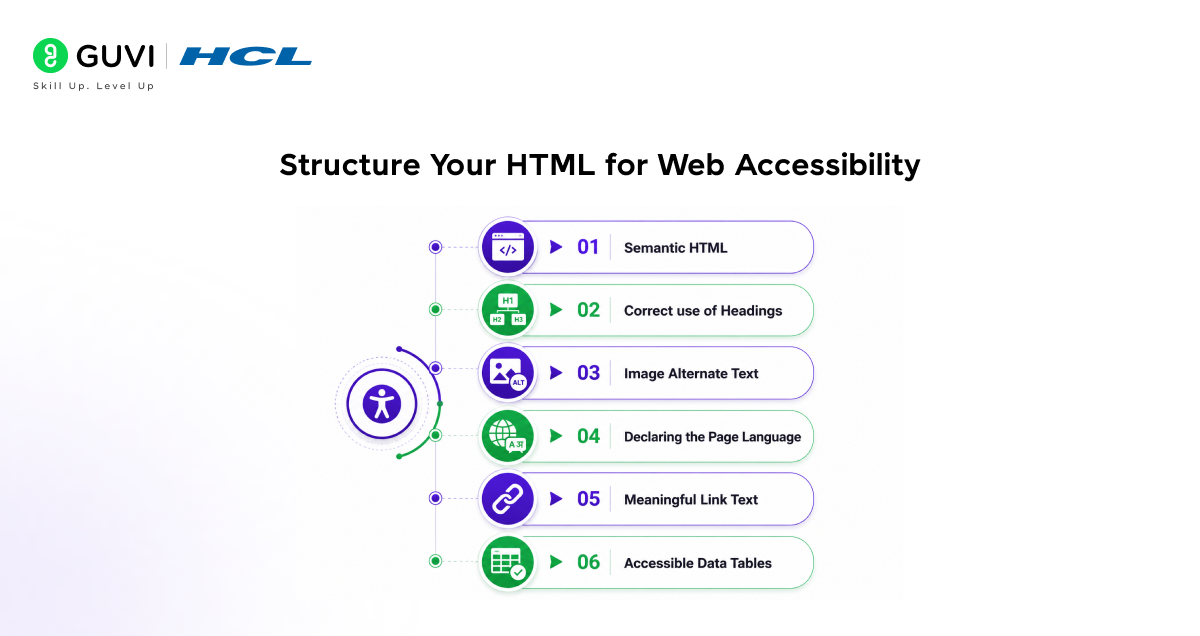
The following are the main techniques of organizing your HTML to enhance web accessibility:
1. Semantic HTML
Semantic HTML involves using meaningful HTML tags that describe the purpose of the content rather than just its appearance.
Semantic elements have an inbuilt meaning rather than using generic elements such as <div> and <span.
For example:
- <header> defines the top section of a page
- <nav> indicates navigation links
- <main> contains the core content
- <article> represents independent content
This will help in filtering readers to understand the page in the right way and enable users to navigate more easily.
Example:
| <header> <h1>My Blog</h1> </header> <main> <article> <h2>Accessibility in HTML</h2> <p>Making the web inclusive for all users.</p> </article> </main> |
Using semantic HTML reduces the need for additional accessibility fixes and creates a strong foundation for inclusive design.
2. Correct use of Headings
Headings are not just about style, but also about how your content is structured.
An appropriate hierarchy in the headings enables users and particularly those using screen readers to navigate content fast.
- <h1> should be used for the main title (only once per page)
- <h2> to <h6> should follow in a logical order
Do not jump levels, as it can confuse assistive technologies.
Example:
| <h1>Accessibility Guide</h1> <h2>Introduction</h2> <h3>Why Accessibility Matters</h3> |
This is a systematic way of making your content easier to scan, understand and navigate.
3. Image Alternate Text
The images should have alternative text (alt text) to ensure that even users who cannot see the images can tell their purpose.
Screen readers read out alt text and it is shown when the image cannot be loaded.
Example:
| <img src=”dashboard.png” alt=”User dashboard showing analytics charts”> |
Best practices:
- Be descriptive and to the point.
- Do not use such phrases as “image of”.
- Show decorative pictures with empty alt (alt=“”).
This makes visual content available to all.
4. Declaring the Page Language
The HTML lang attribute is used to define the language of a webpage.
This will help in filtering the pronunciation of words by the readers and enhances accessibility to multilingual users.
Example:
| <html lang=”en”> |
When you have several languages in your content, then you can mark language change within elements:
| <p>This is English. <span lang=”fr”>Bonjour</span></p> |
Without proper language declaration, assistive technologies may misinterpret or mispronounce content.
5. Meaningful Link Text
Links should clearly describe their destination or purpose.
The generic phrases such as Click here or Read more lack sufficient context particularly when used by the screen readers.
Bad Example:
| <a href=”#”>Click here</a> |
Good Example:
| <a href=”#”>Download the accessibility checklist</a> |
Descriptive links improve:

- Accessibility
- User experience
- SEO performance
Users should understand where a link leads before clicking it.
6. Accessible Data Tables
Tables are meant to present data not to lay out.
To make tables accessible:
- Use <th> in place of headers.
- Include a <caption> to explain the table.
- Organize rows and columns.
Example:
| <table> <caption>Monthly Sales Report</caption> <tr> <th>Month</th> <th>Revenue</th> </tr> <tr> <td>January</td> <td>$5000</td> </tr> </table> |
This helps in filtering readers to analyze connections among information points and display them in a meaningful manner.
Note on Structure:
One of the most effective and the simplest methods of enhancing accessibility is to structure your HTML correctly.
When you:
- Use semantic elements
- Follow heading hierarchy
- Add alt text
- Declare language
- Write meaningful links
- Structure tables correctly
You develop a site that is not only accessible but also easier to maintain and clean and use.
What is ARIA and When Should You Use It?
ARIA (Accessible Rich Internet Applications) helps make dynamic and complex UI components accessible.
It provides additional information to assistive technologies.
Common ARIA Attributes
- aria-label – Describes an element
- aria-hidden – Hides content from screen readers
- role – Defines element purpose
- aria-live – Announces dynamic updates
Example
| <button aria-label=”Close menu”>X</button> |
Important Rule
Use ARIA only when necessary.
If semantic HTML can do the job, prefer that.
Bad:
| <div role=”button”>Click</div> |
Better:
| <button>Click</button> |
WCAG: Standard of Accessibility
WCAG (Web Content Accessibility Guidelines) is the international standard of accessibility of websites. It is founded on four main principles, which are POUR:
1. Perceivable
Content must be easy to see or understand.
- Include image alt texts.
- Use captions to videos.
- Make sure that there is good color contrast.
2. Operable
The navigation and interaction should be easy.
- Support keyboard navigation
- Avoid strict time limits
3. Understandable
Content should be clear and predictable.
- Use simple language
- Keep navigation consistent
4. Robust
Content should work across devices and tools.
- Use clean HTML
- Make sure it is compatible with screen readers.
Over 1 billion people worldwide live with some form of disability, making accessibility a critical part of web design.
Using proper semantic HTML can reduce the need for excessive ARIA attributes, simplifying development while improving usability.
Additionally, search engines favor accessible websites, which can help improve your SEO rankings.
Inclusive Design: Thinking Beyond Code
Inclusive design means building for all users from the start, not fixing accessibility later.
Key Principles
- Design to meet various user requirements.
- Provide multiple ways to interact
- Avoid assumptions about users
Example
Instead of:
Showing errors only with color
Use:
Text + icons + color
This makes sure that all people are able to understand the content, irrespective of their capabilities.
Take your learning beyond theory with HCL GUVI’s AI & Machine Learning Course with Intel & IITM Pravartak Certification Program. Learn Python from scratch, work on real-world projects, and gain hands-on experience in Machine Learning, Deep Learning, and AI tools. With industry-recognized certification and practical learning, you’ll build the skills needed to become job-ready in the AI-driven world.
Wrapping it up:
Most developers believe that accessibility is something that you add when the website is complete. In reality, it’s something that quietly exists in every line of HTML you write.
All proper headings, meaningful tags and well organized elements have a direct impact on how a person will experience your site. For some users, it’s convenient. To some it will be the deciding factor of whether they will be able to use your site or not.
This is why Accessibility and HTML are important. Semantic structure, WCAG fundamentals, thinking inclusively make you not only a better codewriter but your website accessible to more people.
FAQs
1. What is Accessibility and HTML?
The term accessibility refers to using HTML on a website so that all people (including people with disabilities) may use that website.
2. Why is web accessibility important?
Web accessibility is important for many reasons; it provides all users with an equal opportunity to access the web, creates a better user experience for everyone using your site, and helps you comply with legal and other web accessibility standards.
3. What is semantic HTML?
Semantic HTML uses meaningful tags like <header>, <nav>, and <article> to structure content clearly.
4. What is ARIA used for?
ARIA is a standard that provides additional information to assistive technology beyond what HTML provides when HTML alone does not provide enough information for effective use by people with disabilities.
5. What are WCAG guidelines?
WCAG is a set of standards that help make web content accessible to people with different abilities.
Success Stories

About the Author
Vishalini Devarajan
An Aerospace Engineer turned content writer, I focus on making complex concepts easy to understand through well-structured, reader-friendly blogs. Whether it’s a technical topic or a non-technical one, I love creating content that is clear, engaging, and impactful.
View all posts by Vishalini Devarajan
Connect with me @





































Did you enjoy this article?