


Artificial Intelligence and Machine Learning Articles
AI/ML Skills Gap 2026: Why Companies Can't Find Job-Ready Talent
20 AI/ML Interview Questions Recruiters Can Use Without a Tech Background - Best Guide
How Industry-Backed AI/ML Bootcamps Are Changing the AI/ML Hiring Pipeline - Best Guide 2026
From IT Support to AI Engineer: A Realistic Career Switch Guide 2026


Get In Touch For Details! Request More Information
ClinicalTrials.gov Meets Claude: A Smarter Way to Search Trials
Jul 03, 2026 6 Min Read 892 Views
(Last Updated)
Clinical research is drowning in data: hundreds of thousands of trials, each with different eligibility, sponsors, sites, and outcomes. Finding the right one used to take hours of manual browsing through ClinicalTrials.gov. The interface is thorough but not built for the nuanced questions clinicians and researchers actually need.
The ClinicalTrials.gov connector in Claude closes this gap by giving the AI direct access to the world’s largest trial registry. Users can now ask natural‑language questions and get targeted, structured answers in seconds. This turns a slow, manual search into a fast, conversational workflow.
In this article, we will walk through exactly what the ClinicalTrials.gov connector is, what database it connects to, how the six core tools work, who it is built for, how to set it up, and the most practical ways to use it in your day-to-day clinical or research workflow.
Quick TL;DR:
- Instant Access: Claude queries ClinicalTrials.gov’s 500K+ trials via API v2 for natural language searches on conditions, eligibility, sponsors, and more.
- Six Core Tools: General search, NCT lookup, eligibility screening, endpoint analysis, investigator/site finder, and sponsor tracking, tailored for real workflows.
- Who Benefits: Coordinators match patients, pharma tracks competitors, physicians find recruiting trials, all in seconds.
- Easy Setup: Remote connector; search “Clinical Trials” in Claude settings, connect publicly no installs or logins.
- Limitations: Great for insights, not decisions; data lags are possible; always verify with clinical teams.
Table of contents
- What Is the ClinicalTrials.gov Connector in Claude?
- The Six Core Tools the Connector Provides
- Tool 1: General trial search
- Tool 2: NCT‑ID trial lookup
- Tool 3: search_by_eligibility
- Tool 4: analyze_endpoints
- Tool 5: search_investigators
- Tool 6: search_by_sponsor
- Who Is This Connector Built For?
- Who Benefits from the Connector
- Clinical Research Coordinators & Recruiters
- Pharmaceutical and Biotech Teams
- Physicians and Oncologists
- How to Set Up the Connector
- Practical Workflows: What You Can Actually Do
- Seeing the Connector in Action
- Trial Design and Endpoint Benchmarking
- Site Selection, Investigators, and Feasibility
- Where This Fits in the Broader Claude for Healthcare Ecosystem
- Important Limitations to Keep in Mind
- Final Thoughts
- FAQs
- Who can use the ClinicalTrials.gov connector?
- How current is the data?
- Do I need special credentials?
- Can it match a specific patient to trials?
- How does it fit with other tools?
What Is the ClinicalTrials.gov Connector in Claude?
It gives Claude direct access to 500,000+ clinical trials so that you can search and analyze them through conversation
- The ClinicalTrials.gov connector gives Claude access to ClinicalTrials.gov API v2, the world’s largest clinical trial registry managed by the National Library of Medicine at the National Institutes of Health.
- With more than 1,200 studies at its founding, the database has grown to over 500,000 registered trials across 221 countries and territories, representing the most comprehensive source of clinical research information worldwide.
- The connector works through Model Context Protocol, the same open standard that powers other Claude connectors like Benchling, BioRender, and PubMed.
- When you ask Claude a question that requires clinical trial data, it uses the connector to query the registry’s API in the background and returns a clear, organized answer without you having to build a search query, filter results, or read through pages of raw data.
- On the provider side, the connector queries ClinicalTrials.gov’s RESTful API v2, which accesses a PostgreSQL database updated daily with trial registration data submitted by study sponsors. This means the information Claude returns is refreshed every day with new registrations and updated trial statuses.
- The regulatory backbone behind this data is also worth understanding. All interventional trials of FDA-regulated products must be registered before enrollment begins, per FDAAA 801, and results must be submitted within one year of study completion.
- The database includes structured data fields for conditions using MeSH terminology, interventions, locations, eligibility criteria, outcome measures, and study design parameters. The connector gives Claude access to all of this structured information simultaneously.
The Six Core Tools the Connector Provides
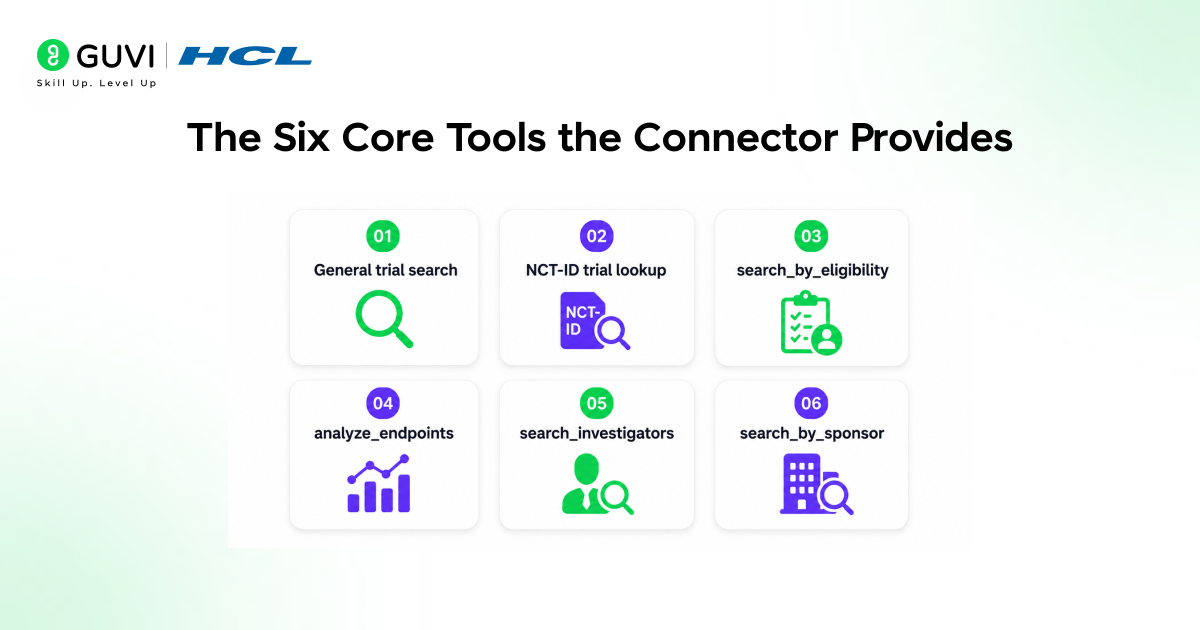
Tool 1: General trial search
The first tool handles general clinical‑trial searches. It finds trials by condition, intervention, location, status, or other criteria, letting you quickly distinguish recruiting from completed studies. This is the broadest entry point: an intelligent search that understands medical terminology and context.
Tool 2: NCT‑ID trial lookup
The second tool retrieves full details for any specific trial using its NCT identifier. If you already know the trial, it returns eligibility criteria, outcome measures, site locations, sponsor details, and available results in one conversational response, no need to click through multiple pages on ClinicalTrials.gov.
Tool 3: search_by_eligibility
The third tool, search_by_eligibility, lets clinical research coordinators screen for trials matching specific demographic and clinical criteria such as age and sex. It supports keyword searches in inclusion and exclusion text (for example, “BRCA mutation,” “HbA1c greater than 8%,” or “ECOG 0‑1”), making it one of the most practical tools for patient‑facing clinical work.
Tool 4: analyze_endpoints
The fourth tool, analyze_endpoints, compares outcome measures across trials. In single‑trial mode, it returns all endpoints for one NCT ID, while in aggregate mode, it identifies common endpoint patterns across multiple trials in a therapeutic area. This is essential for protocol benchmarking and understanding standard measures in a disease area.
Tool 5: search_investigators
The fifth tool, search_investigators, supports site selection and network building. It identifies principal investigators and research sites running trials in specific therapeutic areas, returning investigator names, roles, institutional affiliations, facility locations, and associated trial information for site selection and investigator verification.
Tool 6: search_by_sponsor
The sixth tool, search_by_sponsor, focuses on competitive intelligence. It finds all trials funded by specific companies or institutions, enabling pharmaceutical pipeline analysis with filtering by condition and phase. This helps track who is developing what, where, and at what stage.
Who Is This Connector Built For?
Who Benefits from the Connector
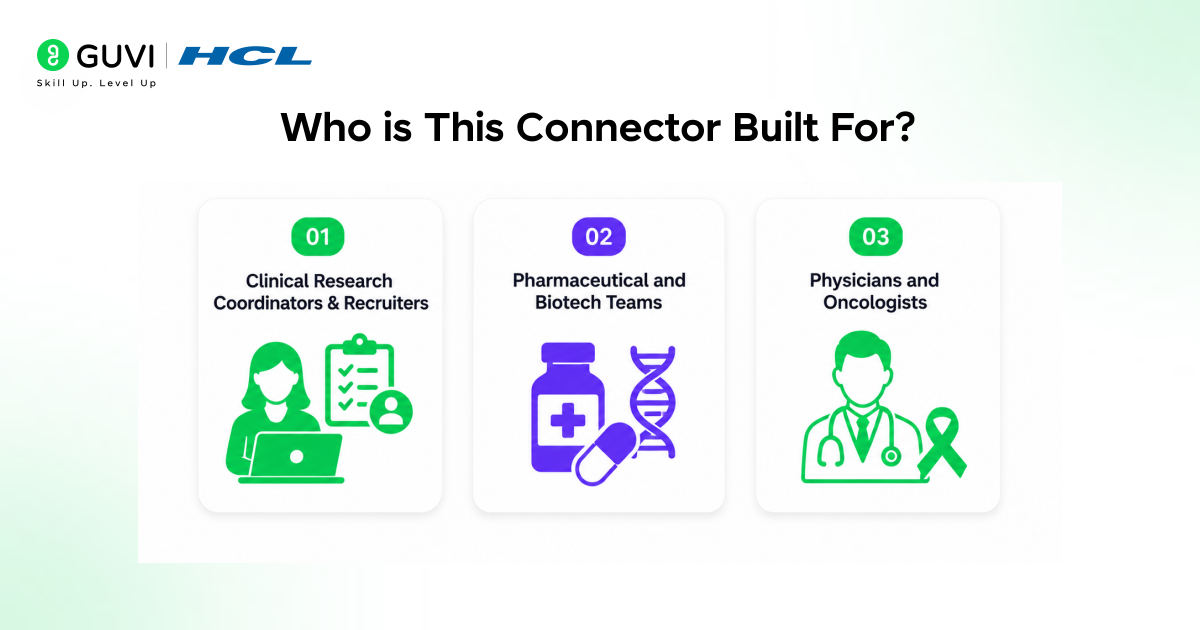
The ClinicalTrials.gov connector supports a wide range of users across the clinical research ecosystem, from bedside clinicians to pharmaceutical strategy teams. It simplifies access to trial data for anyone who needs to find, design, or track studies, regardless of their role or technical background.
1. Clinical Research Coordinators & Recruiters
Coordinators and recruiters can screen institutional patient populations for trial eligibility using demographic and clinical criteria. They can identify nearby recruiting studies for referral programs, verify detailed trial requirements and visit schedules, and coordinate with sponsors to speed up enrollment, especially useful for core facilities managing many trials at once.
2. Pharmaceutical and Biotech Teams
Pharma and biotech teams gain the most from sponsor‑focused and endpoint‑analysis tools. They can answer strategic questions like “Find all GLP‑1 agonist trials for obesity and their endpoints” or “Show me Moderna’s active trials and phases,” often replacing manual, hours‑long data compilation across hundreds of records.
3. Physicians and Oncologists
Physicians and oncologists use the connector for real‑time patient‑matching at the point of care. For example, they can ask, “I have a 62‑year‑old female patient with metastatic breast cancer in New York any recruiting trials she might qualify for?” Claude then returns focused matches based on those criteria, cutting out long, manually filtered result lists.
The ClinicalTrials.gov connector gives Claude access to over 500,000 registered clinical trials across 221 countries, updated daily through the NIH-managed registry. You can search using natural language instead of complex filters — including queries about conditions, interventions, and eligibility criteria.
With advanced capabilities like eligibility-based screening and endpoint analysis, it supports workflows such as patient matching, protocol benchmarking, and competitive intelligence for sponsors like Pfizer and Moderna. Since it is built on a public registry, no external login is required — just enable it in settings to unlock seamless access.
How to Set Up the Connector
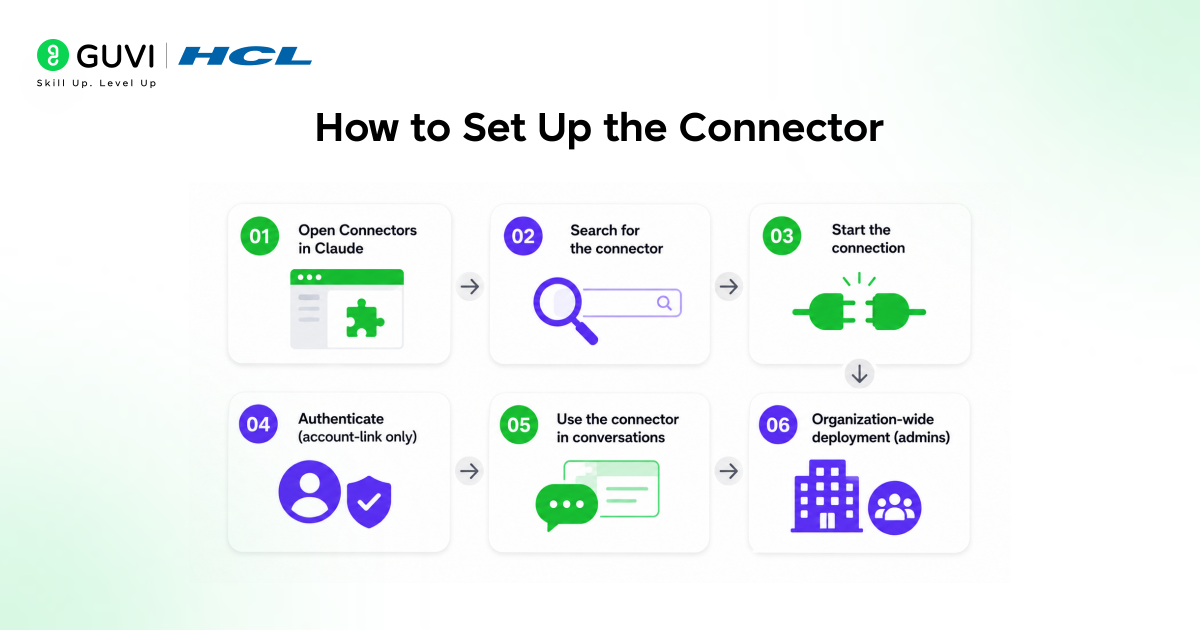
Step 1: Open Connectors in Claude
Go to your Claude settings and open the Connectors section. This is where all remote integrations are managed.

Step 2: Search for the connector
In the search bar, type “Clinical Trials” and select the ClinicalTrials.gov connector from the list.
Step 3: Start the connection
Click on the Connect option for the ClinicalTrials.gov connector and follow the on‑screen prompts. You do not need to install any local software or configure a server.
Step 4: Authenticate (account‑link only)
Authentication links the connector to your Claude account; no separate ClinicalTrials.gov login is required, since it is a public registry. Confirm the connection in your account settings.
Step 5: Use the connector in conversations
Once connected, Claude automatically uses the connector whenever your questions involve clinical trial data. You can ask natural‑language trial queries and get structured answers.
Step 6: Organization‑wide deployment (admins)
For teams or enterprises, administrators can enable the connector organization‑wide from the same Connectors management interface. Individual Pro and Max users can also connect it themselves without admin support.
Practical Workflows: What You Can Actually Do
Seeing the Connector in Action
The real value of the ClinicalTrials.gov connector becomes clear when you apply it to common clinical‑research tasks. Instead of juggling spreadsheets and manual searches, you can ask Claude precise questions and get structured, registry‑based answers in the flow of your workflow.
Trial Design and Endpoint Benchmarking
For trial design and protocol development, the endpoint analysis tool is especially powerful. Example prompts like “What primary endpoints have Phase 3 diabetes trials used in the last five years?” or “Compare endpoints in heart‑failure trials by top‑five pharma sponsors” return benchmarking data that previously required lengthy literature reviews.
Site Selection, Investigators, and Feasibility
For site selection and investigator identification, you can ask questions such as “Find oncologists running Phase 2 solid‑tumor trials in the Midwest” or “Which institutions are most active in X therapeutic area?” The connector returns names, affiliations, and associated trials, helping you prioritize sites for feasibility.
When combined with tools like Medidata, it adds historical enrollment and site‑performance data, giving a richer, more complete picture for feasibility assessment and trial planning.
Where This Fits in the Broader Claude for Healthcare Ecosystem
- Claude for Healthcare and the Life Sciences Ecosystem
- The ClinicalTrials.gov connector is one component of Anthropic’s broader Claude for Healthcare platform, launched in January 2026.
- This suite includes HIPAA‑ready products and new life sciences connectors such as Medidata, bioRxiv, medRxiv, ToolUniverse, and Open Targets, enabling healthcare providers, payers, and health‑tech companies to use Claude for medical workflows.
- From Hypothesis to Clinical Operations
- Together, these tools aim to support the full drug‑and‑device development arc from target identification and preclinical research through trial design, execution, and regulatory submission.
- With Agent Skills for bioinformatics, protocol development, and data analysis, Claude acts as a digital co‑pilot across the R&D chain, while the ClinicalTrials.gov connector anchors the clinical‑operations phase by bridging trial planning with real‑world site management and patient‑matching tasks.
Important Limitations to Keep in Mind
- Like any tool built on a registry, the connector’s usefulness is bound by what is actually in ClinicalTrials.gov. Not all international trials are registered there; the database is comprehensive for FDA-regulated studies, but coverage of purely academic or non-interventional research varies.
- The data is also only as current as what sponsors have submitted: trial status updates, protocol amendments, and results submissions can sometimes lag behind what is actually happening on the ground.
- The connector is also a research and operations tool, not a clinical decision-making system. Matching a patient to a potentially relevant trial is a starting point for a conversation with the treating physician and the study team, not a substitute for the formal screening and eligibility assessment that enrollment requires.
- Claude will surface relevant options and explain the criteria, but the clinical judgment call about whether a specific patient qualifies and whether enrollment is appropriate remains with the healthcare provider.
If you want to go beyond searching trials and learn how Claude’s connectors, agentic workflows, and healthcare‑focused tools fit into modern AI‑driven research, explore HCL GUVI’s IIT Pravartak AI and ML program at GUVI. Build real‑world clinical‑research assistants, automate trial‑matching workflows, and master AI‑driven protocol design step by step.
Final Thoughts
The ClinicalTrials.gov connector in Claude brings one of the most information-dense databases in clinical research within reach of plain language queries.
Whether you are a research coordinator looking for trials your patient population can join, a pharmaceutical strategist mapping the competitive landscape, or a protocol team benchmarking endpoints against what the field has used historically, the connector compresses what used to take hours of manual database work into a focused conversation.
Anthropic is focusing on AI as a connecting layer between fragmented data, regulations, and daily practice, not as a replacement for professionals, but as an accelerator of insight, collaboration, and decision-making.
The ClinicalTrials.gov connector fits squarely within that philosophy. Connect it through your Claude settings, start with a question that reflects a real gap in your current workflow, and build from there as you discover what the six tools can do together.
FAQs
1. Who can use the ClinicalTrials.gov connector?
Anyone on Claude Pro/Max: clinicians, coordinators, pharma teams, and researchers. Enterprise admins deploy it organization-wide.
2. How current is the data?
Daily updates from sponsors via PostgreSQL-backed API v2, but status changes or results can lag real-world events.
3. Do I need special credentials?
No, it’s a public registry. Just connect via Claude settings; authentication links to your account only.
4. Can it match a specific patient to trials?
Yes, via search by_eligibility (e.g., “62yo female, metastatic breast cancer, NYC”). It flags matches but isn’t a substitute for formal screening.
5. How does it fit with other tools?
Pairs with Medidata (enrollment data), PubMed, and bioRxiv for end-to-end R&D from protocol design to site selection.
Success Stories

About the Author
Vishalini Devarajan
An Aerospace Engineer turned content writer, I focus on making complex concepts easy to understand through well-structured, reader-friendly blogs. Whether it’s a technical topic or a non-technical one, I love creating content that is clear, engaging, and impactful.
View all posts by Vishalini Devarajan
Connect with me @










Did you enjoy this article?