


Artificial Intelligence and Machine Learning Articles
CI/CD Pipelines for Machine Learning Projects
A/B Testing for Machine Learning Models
Canary Deployment Strategies for ML Models
What is Model Drift Detection: Keeping Models Accurate in Production


Get In Touch For Details! Request More Information
What is OpenRouter? A Complete Guide with Practical Examples
Sep 03, 2026 4 Min Read 1160 Views
(Last Updated)
Selecting the right AI model has become quite complex as developers deal with multiple APIs, varied pricing structures, inconsistent outputs, and constant updates across platforms like OpenAI, Anthropic, and Google. This fragmentation slows development and increases maintenance overhead. OpenRouter addresses this by providing a single API to access multiple LLMs, enabling seamless model switching, cost control, and performance optimization without requiring changes to the underlying codebase.
Read the full blog to understand how OpenRouter works and how to use it in real applications.
TL;DR Summary:
OpenRouter is a unified API platform that allows developers to access and switch between multiple large language models (LLMs) like OpenAI, Anthropic, and Google through a single interface. Instead of integrating each provider separately, OpenRouter simplifies model selection, routing, and cost optimization. It enables developers to dynamically choose the best model for tasks like chat, coding, or reasoning, which makes AI application development faster and more efficient.
- The global AI market is expected to reach nearly $1.8 trillion by 2030, reflecting rapid adoption across industries.
- Over 65% of organizations already use AI in their workflows, increasing demand for scalable infrastructure.
- By 2030, nearly 25% of IT work could be handled entirely by AI systems, boosting reliance on efficient model orchestration.
Table of contents
- What is OpenRouter?
- Why OpenRouter is Needed
- The Problem with Direct LLM Integration
- The Solution OpenRouter Provides
- OpenRouter vs Direct API Integration
- How OpenRouter Works
- Step 1: The Application Sends a Single API Request
- Step 2: OpenRouter Interprets the Request Context
- Step 3: The Best-Fit Model Is Selected
- Step 4: The Request Is Forwarded to the Provider
- Step 5: The Response Is Standardized and Returned
- Step 6: Fallback Logic Supports Reliability
- Step 7: Teams Monitor Usage, Cost, and Performance Centrally
- Practical Examples of OpenRouter
- Example 1: Cost-Aware Chatbot Routing
- Example 2: Real-Time Fallback for High Availability
- Example 3: Multi-Model Evaluation Pipeline
- Example 4: Coding Assistant with Task-Specific Routing
- Example 5: Centralized Cost Governance in Enterprises
- Conclusion
- FAQs
- How does OpenRouter work?
- Why use OpenRouter instead of direct APIs?
- Can OpenRouter switch between AI models automatically?
- What are the main use cases of OpenRouter?
What is OpenRouter?
OpenRouter is a unified LLM routing layer that abstracts multiple AI providers behind a single, OpenAI-compatible API, enabling seamless access to models from OpenAI, Anthropic, and Google. It handles model selection, request routing, fallback logic, and cost optimization in real time. By decoupling application logic from model providers, OpenRouter allows developers to dynamically switch models based on latency, pricing, or task complexity.
Why OpenRouter is Needed
The Problem with Direct LLM Integration
Working directly with multiple AI providers like OpenAI, Anthropic, and Google creates friction that grows over time. What starts as a simple integration quickly turns into a system that is difficult to manage, expensive to operate, and hard to scale.
- Multiple APIs: Each provider has its own API structure, authentication flow, and response format. Developers must build separate integrations, which increases code complexity and slows down development cycles.
- Vendor Lock-In: Applications often become tightly coupled to one provider’s ecosystem. Switching to a better or more cost-efficient model later requires reworking prompts, logic, and sometimes the entire architecture.
- Cost Unpredictability: Pricing varies by model, token usage, and provider. Without a unified layer, teams struggle to control costs or choose the most efficient model for each task.
- Maintenance Overhead: Frequent model updates, deprecations, and performance changes require constant monitoring and code adjustments. This shifts focus away from building product features.
Build scalable AI systems beyond single-model integrations and vendor lock-in. Join HCL GUVI’s Artificial Intelligence and Machine Learning Course to learn from industry experts and Intel engineers through live online classes, master Python, ML, MLOps, Generative AI, and Agentic AI, and gain hands-on experience with 20+ industry-grade projects, 1:1 doubt sessions, and placement support with 1000+ hiring partners.
The Solution OpenRouter Provides
OpenRouter simplifies this fragmented setup by introducing a unified access layer for multiple models, allowing teams to focus on outcomes rather than integrations.
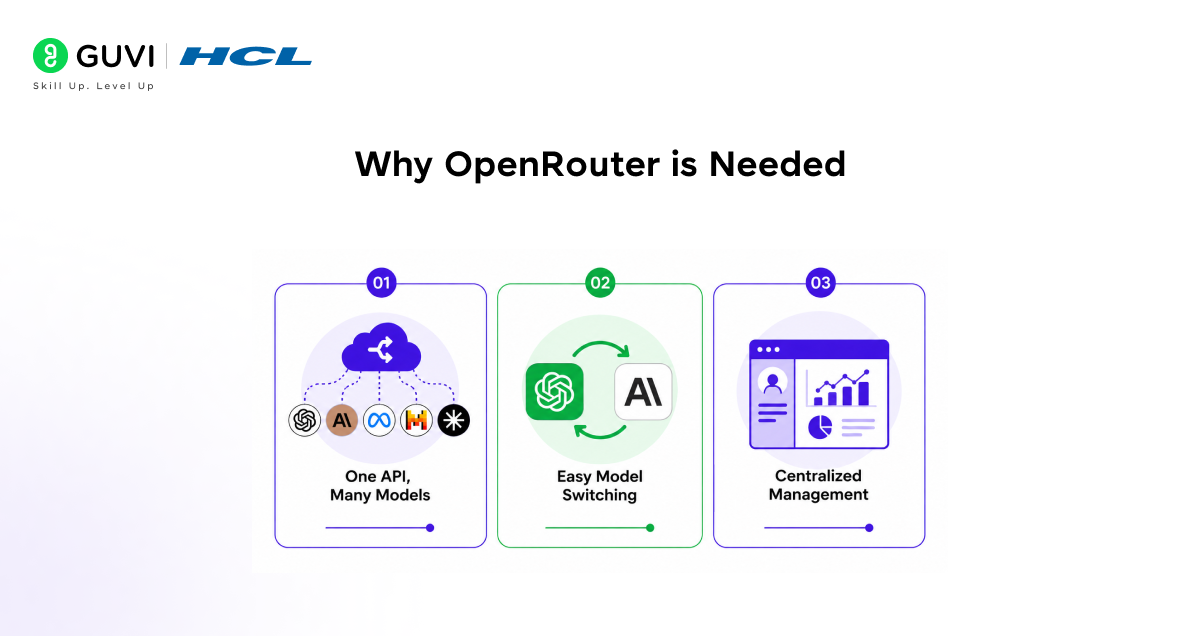
- One API, Many Models: A single interface provides access to models across providers. This reduces integration effort and keeps the system architecture clean and consistent.
- Easy Model Switching: Developers can switch between models based on performance, cost, or task requirements without modifying core application logic.
- Centralized Management: Usage, cost, and routing logic can be controlled from one place. This improves visibility and decision-making across AI workloads.
OpenRouter vs Direct API Integration
| Feature | OpenRouter | Direct API |
| Integration | Single API | Multiple APIs |
| Flexibility | High | Low |
| Vendor Lock-in | No | Yes |
| Cost Optimization | Built-in | Manual |
| Maintenance | Low | High |
How OpenRouter Works
Step 1: The Application Sends a Single API Request
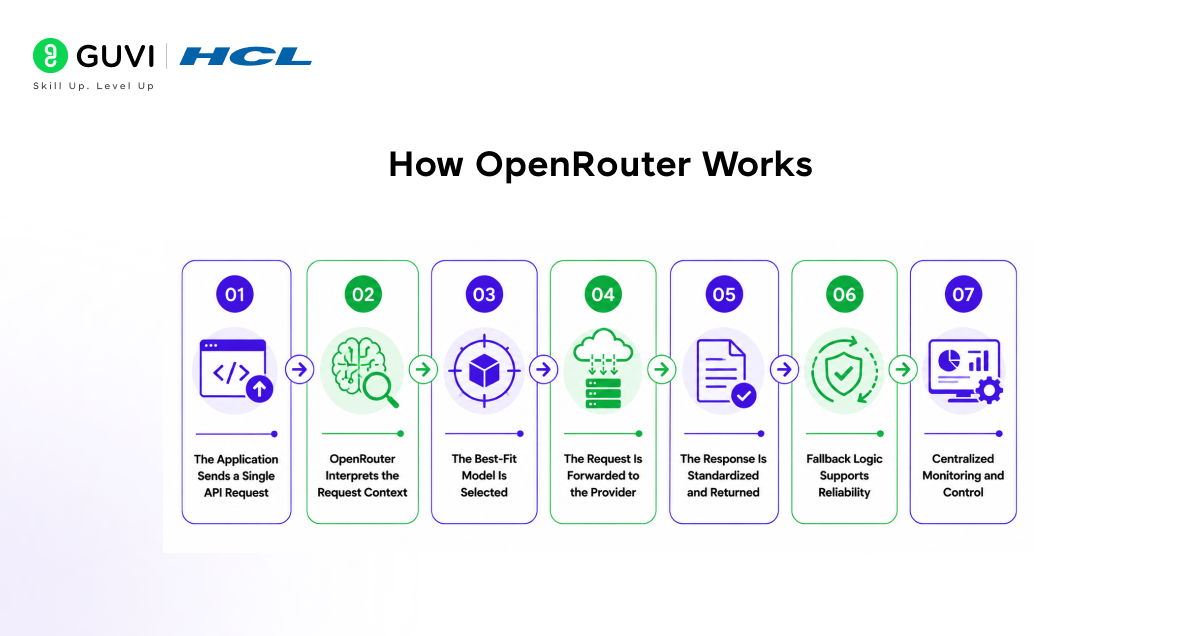
Your application sends a prompt or structured input to OpenRouter through one API endpoint. At this stage, the app does not need separate logic for providers like OpenAI, Anthropic, or Google. This keeps the integration clean and reduces duplication across the codebase.
- Single entry point: One API request replaces multiple provider-specific integrations.
- Cleaner architecture: The application layer stays independent from individual model vendors.
- Lower development effort: Teams spend less time maintaining separate connectors.
Step 2: OpenRouter Interprets the Request Context
Once the request is received, OpenRouter evaluates the parameters attached to it. These may include the selected model, token limits, response format, or routing preferences. This step is important because different tasks require different model characteristics.
- Task alignment: A lightweight request can be routed differently from a reasoning-heavy request.
- Policy control: Teams can define which models should be used for cost-sensitive or quality-sensitive workloads.
- Consistent formatting: Requests follow one standard structure even when the backend models differ.
Step 3: The Best-Fit Model Is Selected
OpenRouter then maps the request to the most appropriate model. This can happen through manual model selection or routing logic set by the developer. The practical value here is flexibility. Teams can choose high-performance models for complex queries and lower-cost models for routine tasks.
- Model choice by use case: Different workloads can be matched to different models.
- Cost awareness: Expensive models do not need to handle every request.
- Operational flexibility: Model selection becomes a runtime decision, not a hardcoded dependency.
Step 4: The Request Is Forwarded to the Provider
After the model is selected, OpenRouter forwards the request to the relevant provider using its backend integration layer. Your application does not need to manage provider-specific authentication patterns, request formatting differences, or endpoint logic.
- Provider abstraction: Backend complexity stays hidden from the application.
- Less integration overhead: Teams avoid building separate infrastructure for each provider.
- Faster updates: New providers or models can be introduced with less disruption.

Step 5: The Response Is Standardized and Returned
When the provider returns an output, OpenRouter sends it back in a consistent response format. This is one of its strongest operational advantages. Even if the request was served by different providers, your application receives predictable output structures.
- Consistent responses: Downstream systems do not need custom handling for each provider.
- Simpler product logic: Frontend and backend layers can process outputs more reliably.
- Better scalability: Standardized responses support easier testing and deployment.
Step 6: Fallback Logic Supports Reliability
If a selected model is unavailable, rate-limited, or underperforming, OpenRouter can reroute the request to another model based on predefined logic. This improves service continuity and reduces the risk of application failure due to one provider issue.
- Higher reliability: Traffic can shift when one model fails or slows down.
- Reduced downtime risk: Applications remain operational even during provider disruptions.
- Smarter failover: Reliability is built into the routing layer rather than handled manually.
Step 7: Teams Monitor Usage, Cost, and Performance Centrally
Because all traffic flows through one layer, teams get a more unified view of model usage, cost patterns, and performance behaviour. This supports better governance and helps teams make practical decisions about where to optimize.
- Central visibility: Usage trends can be tracked across models and providers.
- Cost control: Teams can identify where spend is rising and adjust routing policies.
- Performance review: Latency, output quality, and provider efficiency can be compared more clearly.
Practical Examples of OpenRouter
Example 1: Cost-Aware Chatbot Routing
A customer support chatbot receives thousands of daily queries with varying complexity. Instead of routing all traffic to a high-cost model, OpenRouter allows selective model usage.
- Basic queries: Routed to a low-cost model for FAQs and simple intent classification
- Complex queries: Escalated to advanced models from OpenAI or Anthropic for reasoning-heavy responses
- Outcome: Reduced token cost while maintaining response quality
This setup aligns compute cost with query complexity, which is critical in high-volume systems.
Example 2: Real-Time Fallback for High Availability
In production environments, API reliability directly impacts user experience. OpenRouter supports fallback routing when a model fails or is rate-limited.
- Primary model: A preferred model is selected for performance
- Fallback model: If latency spikes or errors occur, traffic is rerouted to an alternative model
- Outcome: Consistent uptime without manual intervention
This approach is particularly useful in SaaS platforms where downtime leads to direct revenue loss.
Example 3: Multi-Model Evaluation Pipeline
AI teams often compare outputs across models to benchmark quality before deployment. OpenRouter simplifies this by standardizing access.
- Parallel requests: Same prompt sent to multiple models across providers like Google and OpenAI
- Evaluation layer: Outputs scored based on accuracy and cost
- Outcome: Data-driven model selection for production use
This reduces the need for separate evaluation pipelines for each provider.
Example 4: Coding Assistant with Task-Specific Routing
A developer tool that generates and reviews code requires different capabilities depending on the task.
- Code generation: Routed to models optimized for structured output
- Code explanation: Routed to models better at natural language reasoning
- Bug detection: Sent to models with stronger analytical performance
- Outcome: Improved output quality by matching task type with model strengths
This avoids over-reliance on a single model for all coding tasks.
Example 5: Centralized Cost Governance in Enterprises
Large organizations often run multiple AI applications across teams. Without central control, costs can escalate quickly.
- Routing policies: Define which teams or workloads can access premium models
- Usage tracking: Monitor token consumption across providers
- Budget control: Adjust routing rules based on spend patterns
- Outcome: Better financial control and accountability across AI usage
Conclusion
OpenRouter brings clarity to a fragmented AI landscape by giving developers a practical way to work across models without added complexity. Instead of committing to a single provider, teams gain the flexibility to choose what works best for each task while keeping systems stable and cost-aware. As platforms like OpenAI and Anthropic continue to evolve, this approach helps teams stay adaptable and focused on building reliable, high-quality AI applications.
FAQs
1. How does OpenRouter work?
OpenRouter routes your API request to the best available AI model based on cost, performance, or task requirements, then returns the response to your application.
2. Why use OpenRouter instead of direct APIs?
OpenRouter reduces complexity by replacing multiple integrations with one API, avoids vendor lock-in, and helps optimize costs across different AI providers.
3. Can OpenRouter switch between AI models automatically?
Yes, OpenRouter can dynamically switch between models or use fallback options to ensure better performance and reliability.
4. What are the main use cases of OpenRouter?
OpenRouter is used for chatbots, coding assistants, SaaS AI tools, and applications that require flexibility across multiple AI models.
Success Stories

About the Author
Vaishali
I'm a seasoned writer with four years of experience across technical, non-technical, and just about every genre or niche you can imagine. Adaptable and curious, I enjoy exploring new topics and making information engaging and easy to understand. Fueled by a steady stream of tea, I approach each project with creativity, reliability, and genuine enthusiasm for storytelling.
View all posts by Vaishali
Connect with me @








Did you enjoy this article?