


Artificial Intelligence and Machine Learning Articles
AI/ML Skills Gap 2026: Why Companies Can't Find Job-Ready Talent
20 AI/ML Interview Questions Recruiters Can Use Without a Tech Background - Best Guide
How Industry-Backed AI/ML Bootcamps Are Changing the AI/ML Hiring Pipeline - Best Guide 2026
From IT Support to AI Engineer: A Realistic Career Switch Guide 2026


Get In Touch For Details! Request More Information
10 Important MCP Servers for Modern Development
May 25, 2026 6 Min Read 1112 Views
(Last Updated)
Developers’ AI workflows have evolved dramatically in two years from pasting code into chats to AI accessing codebases, databases, browsers, and repositories directly. The Model Context Protocol (MCP) makes this seamless integration possible.
MCP, launched by Anthropic in November 2024, exploded with thousands of servers within a year as OpenAI and Google DeepMind adopted it. Donated to Linux Foundation’s Agentic AI Foundation by December 2025, it now boasts 10,000+ servers and 97M SDK downloads in 2026.
In this article, we will break down what MCP actually is, why it matters more today than it did even six months ago, and which MCP servers are genuinely worth your time, not just in theory, but in real day-to-day development work.
Quick TL;DR Summary
1. AI assistants can now reach into your codebase, talk to your database, and push to repositories through MCP – the universal adapter making this possible.
2. MCP went from Anthropic experiment to open standard under Linux Foundation with 10,000+ servers and 97M SDK downloads.
3. This article breaks down what MCP is and reveals the 10 best MCP servers worth using in real development workflows.
4. It covers GitHub MCP for repo access, Firecrawl for web scraping, PostgreSQL for database queries, Playwright for browser automation, and 6 more essential servers.
5. The blog explains practical use cases, security considerations, and how to start with MCP without overwhelming your setup.
Table of contents
- MCP: Solving the N × M Problem
- The Integration Nightmare Before MCP
- USB-C for AI: The Universal Solution
- Three Core Primitives
- Clean Architecture: Host, Client, Server
- The Best MCP Servers for Developers in 2026
- GitHub MCP: The Essential Coding Companion
- Firecrawl MCP: Web Scraping and Live Research
- PostgreSQL MCP: Your Database, in Plain Language
- Playwright MCP: Browser Automation Without the Boilerplate
- Context7 MCP: Documentation That Actually Stays Current
- Sentry MCP: Error Tracking Inside Your Editor
- 7. Figma MCP: Design Handoff Without the Back-and-Forth
- Qdrant MCP: Long-Term Memory for Your Agents
- 9. Vercel MCP: Deployment Observability from Your Chat
- 10. Brave Search MCP: Lightweight Real-Time Web Access
- Closing Thoughts
- FAQs
- What is MCP and why does it matter?
- Which MCP server should I install first?
- Are MCP servers safe to run?
- How do I get started without being overwhelmed?
- What makes Firecrawl different from other web tools?
MCP: Solving the N × M Problem
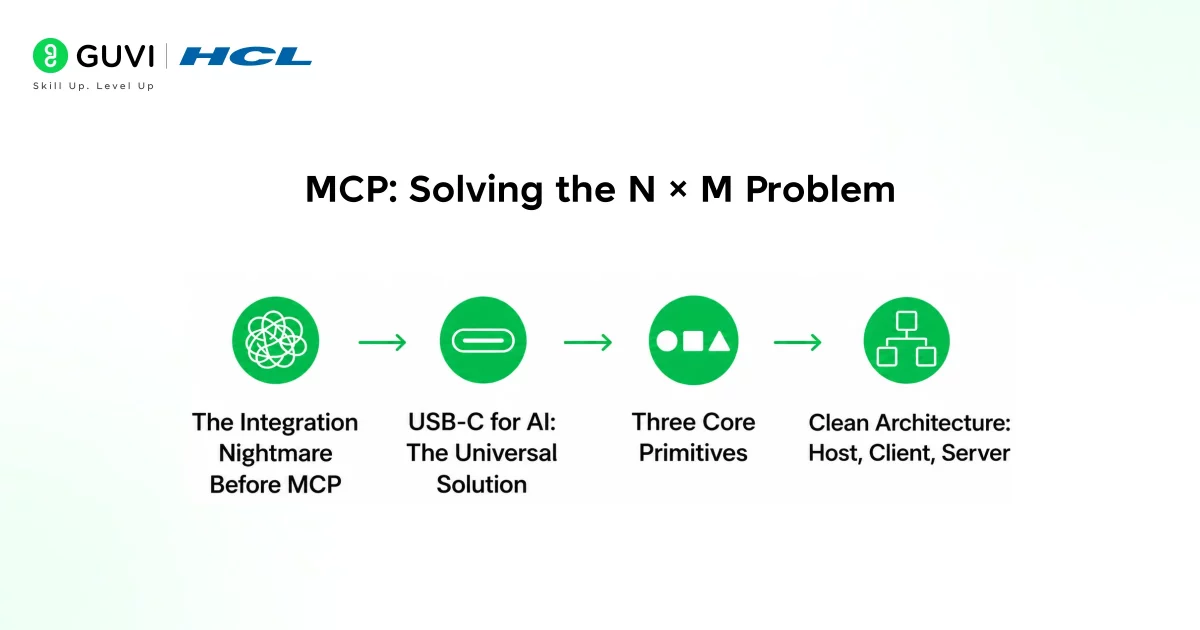
1. The Integration Nightmare Before MCP
Before MCP existed, connecting an AI assistant to any external tool meant building a custom integration for each pair. Anthropic described this as the “N × M problem”, N tools multiplied by M clients, producing exponentially growing brittle code.
2. USB-C for AI: The Universal Solution
MCP solves this by defining a universal interface that works everywhere. A server built to MCP spec connects to Claude Desktop, Cursor, VS Code, or any compliant client without modification build once, use everywhere.
3. Three Core Primitives
The protocol uses JSON-RPC 2.0 and defines tools (actions AI invokes), resources (data AI reads), and prompts (reusable templates). This clean separation fueled rapid ecosystem growth.
4. Clean Architecture: Host, Client, Server
The model includes a host (like Claude Desktop), client (manages connections), and server (exposes tools/data). One host connects to many servers simultaneously GitHub, Postgres, Figma all accessible in one AI session.
Ready to master Figma AI and design smarter UI/UX with automation? Enroll in HCL GUVI’s Figma AI Course today for hands-on projects, certification, and industry-ready skills in just 12 hours.
The Best MCP Servers for Developers in 2026
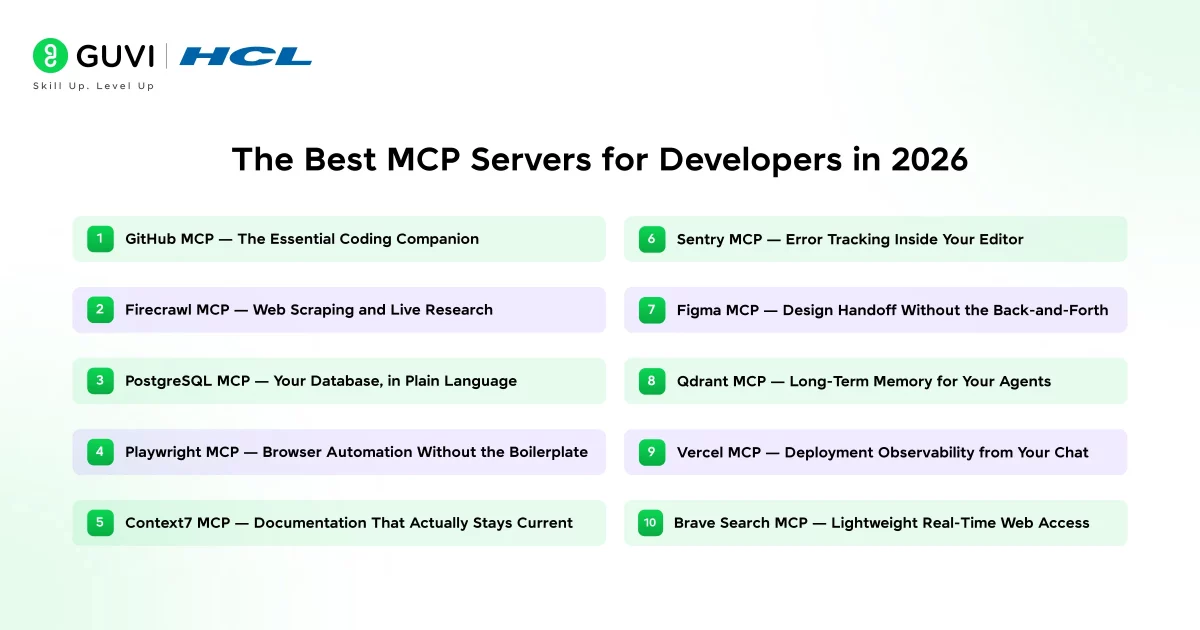
1. GitHub MCP: The Essential Coding Companion
If you install just one MCP server, make it the official GitHub MCP. It immediately transforms your daily workflow by letting AI search repos directly, fetch files, check PRs, summarize commits, create issues, and manage branches, all without leaving your editor.
The “search code” feature shines in large monorepos. Ask “find all places this function is called” and get live repo data, not outdated training knowledge. AI reads your actual repository in real time.
For teams, agents handle PRs and issues autonomously, eliminating manual context switching.
- Key capabilities: Repo search, file fetching, PR/issue management, commit summaries
- Deployment: Docker + remote options
- Safest choice: Officially maintained by GitHub
2. Firecrawl MCP: Web Scraping and Live Research
Firecrawl is the go-to MCP server for web data, exposing 13+ tools for scraping pages to clean markdown, web search with content extraction, async site crawling, URL mapping, and JSON schema data extraction, all without custom scraping rules.
The firecrawl_agent launches autonomous research agents that browse, search, and compile structured web reports. Firecrawl stands out by automatically stripping navigation, ads, and markup for AI-ready content.
The 2026 firecrawl_interact tool enables natural language actions click buttons, fill forms, and navigate deeper. With 85,000+ GitHub stars, it’s battle-tested in production AI workflows.
- 13+ tools: Scraping, crawling, search, structured extraction
- Standout features: Clean output, firecrawl_interact, persistent sessions
- Proven: 85K GitHub stars, production-ready
3. PostgreSQL MCP: Your Database, in Plain Language
The PostgreSQL MCP server is the bridge between your AI assistant and your relational data, and it is one of those tools that immediately changes how you interact with your own systems. Instead of writing a query, running it, and pasting the output back into a chat, the agent can inspect schemas and execute SELECT statements directly to answer questions about your data in real time.
Teams using it report that it is particularly useful for exploratory data analysis, debugging unexpected query results, and onboarding new developers who need to understand a legacy schema quickly.
One important caveat worth knowing before you install it: the token cost of working with large schemas can be significant. According to pgEdge’s engineering research, calling `get_schema_info` without any filtering on an enterprise database with 200 or more tables can consume tens of thousands of tokens just for the schema enough to fill a context window before any real work starts.
4. Playwright MCP: Browser Automation Without the Boilerplate
Microsoft’s Playwright MCP server turns your AI assistant into a capable browser automation engine. It allows agents to control a real Chromium browser navigating pages, clicking elements, filling out forms, running end-to-end tests, and extracting content from dynamically rendered pages that simple HTTP fetching cannot handle.
This matters enormously for modern web apps, where large parts of the UI are rendered client-side by JavaScript and are invisible to any scraper that does not actually run a browser.
For developers, the most practical uses tend to be writing and debugging automated tests without having to look up Playwright’s API for every interaction, and handling login flows or multi-step UI sequences that would otherwise require a lot of boilerplate code.
The server accepts natural language instructions and translates them into Playwright actions, which means the barrier to setting up a test or automation is dramatically lower than it used to be. It also pairs well with Firecrawl for clean, fast content extraction from static pages, and Playwright for anything that requires a real browser session.
5. Context7 MCP: Documentation That Actually Stays Current
One of the most frustrating limitations of working with AI coding assistants is that they are trained on a snapshot of the world at a specific point in time. Ask about the latest release of a library and you might get information that is six months or a year out of date. Context7 solves this by giving AI direct access to current documentation through what it calls a documentation-as-context pipeline.
When you ask your agent how to use a specific feature of a library, it fetches the current docs for the exact version you are running rather than relying on training data.
This sounds like a small improvement, but in practice, it closes one of the most common gaps between what AI assistants say and what actually works. Developers who work with rapidly evolving libraries or who are pinned to a specific older version of a dependency and need version-accurate answers find Context7 particularly valuable.
- Lightweight and easy to configure
- Supports RAG workflows
- Works with your internal documentation
- Grounds responses in project-specific context
6. Sentry MCP: Error Tracking Inside Your Editor
Sentry’s official MCP pulls production errors, stack traces, trends, and code context directly to your AI. Ask for the most frequent error, get diagnosis + fix proposal instantly.

Replaces the tedious loop: Sentry → GitHub → commit history → execution path. With GitHub MCP, agents handle full debugging sequences automatically. Runs remotely via OAuth.
- Full context: Stack trace + code + trends
- Auto-correlation: Links errors to recent releases
- Setup: Remote OAuth, no local infra
7. Figma MCP: Design Handoff Without the Back-and-Forth
Design-to-code handoff is one of the most persistent sources of friction in product development teams. Developers need to extract spacing values, confirm typography choices, pull asset IDs, or check what changed in the latest design update, and all of that typically means stopping work to open Figma, dig through layers, or ping a designer.
Ask for component spacing, generate CSS from tokens, or check latest design updates—all instantly accessible. Speeds parallel design/dev sprints dramatically.
- Instant access: Spacing, colors, tokens, changes
- CSS generation: Direct from design tokens
- Sprints: Real-time design updates
For teams running fast product sprints where design and development happen in parallel, this kind of live access to design data meaningfully reduces the back-and-forth that normally piles up during implementation.
8. Qdrant MCP: Long-Term Memory for Your Agents
Qdrant is a vector database, and its MCP server makes it possible to give your AI agent something it normally lacks: persistent, semantic memory. The server exposes tools to both store and retrieve information, which means an agent can autonomously save important context from one session and recall it accurately in a future one.
This goes beyond simple retrieval because Qdrant is a vector store; retrieval is semantic rather than exact-match, so the agent can surface relevant memories even when the query is phrased differently from how the information was originally stored.
Qdrant’s vector DB MCP gives agents persistent semantic memory across sessions. Store/retrieve context autonomously with semantic (not exact-match) search.
Beyond RAG, enables agents that accumulate codebase knowledge, track decisions, and remember debugging outcomes. Self-hosted via Docker for data control.
- Persistent memory: Context survives sessions
- Semantic retrieval: Finds relevant info despite phrasing
- Self-hosted: Docker, full data control
9. Vercel MCP: Deployment Observability from Your Chat
Vercel has an official MCP server that connects your AI assistant to your deployment pipeline. When a build fails, instead of going to the Vercel dashboard to find the logs, you can ask the agent to pull the error, analyze what went wrong, and propose a configuration fix.
The server provides access to deployment logs, runtime errors, and environment details, which means the agent has enough context to give useful answers rather than generic suggestions.
Vercel’s MCP connects AI to deployment pipelines, pull failed build logs, runtime errors, env details instantly. Ask “analyze this build failure” → get root cause + fix.
Eliminates dashboard-log-copy-paste-fix loops. Critical for frequent deployment teams. Edge network/serverless debugging shines with runtime data only visible post-deploy.
- Build failure analysis: Logs + root cause
- Runtime debugging: Edge/serverless specific
- Friction eliminated: No dashboard round-trips
10. Brave Search MCP: Lightweight Real-Time Web Access
Every AI assistant eventually needs access to information that postdates its training. The Brave Search MCP provides a clean, lightweight way to give your agent real-time web access without the overhead of running a full browser.
It is best understood as the complement to tools like Firecrawl and Playwright, where those are for deep extraction and interaction, Brave Search is for quick lookups, finding URLs to fetch, or grounding the agent in current information before it touches your codebase.
Complement to Firecrawl/Playwright: Brave for fast search, Firecrawl for extraction, Playwright for interaction. Predictable behavior across agent workflows.
- Lightweight: No browser overhead
- Consistent: Same API across clients
- Perfect trio: Brave → Context7 → Firecrawl
MCP servers inherit your full local permissions via stdio transport, so malicious ones can access SSH keys or delete files. Always prefer official servers, use environment variables for API keys, start read-only, and run uncertain servers in Docker containers.
If you’re serious about mastering MCP servers and building production-ready AI workflows, HCL GUVI’s Intel & IITM Pravartak Certified Artificial Intelligence and Machine Learning Course is exactly where you need to be. This live online program is taught directly by Intel engineers and industry experts. You also get 1:1 doubt sessions with top SMEs, work on 20+ industry-grade projects, including a capstone, learn in your preferred language, and receive placement assistance through 1000+ hiring partners.
Closing Thoughts
MCP has gone from an interesting Anthropic proposal to the foundational protocol for how AI agents connect to the real world, all in the space of about 18 months.
The servers covered in this article are not the only ones worth knowing the ecosystem is growing too fast for any single list to be complete but they represent the core toolkit that covers most of what developers actually need day to day: code management, web data, database access, browser automation, design files, error tracking, deployment observability, and persistent memory.
The best way to get started is not to install everything at once. Pick one or two servers that solve a specific friction point in your current workflow, get comfortable with how they behave, and then expand from there.
FAQs
1. What is MCP and why does it matter?
MCP is the universal protocol that lets AI assistants connect to tools like GitHub, databases, and browsers using one standard interface instead of custom integrations for each.
2. Which MCP server should I install first?
Start with GitHub MCP it gives your AI direct repo access for searching code, managing PRs, and reading files without copying content into chats.
3. Are MCP servers safe to run?
They inherit your full local permissions, so stick to official servers from GitHub, Sentry, Vercel etc., use environment variables for API keys, and run unknown ones in Docker.
4. How do I get started without being overwhelmed?
Pick 1-2 servers that solve your biggest workflow friction first (like GitHub + Firecrawl), master them, then add more since the protocol stays consistent.
5. What makes Firecrawl different from other web tools?
Firecrawl delivers clean markdown output, handles async crawling of entire sites, and has interactive tools for clicking/filling forms perfect complement to Playwright’s browser automation.
Success Stories

About the Author
Lukesh S
A professional content writer who has experience in freelancing and now working as a Technical Content Writer at HCL GUVI having sound knowledge in Blog Writing and Creative Writing!
View all posts by Lukesh S
Connect with me @








Did you enjoy this article?