


Web Development Articles
How to Enable JavaScript in Chrome (Desktop & Mobile)
What Is Hoisting In JavaScript
What is Promise in JavaScript? A Plain English Guide for Beginners


Get In Touch For Details! Request More Information

useEffect in ReactJS: A Beginner-Friendly Guide in 2025
Dec 15, 2025 4 Min Read 1050 Views
(Last Updated)
We are all aware of the excellent user experience (UX) and seamless navigational flow that React applications provide. But do you ever wonder why these applications are so smooth to use? The reason lies in the effectiveness of functions implemented in React, known as Hooks.
Hooks are special functions that allow you to hook/clip the React features, such as state management, lifecycle methods, and code context, directly from functional components. There are various hooks, such as useState, useEffect, and useContext. Apart from these, developers can also build their own custom hooks to serve specific purposes in the application.
Similarly, useEffect in ReactJS is a type of React Hook that enables you to perform “side effects” inside functional components. This hook was created to replace the traditional way of handling “side effects” via lifecycle methods in class components, which was very time-consuming and tedious. But using useEffect in ReactJS, managing all those tasks becomes much easier, cleaner, and modular.
In this blog, we will focus solely on understanding this particular React function and learning how to use it.
Table of contents
- What is useEffect in ReactJS and Why You Should Care About It
- Mastering useEffect in ReactJS: Syntax, Dependencies, and Cleanup
- Basic Syntax of useEffect in ReactJS
- Understanding Dependencies
- Cleanup Function in useEffect in ReactJS
- Common Use Cases and Best Practices of useEffect in ReactJS
- Real-World Use Cases
- Best Practices
- Conclusion
- FAQ
- What is useEffect used for?
- What is a cleanup function, and why is it important?
- Can I make useEffect async directly?
What is useEffect in ReactJS and Why You Should Care About It
useEffect in ReactJS is a built-in React hook that was explicitly created to be used with functional components rather than with class components. Earlier, side effects such as fetching data from APIs, updating the DOM (Document Object Model ) tree, setting up timeouts (setTimeout, setInterval), or manipulating local Storage or sessionStorage were handled through lifecycle methods: componentDidMount, componentDidUpdate, and componentWillUnmount.
And maintaining the tasks through these individual functions was very lengthy and challenging. To address this issue, useEffect in ReactJS was created as a single unified function inside which we can control the behavior by changing the dependencies as per our requirement.
By using the useEffect in ReactJS, developers can easily synchronize their internal application components with the external system, make the code more modular, improve the speed and performance of the apps, and minimize duplication. Due to these several positive factors, useEffect in ReactJS is used as a primary element while building next-generation applications.
Unlock React mastery with our exclusive free eBook — React eBook
Mastering useEffect in ReactJS: Syntax, Dependencies, and Cleanup
1. Basic Syntax of useEffect in ReactJS
import React, { useEffect } from "react";

function MyComponent() {

  useEffect(() => {

    // Code for the side effect goes here

    console.log("Component rendered or updated!");

  });

  return <div>Hello, useEffect!</div>;

}

export default MyComponent;
Explanation:
- Here we have imported the useEffect hook from React, as you can see at the top of the file: import { useEffect } from “react”.
- After importing it, you have to call the useEffect hook inside your functional component to define the side effects.
- So now you have to write the code for side effects that you want to execute ( for example: setting up the timer, cleaning up logic, fetching data, or updating the DOM). This code will be passed as the first argument inside the useEffect hook.
- Once this is done, React runs the effect after this particular functional component gets rendered. In simple terms, the user interface (UI) element loads before the effect is executed.
- In this case, since we have not specified a dependency array as the second (2nd) parameter, the side effect will execute every time the functional components are rendered. This approach can be effective for conducting some repetitive tasks, but from a performance perspective, it is not a good practice.

2. Understanding Dependencies
import React, { useState, useEffect } from "react";

function Counter() {

  const [count, setCount] = useState(0);

  useEffect(() => {

    console.log(`Count changed: ${count}`);

  }, [count]);    // Effect runs only when 'count' changes

  return (

    <div>

      <p>{count}</p>

      <button onClick={() => setCount(count + 1)}>Increment</button>

    </div>

  );

}

export default Counter;
Explanation:
- Here, observe the Dependency array that is present inside the useEffect as the second (2nd) argument, directing the operational time of side effects.
- In this example, count is the state variable which is passed into the dependency array [count], and this particular side effect will run only when the count changes, preventing unnecessary and other renders. For better comprehension: The effect will only run when a user increases the number of counts by clicking the button multiple times; otherwise, it will not run.
- If an empty dependency array [ ] is passed as the second (2nd) argument, the effect runs only once after the first render takes place, meaning the components get mounted after the first render, similar to the componentDidMount function in the class component.
- And as we discussed above, if we omit the dependency array from the second (2nd) argument, the effect will run every time the functional component gets rendered, which can degrade the performance and speed of your application.
- Implementing dependencies correctly according to the programming needs and requirements can make your effects predictable and efficient.
3. Cleanup Function in useEffect in ReactJS
import React, { useState, useEffect } from "react";

function Timer() {

  const [seconds, setSeconds] = useState(0);

  useEffect(() => {

    const interval = setInterval(() => {

      setSeconds(prev => prev + 1);

    }, 1000);

    // Cleanup function

    return () => {

      clearInterval(interval);

      console.log("Timer cleared");

    };

  }, [ ]);   // Run only once

  return <div>Seconds: {seconds}</div>;   // It will display the seconds running on the screen.

}

export default Timer;Explanation:
- Here, as you can see, we have implemented a cleanup logic to remove the resource, specifically the timers we have used.
- We have returned a function from useEffect to clean up the timer resource.
- This cleanup function runs before the component unmounts or before the side effect runs.
- In this example, the clearInterval inside the cleanup stops the workflow of the timer once the component is unmounted.
- This cleanup logic is required especially in real-world applications where components set up subscriptions or timers that need proper disposal.
Note: Cleanup in useEffect is necessary to keep the React apps efficient by clearing the resources like timers, event listeners, or subscriptions. Without cleanup, the leftover processes associated with these resources can lead to memory leaks, performance issues, and even unusual behavior like duplicacy in API calls or repetitive updates.
Common Use Cases and Best Practices of useEffect in ReactJS
Real-World Use Cases
1. Fetching Data from an API

This is one of the fundamental uses of the useEffect hook: to fetch data from an API endpoint. It is done for automatically fetching the information when the component gets rendered.
useEffect(() => {

  fetch("https://api.example.com/users")

    .then(response => response.json())

    .then(data => setUsers(data));

}, [ ]);
2. Updating the Document Title

You can also implement the useEffect in ReactJS to update the document title dynamically based on state changes.
useEffect(() => {

  document.title = `You clicked ${count} times`;

}, [count]);
3. Setting Up Timers or Intervals
Timers are integrated with the UI components in many forms, such as notification auto-dismiss timers, animation delays, auto-sliding images, or conditional warning messages.
So in the following applications, useEffect becomes great for running the timer or countdown. In addition to this, you can also implement a cleanup logic to remove or stop the timer when the component unmounts.
useEffect(() => {

  const timer = setInterval(() => {

    setSeconds(prev => prev + 1);

  }, 1000);

  return () => clearInterval(timer);

}, [ ]);
4. Handling Event Listeners
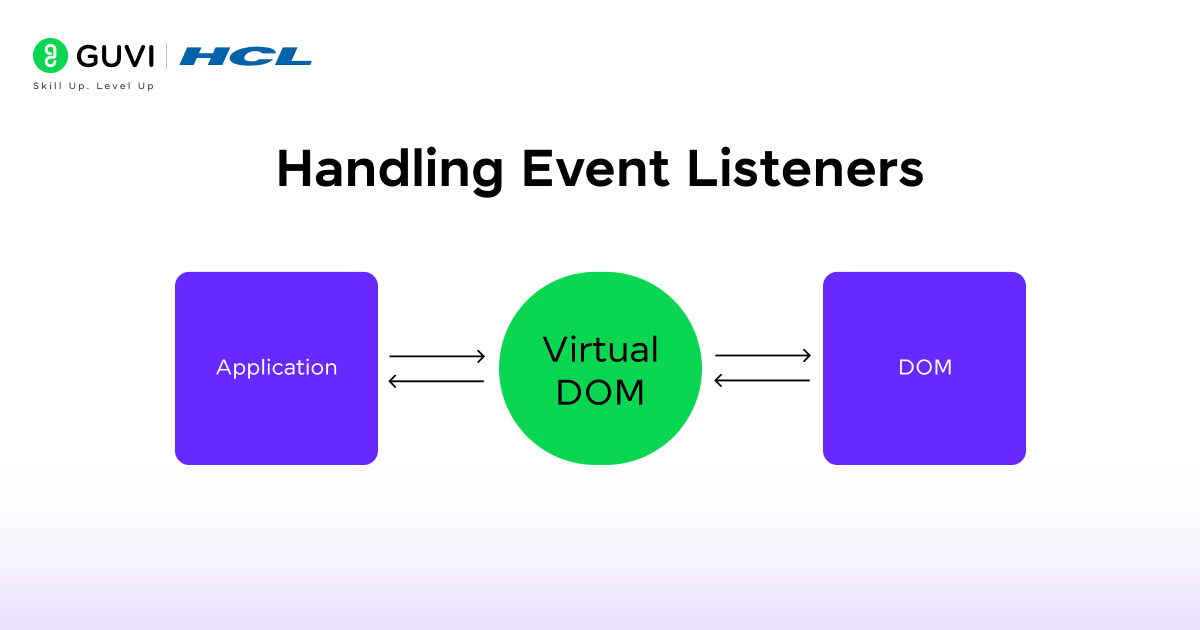
You can use the useEffect hook to handle browser or DOM events, as in this case, effectively, we are resizing the window width. Doing this helps in maintaining the responsiveness of your component.
useEffect(() => {

  const handleResize = () => setWidth(window.innerWidth);

  window.addEventListener("resize", handleResize);

  return () => window.removeEventListener("resize", handleResize);

}, [ ]);
5. Syncing Data with Local Storage

Here, we have used the useEffect hook to maintain the consistency of the React app across sessions. i.e, Every time the theme changes, it’s saved to local storage.
useEffect(() => {

  localStorage.setItem("theme", theme);

}, [theme]);
Best Practices
- Define dependencies clearly to control the execution.
- Avoid unnecessary re-renders by using proper dependency management.
- Use cleanup functions for timers, listeners, and subscriptions.
- Keep effects simple — one task per useEffect.
- Don’t make useEffect in ReactJS async; define an async function inside it. For example, while fetching data from the API, don’t make the useEffect hook async directly. Refer to the code below:
(Code to explain)
// ❌ Common mistake: async function directly in useEffect

useEffect(async() => {

  const fetchData = () => {

    const response = await fetch("https://api.example.com/data");

    const result = await response.json();

    setData(result);

  };

  fetchData();

}, [ ]);
__________________________________________________________________
Note: https://api.example.com/users is a dummy API; use a real API endpoint in actual projects.
  // ✅ Correct way: async function defined inside useEffect

  useEffect(() => {

    const fetchUsers = async () => {

      const response = await fetch("https://api.example.com/users");

      const data = await response.json();

      setUsers(data);

    };

    fetchUsers();

  }, [ ]);
Double up your technical capabilities and stand apart from the crowded job market. If you are among those individuals who dream of cracking the top product-based companies, then you are at the right place. Enroll in HCL GUVI’s IITM Pravartak Certified MERN Full Stack Development Course with AI Integration and explore each phase of MERN Stack with structured, expert-led modules and AI tools.
Conclusion
In conclusion, the useEffect in ReactJS is a powerful tool for managing side effects in React functional components. By understanding its syntax, dependencies, and cleanup functions, we can write clean, efficient, and predictable code, making our React applications more dynamic and responsive.
FAQ
What is useEffect used for?
useEffect lets functional components perform side effects like fetching data, updating the DOM, or setting timers after rendering.
What is a cleanup function, and why is it important?
A cleanup function removes timers, listeners, or subscriptions to prevent memory leaks and performance issues.
Can I make useEffect async directly?
No. useEffect in ReactJS cannot be async directly. Define an async function inside and call it instead.
Success Stories




























Did you enjoy this article?