


Software Development Articles
My Google SDE Interview Experience: From Rejection to Selection [2026 Success Story]
Apple Interview Experience for Software Developers: What to Expect
Decoding Differences between Network OS and Distributed OS
Operating System Examples: Top OS Types, Features, and Uses Explained


Get In Touch For Details! Request More Information

Operating System Structure: A Clear Understanding
Dec 22, 2025 5 Min Read 3091 Views
(Last Updated)
The operating system (OS) is the most essential and complex software, responsible for managing computer hardware and its software resources. In other words, it is a program that enables software to communicate with a device’s hardware components. But have you ever wondered how the OS is structured and how its components interact to perform tasks such as memory management, file storage, device management, and running background software and programs?
In this particular blog, we will try to gain a solid understanding of the system structure in the OS and its types. So, without any further ado, let’s get started.
Table of contents
- What is Operating System Structure
- Types of Structures in Operating Systems (OS)
- Simple Structure
- Layered Structure
- Modular Structure
- Virtual Machines
- Monolithic Structure
- Micro-Kernel Structure
- Exo-Kernel Structure
- Conclusion
- FAQs
- Why are different types of OS structures used?
- Which OS structure is the most efficient?
- How does the OS structure affect system performance?
What is Operating System Structure
In simple terms, the structure of an operating system (OS) refers to the configuration of how multiple OS components, such as the Kernel, System Calls, Process Scheduler, I/O Subsystem, Security Manager, and User Interface Layer, are organized and linked to one another. When a specific OS is structured effectively with all required settings, overall system performance and reliability increase significantly, and it becomes easier to maintain and manage those systems. Many parts of the OS are organized by functionality.
Importance of System Structuring in OS
- Well-structured OS enhances the system performance.
- It improves security by segregating internal program components, enabling better maintenance.
- Ensures seamless communication between hardware and software systems.
- During operational scenarios, it provides stability and consistency to the OS.
- For users, it becomes simpler to maintain, upgrade the OS, and troubleshoot issues.
Types of Structures in Operating Systems (OS)
Below are the different types of operating system structures, each with its own working mechanism and features that define how efficiently it manages system resources and operations:
1. Simple Structure
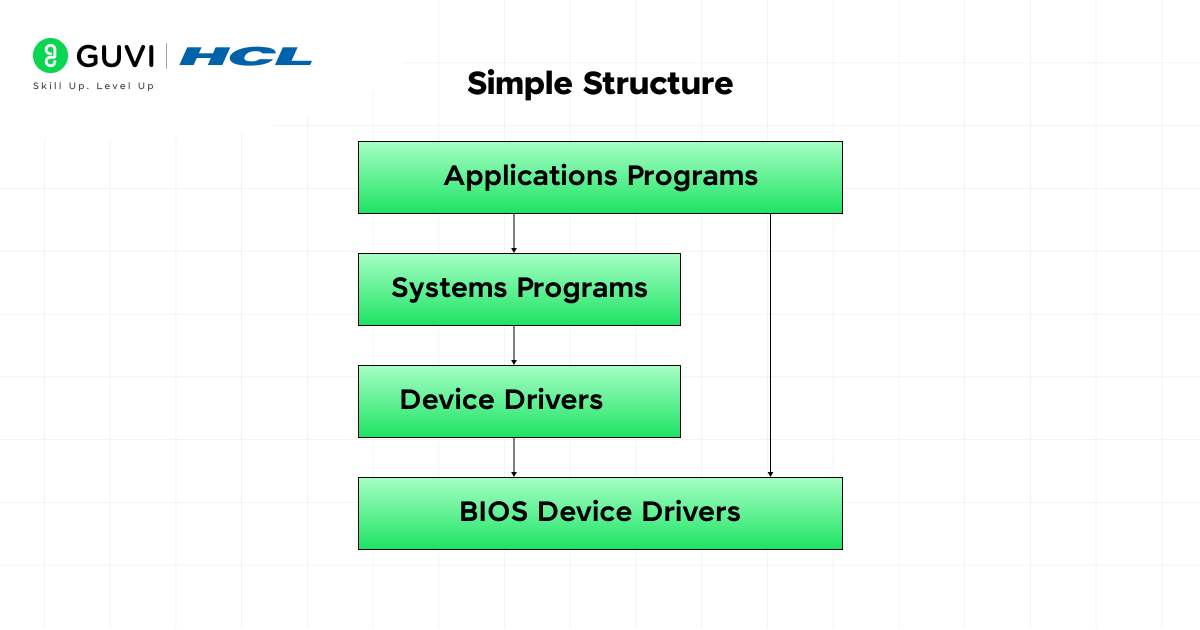
A simple structure operating system (OS) is a collection of processes that contain different software services in a unified module. For better comprehension, there is no layered architecture involved while arranging the components. Here, different software blocks, such as file management, device drivers, memory management, and process management, are directly connected to prevent system failures and outages.
(Working Mechanism)
When the computer system boots, the OS module is loaded first and initializes devices and memory tables. Once initialization is complete, a user program is executed in the background, which triggers the system call.
After the central processing unit (CPU) activates the relevant OS routines by switching to kernel mode, the shared data structures are implemented, allowing the routine to call other routines. After the entire process is completed, the control returns to the source routine, then back to the user program.
Core Features:
- All parts of the OS are combined into one single unit.
- Easy to understand and develop.
- Fast execution because everything is directly connected.
2. Layered Structure
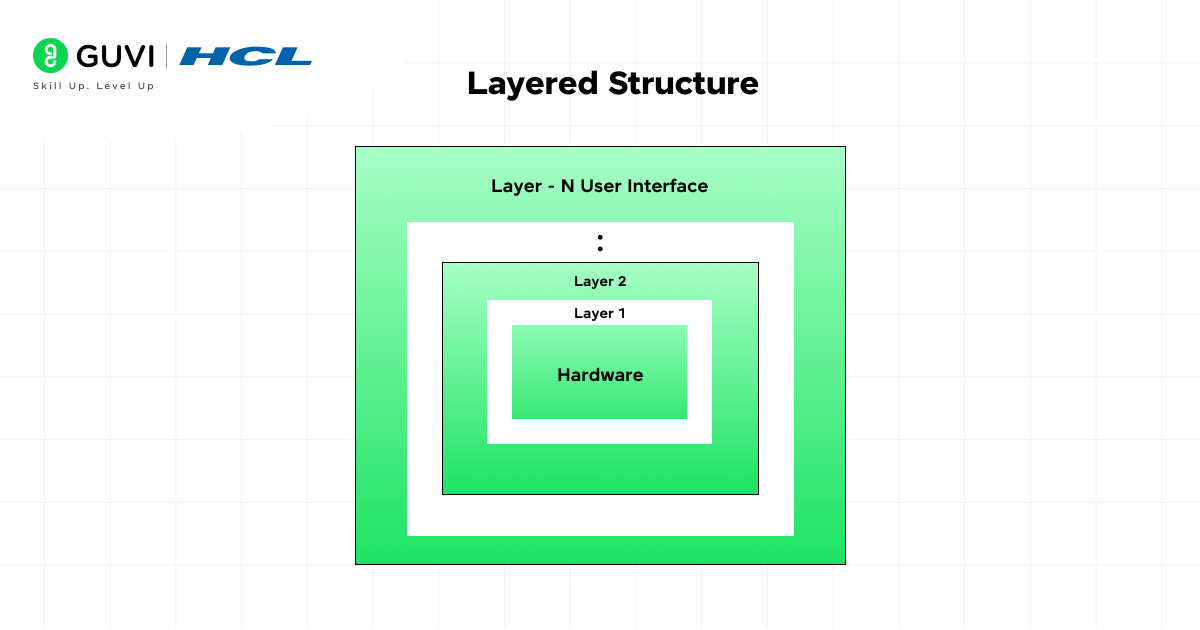
In a layered operating system (OS), the entire software is divided into layers. Each layer is built on top of the others, making it easier to arrange components and manage them efficiently. In this particular structure, the lowest layer communicates with the hardware elements, whereas the topmost layer interacts with the user. Here, each layer operates independently, with no dependencies on the others.
(Working Mechanism)
So basically, the OS is structured into multiple layers, such as the hardware layer, the device driver layer, the user program layer, and others. In this particular structure, each layer provides specific services that are hidden for security purposes. When a user program starts running, the request propagates from the top layer to the bottom.
Once it reaches the hardware components, the hardware system processes it and sends it back, passing through various layers along the way. While this request-response cycle is active, each layer deals with the layer above or below it, keeping the entire system modular and efficient.
Core Features:
- The system is divided into transparent layers with specific roles.
- Increases system security and stability by limiting access between layers.
- Easier to modify or update one part without affecting others.

3. Modular Structure
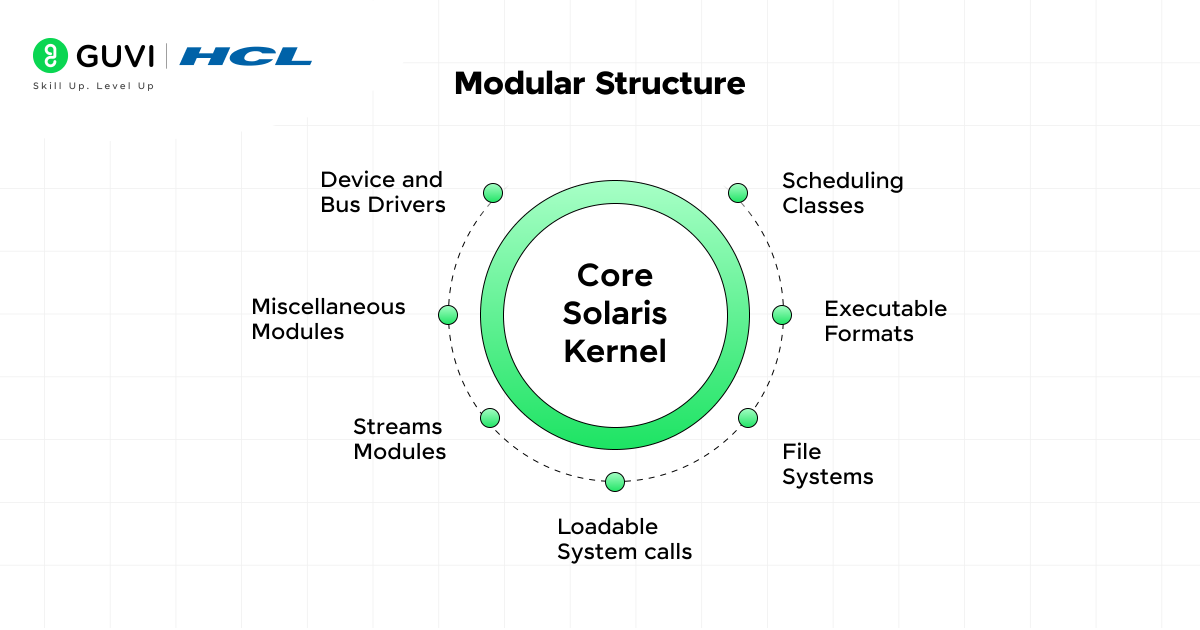
A modular operating system (OS) is built from several small units, known as modules, and each module in this structure is assigned a specific job, such as memory management, file management, or device management. All the modules in this structure are connected to a centralized source — the main kernel —which controls how modules interact without compromising their operational efficiency.
(Working Mechanism)
When the operating system (OS) is initially loaded, all modules are loaded along with it. After that, when a specific task is requested, the main kernel system links it to the appropriate module.
Once connectivity is established, the module executes the assigned task using its own set of features and functionalities and shares the output via a standard interface. After this procedure completes, the control returns to the kernel.
Core Features:
- Modules can be easily added or removed.
- Easier to expand and update without redesigning everything.
- Improves system organization and control.
4. Virtual Machines
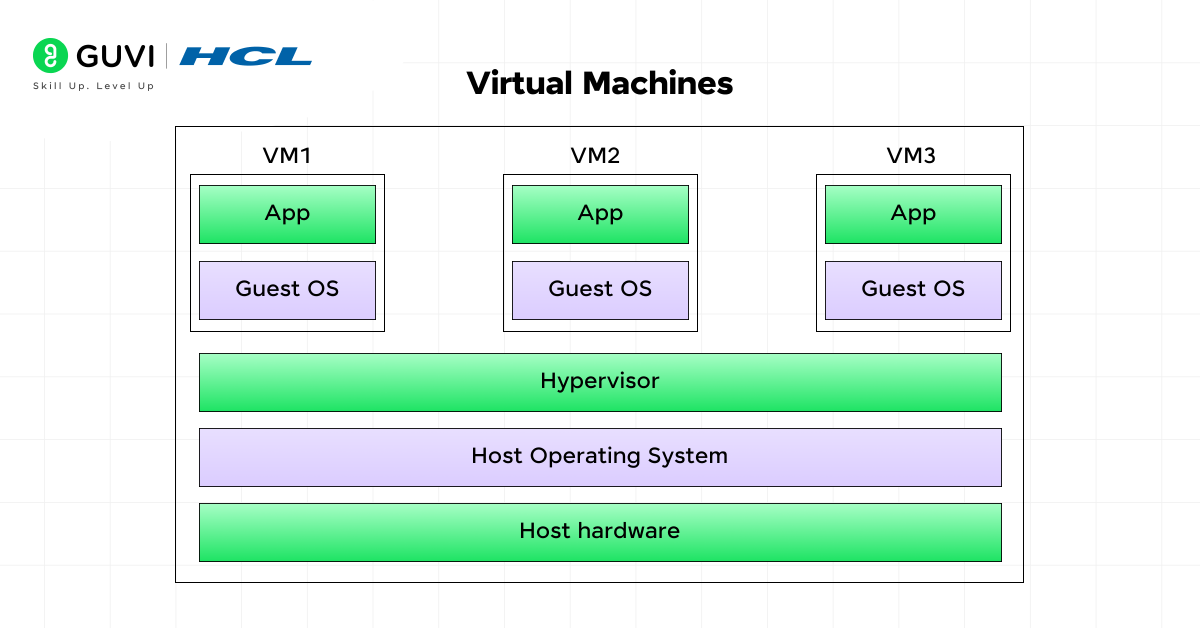
Virtual machines are used in an operating system (OS) to enable a single computing unit to act as multiple separate computers. In this structure, each virtual machine that is involved in processing the software operates with its own set of components, such as a processor, memory, storage, and device managers.
Consequently, system resources are divided by functionality, and each virtual machine has its own independent environment. This whole process is possible with the help of the virtual machine monitor (VMC), which allows us to run multiple processes concurrently without any interference.
(Working Mechanism)
When a user turns on the computer system, the virtual machine monitor (VMC) is the first software to run, gaining complete control of the hardware and enabling it to host multiple virtual machines at once. The monitoring unit then segregates the system’s memory, processor, and storage and distributes them among all the VM units.
After this phase, each virtual machine is assigned its own OS, CPU, memory, and disk. And when an application is now executed inside a VM, and it fails to return a result or is affected by a virus, others can keep operating safely and securely.
Core Features:
- Makes better use of hardware resources through sharing.
- Simplifies testing, development, and system recovery.
- Ensures stability and security since each virtual machine (VM) works independently.
5. Monolithic Structure
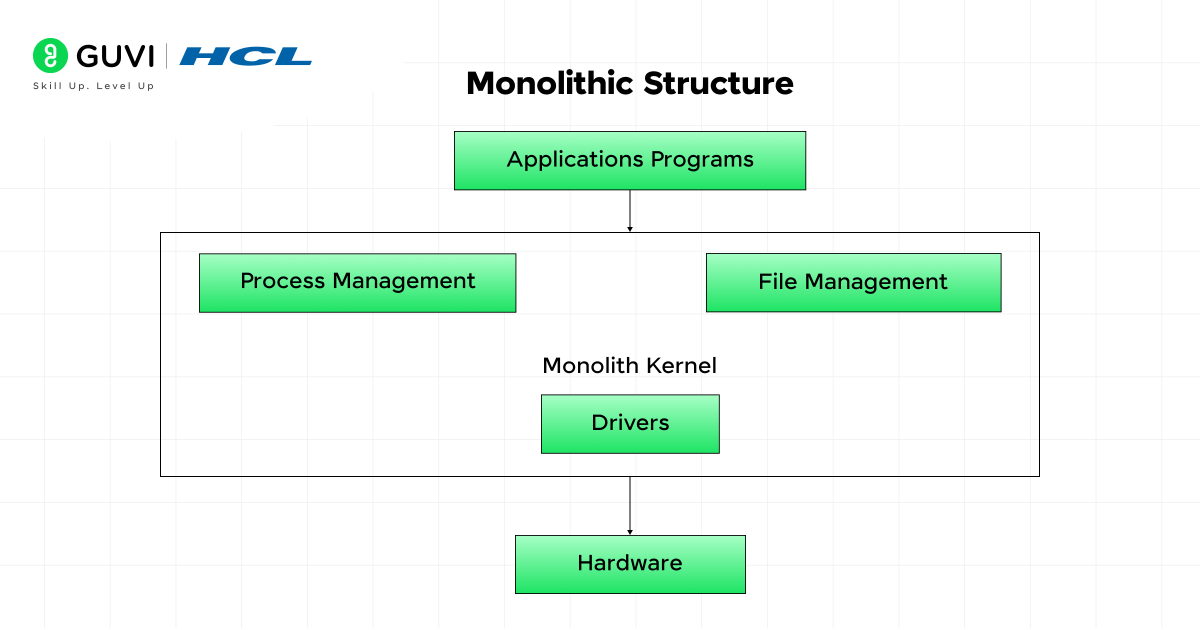
A monolithic structure of an operating system (OS) is one in which all essential functions are synchronized to work together without separation. Every service included in this structure communicates directly in the same space. Due to this structural advantage, the overall system performance improves.
But because it lacks modularity, even a minor technical fault can affect the overall efficiency of the operating system (OS). The primary purpose behind designing this structure is to provide speed and simplicity.
(Working Mechanism)
When the system starts, the entire operating system (OS) is activated and loaded into memory as a single, distinct software block. All the methods or functions are accessible and can invoke each other whenever the requirements are there.
When a specific program is sent as a request, it reaches the OS and is handled instantly in the same memory space. In this OS structure, since all functions are directly connected, data flows quickly from one point to another, minimizing delays and improving system performance.
Core Features:
- Very quick in response because there are no layers or modules in between.
- Simple in concept but complex to repair if a fault occurs.
- Best suited for basic systems where performance matters more than flexibility.
6. Micro-Kernel Structure
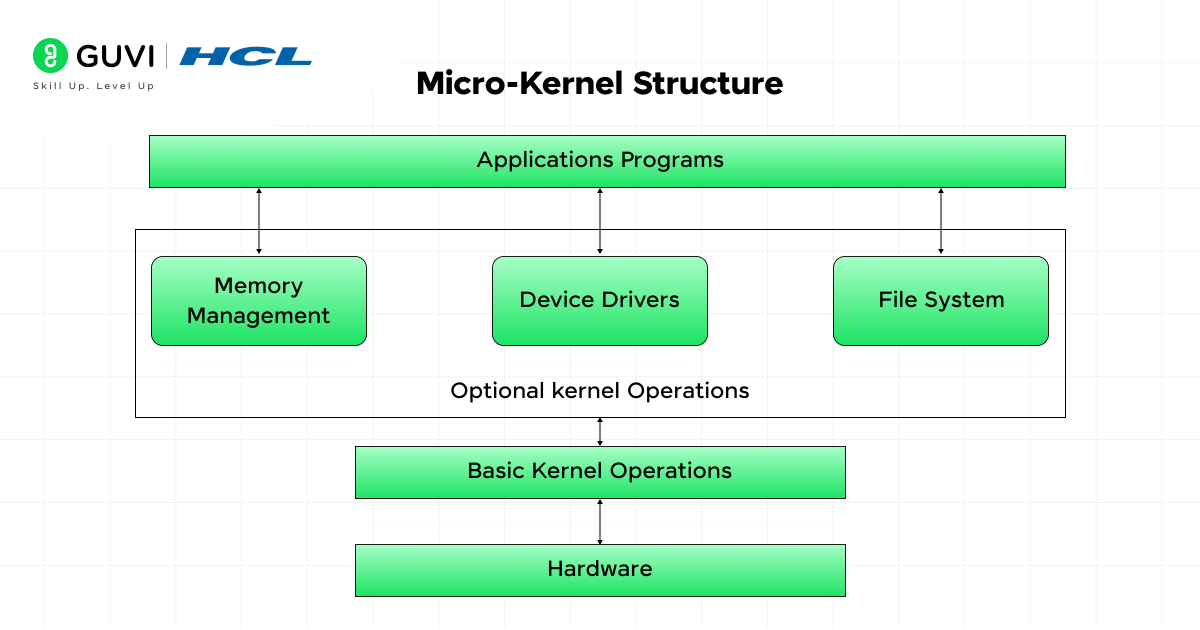
When it comes to preventing redundant tasks and optimizing system operation, the micro-kernel operating system (OS) architecture is one of the best ways to configure an OS. This structure keeps only the required parts of the OS in the main kernel source, while running other services separately without involving the central unit.
The kernel primarily handles communication between the hardware and the software system, while all other tasks, such as file handling, drivers, and system services, run outside the kernel. As a result, the OS achieves greater stability and security.
(Working Mechanism)
When the computer system starts, the micro-kernel loads into memory, consisting only of the essential functions needed to execute software programs. After that, the kernel sets up the message-passing mechanism, which enables different system services to interact.
The kernel then forwards the request to the target external service, receives the response, processes it, and sends it to the user program. In the event of a technical failure on any computing node, the entire system isn’t affected, as each service in this architecture runs in isolation.
Core Features:
- A compact core that reduces system load and speeds up booting.
- Easier to shift services to different systems or upgrade them independently.
- Problems stay limited to the affected service without spreading to others.
7. Exo-Kernel Structure
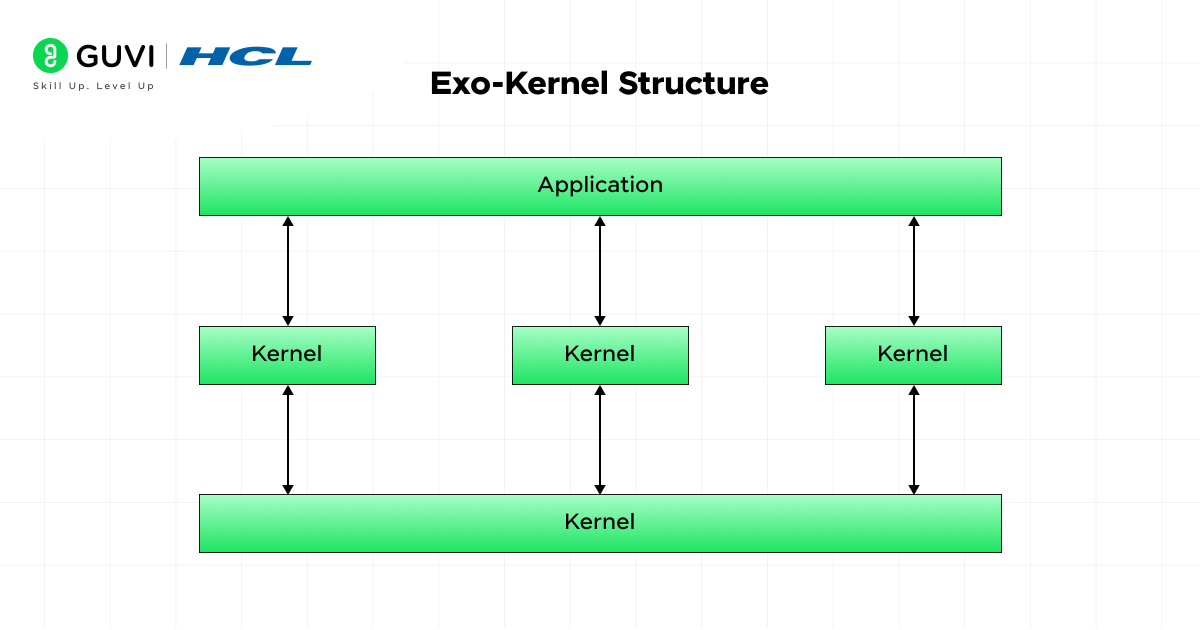
An exokernel operating system is designed to give programs the freedom to control a computer’s hardware. In this structure, instead of executing every system task, the operating system (OS) focuses only on checking the resources associated with each program and, in addition, prevents them from entering technical conflicts. This approach to component organization makes the system extremely fast and efficient by eliminating the need for middle layers.
(Working Mechanism)
When the operating system starts, the exo-kernel quickly begins identifying all hardware components of the computing unit, such as CPU cores, memory blocks, and I/O devices. And rather than using it itself, it explicitly highlights the resources and makes them accessible for applications to implement.
When a program is executed, it requests the hardware resources it needs to run smoothly. Upon request, the exo-kernel checks whether the hardware components are available and grants permission accordingly.
After gaining access, the program uses the resources to complete the task, and once the tasks are finished, the exo-kernel collects and reconfigures the resources for future use cases.
Core Features:
- Focuses on giving user-level programs maximum control.
- Reduces system delay by reducing internal processing.
- Allows each program to build its own custom way of managing resources.
The first monolithic operating system architecture was introduced in UNIX in 1969, combining all core services into a single large kernel for simplicity and speed.
Want to land a top tech job in a product-based company? It takes more than just coding skills—you need real-world project experience and guidance from an expert mentor. Kickstart your journey with HCL GUVI’s IITM Pravartak Certified MERN Full Stack Development Course with AI Integration. Master the latest tools, build hands-on projects, and open the door to a high-paying software career!
Conclusion
Understanding the structure of an operating system helps us see how efficiently it manages both hardware and software to deliver smooth performance. Each OS structure—whether simple, layered, modular, or advanced, such as microkernel and exokernel—has its own way of handling system tasks, balancing speed, flexibility, and security. In short, a well-structured OS not only ensures reliable system performance but also enhances development, maintenance, and resource management.
FAQs
Why are different types of OS structures used?
Different structures suit different needs—some prioritize speed, others security or flexibility.
Which OS structure is the most efficient?
Efficiency depends on use—modular and layered for general systems, microkernel for advanced control, and exokernel for advanced control.
How does the OS structure affect system performance?
It impacts speed, stability, and multitasking by efficiently managing hardware and software.
Success Stories
















Did you enjoy this article?