


Uncategorised Articles
Q-Learning Explained: A Beginner's Guide
Claude for Code Documentation with JSDoc


Get In Touch For Details! Request More Information
Claude for Tutoring: Adaptive Explanations Step by Step
Jul 28, 2026 4 Min Read 267 Views
(Last Updated)
Table of contents
- TL;DR Summary Box
- How Claude Becomes a Tutor
- What Adaptive Explanations Mean
- How To Set Up Claude Like a Tutor
- Why This Works So Well
- How To Study Step by Step
- Socratic Mode for Deeper Learning
- When To Use Claude
- Common Mistakes To Avoid
- Real-World Example
- Conclusion
- FAQs
- How do I use Claude for tutoring?
- What are adaptive explanations in Claude?
- Can Claude teach hard subjects step by step?
- What is the best prompt for Claude tutoring?
- Should I use Socratic questioning with Claude?
- Is Claude good for exam prep?
- How do I make Claude explain more clearly?
TL;DR Summary Box
- Claude works best as a tutor when you ask it to explain ideas in layers, from simple to advanced.
- Learning Mode is designed to guide you with Socratic-style prompts that help you think more deeply.
- Claude Projects are useful when you want one place for notes, syllabus details, and long-term study context.
- The strongest tutoring sessions are interactive rather than passive because they force recall and reveal gaps in understanding.
- Claude is especially useful for complex subjects when you want a personalized explanation instead of a generic summary.
How Claude Becomes a Tutor

- Claude becomes a real tutor when you stop treating it like a search box and start treating it like a learning partner. Instead of asking only for summaries, you can ask it to explain topics, quiz you, compare concepts, and help you fix weak spots.
- The best tutoring experience happens when Claude adapts to your level. If you are a beginner, it should slow down and use plain language.
- If you already know the basics, it should move into deeper details and challenge your thinking.
- That matters because many learning problems are not really about the topic itself. They are about the explanation being too fast, too abstract, or too disconnected from what you already know. Claude helps by changing its depth, tone, and pacing to match the learner.
Use Claude as a tutor to explain concepts step by step and adapt to your pace. Learn AI & ML with HCL GUVI’s Artificial Intelligence and Machine Learning course.
What Adaptive Explanations Mean
- Adaptive explanations mean the tutor changes based on your response. If you are new to a topic, Claude can use everyday language and simple examples. If you already understand the basics, it can move to technical details, edge cases, and formal reasoning.
- A strong adaptive explanation usually starts with a quick check of what you know, then gives a short definition, then breaks the concept into manageable steps. After that, it can use a real-world analogy and end with a checkpoint question.
- In other words, Claude should teach the way a great human tutor would: assess first, explain second, and test understanding before moving on.
How To Set Up Claude Like a Tutor
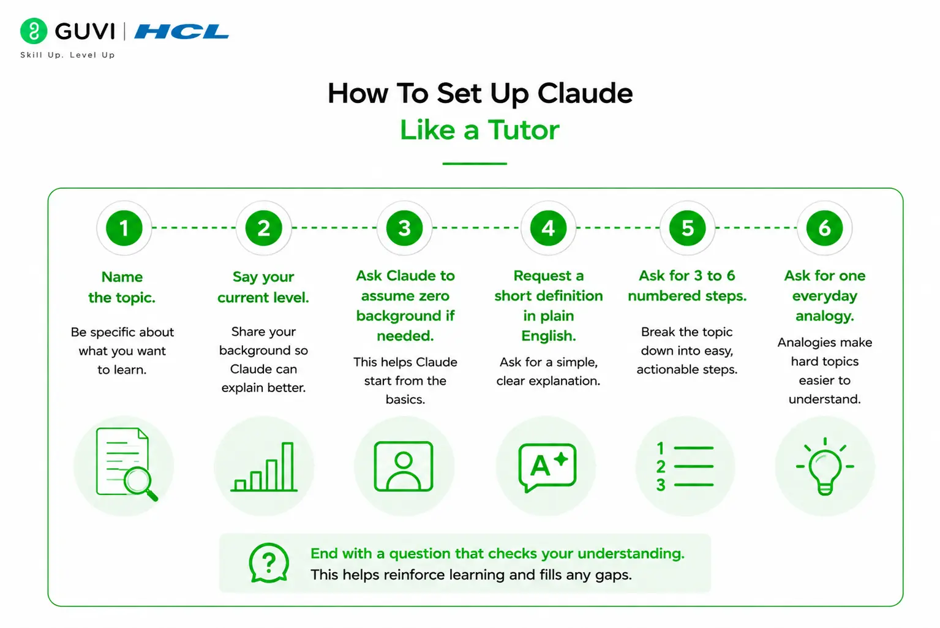
The best tutoring prompt is clear, structured, and goal-driven. Instead of asking “Explain this,” tell Claude exactly how to behave: what role to take, how much detail to give, and when to stop.
A practical setup looks like this:
- Name the topic.
- Say your current level.
- Ask Claude to assume zero background if needed.
- Request a short definition in plain English.
- Ask for 3 to 6 numbered steps.
- Ask for one everyday analogy.
- End with a question that checks your understanding.
A good prompt might sound like this:
“You are my tutor. Topic: [insert topic]. My level: [beginner/intermediate/advanced]. Goal: Help me understand this step by step. Start with a short definition, then explain in numbered steps, then give one analogy, then ask me a question before going deeper.”
Why This Works So Well
- Claude works well as a tutor because it can change its approach based on your needs. You can tell it to simplify a topic, give examples, challenge your answer, or walk you through a problem step by step.
- This matters because students often do not need more information. They need a better way to organize what they already know. Claude helps with that by breaking hard ideas into smaller pieces and asking follow-up questions that keep you engaged.
- The result is a learning session that feels more like a conversation than a lecture. That makes it easier to stay focused and easier to remember the material later.
How To Study Step by Step
A good Claude tutoring session should feel like a guided lesson, not a one-shot answer dump. The point is to move from confusion to clarity in small, controlled steps.
Use this workflow:
- Ask for a plain-English explanation.
- Ask Claude to break the idea into numbered steps.
- Request one analogy from a field you already know.
- Answer the mini-checkpoint in your own words.
- Ask Claude to correct only the parts you missed.
- Repeat with a harder version of the same idea.
This approach works because it combines explanation, recall, correction, and repetition. That is the kind of study loop that actually sticks.
Socratic Mode for Deeper Learning

If you already understand the basics, Claude can switch from tutor mode to Socratic mode. In that mode, it should ask you guiding questions instead of giving direct explanations right away. The idea is to help you reason your way to the answer.

This works especially well for math, science, programming, essay writing, and decision-making. A Socratic session helps you notice assumptions, test logic, and uncover gaps that a normal explanation might miss.
A useful instruction is, “Do not give the final answer outright. Lead me with questions that narrow the solution space.” That keeps the focus on thinking, not copying.
When To Use Claude
Claude is strongest when the concept is complex, layered, or easy to misunderstand. It is also very useful when you need explanations that can change based on your progress.
Good use cases include:
- Learning a difficult chapter.
- Preparing for an exam.
- Reworking lecture notes.
- Practicing conceptual questions.
- Improving your own written explanations.
- Studying with a mix of beginner and advanced depth.
Claude is less useful when you want instant answers with no interaction. In those cases, you may get a correct response, but you lose most of the learning value.
Use Claude as a tutor to explain concepts step by step and adapt to your pace. Learn AI & ML with HCL GUVI’s Artificial Intelligence and Machine Learning course.
Common Mistakes To Avoid
The biggest mistake is asking Claude to explain everything at once. That creates long answers that feel helpful but are hard to learn from. A better approach is to use checkpoints and small steps.
Other mistakes include:
- Not telling Claude your level.
- Skipping the baseline check.
- Ignoring follow-up questions.
- Letting Claude go too deep too early.
- Treating summaries as understanding.
- Using the same prompt for every subject.
Another mistake is trusting the response without checking your notes. Claude can help you learn, but it should never replace your own thinking.
Real-World Example
Imagine you are studying recursion in programming. If you ask Claude for a full technical explanation right away, the answer may feel dense. But if you ask it to start with a simple definition, then show one example, then quiz you on how the call stack changes, the topic becomes much easier to understand.
That same approach works for biology, economics, and history too. The topic changes, but the learning pattern stays the same: explain, check, correct, repeat.
Conclusion
Claude can be a strong tutoring partner when you use it to learn actively. It works best as a guided tutor, a quiz generator, and a thinking aid, especially when you give it clear context and ask it to challenge your understanding.
The best results come from structure. If you combine Claude Learning Mode, Projects, and self-testing, you get a study system that is faster, clearer, and much easier to repeat.
FAQs
1. How do I use Claude for tutoring?
Tell Claude to act like a tutor, explain the topic in simple steps, and ask you a question after each section. That keeps the session interactive and helps you learn more deeply.
2. What are adaptive explanations in Claude?
Adaptive explanations are explanations that change based on your level of understanding. Claude can start simple, then go deeper if you ask for more detail.
3. Can Claude teach hard subjects step by step?
Yes. Claude is useful for hard subjects because it can break them into small steps, add analogies, and pause for checkpoints before moving on.
4. What is the best prompt for Claude tutoring?
The best prompt gives Claude a role, a topic, your skill level, and clear instructions to explain step by step and wait for your response before continuing.
5. Should I use Socratic questioning with Claude?
Yes, if you already know some basics. Socratic questioning is useful when you want Claude to guide your thinking instead of giving the answer immediately.
6. Is Claude good for exam prep?
Yes. Claude can help you review concepts, quiz yourself, and identify weak spots. It works best when you use it as an active study partner, not a passive summary tool.
7. How do I make Claude explain more clearly?
Ask it to use plain language, numbered steps, and one real-world analogy. You can also tell it to assume zero background if the topic is new to you.
Success Stories

About the Author
Vishalini Devarajan
An Aerospace Engineer turned content writer, I focus on making complex concepts easy to understand through well-structured, reader-friendly blogs. Whether it’s a technical topic or a non-technical one, I love creating content that is clear, engaging, and impactful.
View all posts by Vishalini Devarajan
Connect with me @














Did you enjoy this article?