


Uncategorised Articles
Q-Learning Explained: A Beginner's Guide
Claude for Code Documentation with JSDoc


Get In Touch For Details! Request More Information
Claude for Podcast Show Notes and Episode Summaries
Jul 28, 2026 4 Min Read 185 Views
(Last Updated)
If you publish podcasts regularly, show notes can become a real bottleneck. Claude helps you turn long transcripts into polished summaries faster, while still giving you enough control to keep the output on-brand.
In this guide, you will learn how to use Claude for podcast show notes and episode summaries, how to structure your prompts, and how to avoid the most common mistakes.
Table of contents
- TL;DR Summary Box
- What is Claude for podcast show notes and episode summaries?
- Why does it matter for podcasters?
- How does the workflow work?
- What prompt structure works best?
- Example prompt
- Claude vs manual show notes
- What are the risks and limits?
- How do you measure success?
- Original insight
- What to do next
- Conclusion
- FAQs
- Is Claude good for podcast show notes?
- Can Claude summarize a full podcast episode?
- How do I keep Claude from inventing details?
- Can Claude write SEO-friendly podcast notes?
- What should I include in a prompt for podcast notes?
- Should I use Claude for every episode?
TL;DR Summary Box
- Claude is useful for turning podcast transcripts into structured show notes and concise episode summaries.
- It works best when you provide a transcript, clear formatting rules, and the exact output you want.
- A human review pass is still needed for names, quotes, timestamps, and factual accuracy.
- You can use Claude for SEO-friendly notes, guest highlights, key takeaways, and repurposed content.
- The best workflow is transcript cleanup, batch prompting, quality checks, and publishing.
Turn episodes into polished show notes and crisp summaries with Claude. Master business analytics with HCL GUVI’s Complete Business Analytics Professional Program.
What is Claude for podcast show notes and episode summaries?
Claude for podcast show notes and episode summaries” means using Claude to convert audio transcripts, episode outlines, or raw notes into readable episode assets. These assets can include summaries, bullet points, chapter markers, guest bios, pull quotes, and calls to action.
The main value is speed with structure. Instead of starting from a blank page, you give Claude the episode content and ask it to organize the material into a format listeners, readers, and search engines can understand.
Why does it matter for podcasters?
Show notes are often the first text people see after an episode goes live. They can improve discoverability, help listeners decide whether to click, and give you content you can reuse across channels.
Claude is especially useful if your team is small or if you publish weekly. It reduces the time spent summarizing, formatting, and rewriting the same episode into multiple versions for web, email, and social distribution.
💡 Pro Tip: Use Claude to generate both a summary and a detailed summary. The short version works for podcast apps, while the detailed version works better on your website.
How does the workflow work?
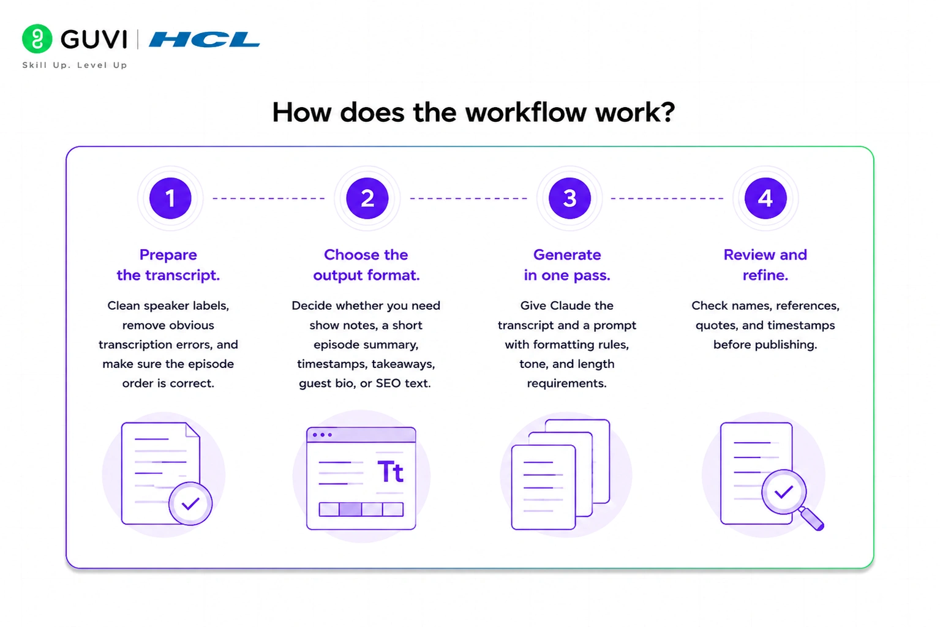
A reliable workflow has four steps: transcript prep, prompt design, generation, and review. That keeps the process fast without losing accuracy.
- Prepare the transcript.
Clean speaker labels, remove obvious transcription errors, and make sure the episode order is correct. - Choose the output format.
Decide whether you need show notes, a short episode summary, timestamps, takeaways, guest bio, or SEO text. - Generate in one pass.
Give Claude the transcript and a prompt with formatting rules, tone, and length requirements. - Review and refine.
Check names, references, quotes, and timestamps before publishing.
📊 Data Point: The most useful podcast workflows do not stop at summarization. They turn one transcript into a publishable package that supports SEO, distribution, and audience retention.
What prompt structure works best?

Claude works best when you give it a clear role, a defined output, and quality constraints. The prompt should tell it exactly what the podcast content is and what format you want back.
Use this structure:
Prompt template
- Role: You are a podcast editor.
- Input: transcript or episode outline.
- Goal: Write show notes and a summary.
- Output: title, short summary, key topics, timestamps, guest highlights, and CTA.
- Rules: keep it accurate, concise, conversational, and easy to scan.
Example prompt
Create podcast show notes from this transcript. Include a 2-paragraph episode summary, 5 key takeaways, a short guest bio, 3 pull quotes, and SEO-friendly headings. Keep the tone clear and conversational. Do not invent facts or quotes.
✅ Best Practice: Ask Claude to separate “facts from the transcript” and “editorial summary.” That makes it easier to check accuracy later.
A single podcast transcript can be repurposed into multiple content formats using Claude. Besides generating podcast show notes and episode summaries, Claude can create SEO-friendly blog content, email newsletters, social media posts, guest highlights, and key takeaways—helping creators expand their content reach without rewriting everything from scratch.

Claude vs manual show notes
Claude is much faster than writing show notes by hand, but it is not a substitute for editorial judgment. The best workflow is usually a hybrid one.
| Approach | Strengths | Weaknesses | Best use |
| Manual writing | Strong nuance and voice | Slow at scale | Flagship episodes, premium content |
| Claude drafting | Fast and consistent | Needs review | Weekly episodes, large back catalogs |
| Hybrid workflow | Balanced speed and quality | Requires process design | Most podcast teams |
The hybrid model usually works best. Claude drafts the structure, and a human editor checks accuracy, tone, and episode-specific nuance. That keeps your workflow efficient without making the notes sound generic.
What are the risks and limits?
The biggest risk is factual drift. Claude may summarize correctly overall but still misstate names, product references, dates, or nuanced opinions.
The second risk is blandness. If your prompt is too open-ended, the notes may sound polished but forgettable. That matters because show notes should help listeners quickly understand why the episode is worth their time.
⚠️ Warning: Always verify direct quotes, timestamps, and guest names before publishing. A clean summary is not enough if the details are wrong.
How do you measure success?
Do not measure success only by speed. The better question is whether your notes help listeners, search traffic, and content reuse.
Track these metrics:
- Time saved per episode.
- Edit rate on first drafts.
- Search impressions for episode pages.
- Click-through rate from podcast notes to the episode.
- Newsletter clicks from repurposed summaries.
- Social engagement on clipped quotes or highlights.
Original insight
A practical benchmark is “publishable draft rate.” If Claude gives you a usable first draft for most episodes, your prompt system is working. If every episode needs major rewrites, the problem is usually the input structure, not the model.
What to do next
Start by testing Claude on three recent episodes. Use the same prompt format for each one, then compare edit time, readability, and audience response.
Add a repeatable show-notes template with:
- Episode title.
- Short summary.
- Key takeaways.
- Guest bio.
- Resources mentioned.
- CTA.
A visual workflow diagram would help here, especially for teams training a new podcast editor or assistant.
Turn episodes into polished show notes and crisp summaries with Claude. Master business analytics with HCL GUVI’s Complete Business Analytics Professional Program.
Conclusion
Claude can make podcast show notes and episode summaries much faster to produce, especially when you need a repeatable workflow. The strongest setup is structured input, a clear prompt, and a careful human edit before publishing.
This article is for editorial and workflow guidance, not legal, financial, or compliance advice. Always verify transcript accuracy before publishing show notes.
FAQs
1. Is Claude good for podcast show notes?
Yes. Claude is good for turning transcripts into structured show notes, especially when you want summaries, takeaways, and reusable episode copy.
2. Can Claude summarize a full podcast episode?
Yes, as long as you provide the transcript or detailed notes. It works best when the transcript is cleaned up and organized.
3. How do I keep Claude from inventing details?
Use only verified transcript content and tell Claude not to add unsupported facts. Always do a final human review for names, quotes, and timestamps.
4. Can Claude write SEO-friendly podcast notes?
Yes. You can ask it to include keyword-rich headings, a meta description, and a short summary that helps episode pages perform better in search.
5. What should I include in a prompt for podcast notes?
Include the episode transcript, desired tone, output format, length, and any required sections such as summary, takeaways, guest bio, or CTA.
6. Should I use Claude for every episode?
You can, but the best approach is to use it as a drafting assistant. For high-profile episodes, a deeper editorial review is worth the extra time.
Success Stories

About the Author
Vishalini Devarajan
An Aerospace Engineer turned content writer, I focus on making complex concepts easy to understand through well-structured, reader-friendly blogs. Whether it’s a technical topic or a non-technical one, I love creating content that is clear, engaging, and impactful.
View all posts by Vishalini Devarajan
Connect with me @











Did you enjoy this article?