


Uncategorised Articles
Q-Learning Explained: A Beginner's Guide
Claude for Code Documentation with JSDoc


Get In Touch For Details! Request More Information

Building an AI Workflow with Claude and Zapier
Aug 17, 2026 4 Min Read 418 Views
(Last Updated)
Many teams spend hours each week on repetitive tasks that involve reading, writing, or classifying information, work that is time-consuming but not complex enough to justify custom software development. Building an AI workflow with Claude and Zapier automates exactly these tasks, connecting Claude’s language capabilities to the tools your team already uses through a no-code interface.
Table of contents
- Quick TL;DR
- What Is Zapier and How Does It Connect to Claude?
- What Tasks Can Claude Handle Inside a Zapier Workflow?
- Setting Up Claude in Zapier: Step by Step
- Step 1: Create a Zapier Account
- Step 2: Get Your Anthropic API Key
- Step 3: Create a New Zap
- Step 4: Add Claude as an Action Step
- Step 5: Configure the Claude Prompt
- Step 6: Add the Output Action
- Step 7: Test and Activate
- Practical Claude and Zapier Workflow Examples
- Workflow 1: Automated Customer Support Triage
- Workflow 2: Meeting Notes to Action Items
- Conclusion
- FAQ
- What is Claude and Zapier used for together?
- Do I need coding skills to build Claude and Zapier workflows?
- How do I connect Claude to Zapier?
- What apps can I connect Claude to through Zapier?
- Is there a free plan for using Claude with Zapier?
- What kinds of tasks is Claude best suited for in Zapier workflows?
Quick TL;DR
Claude and Zapier together let you build automated AI workflows that connect Claude’s language capabilities to hundreds of apps and services without writing code. Zapier acts as the automation layer that triggers Claude to summarize, classify, draft, or respond to content, then routes the output to wherever it needs to go, whether that is a spreadsheet, a CRM, a Slack channel, or an email.
Want to build the skills to design and deploy real AI-powered systems from the ground up? Explore HCL GUVI’s Artificial Intelligence & Machine Learning Course, designed to help you master machine learning, model deployment, and the systems thinking that modern AI development demands.
What Is Zapier and How Does It Connect to Claude?
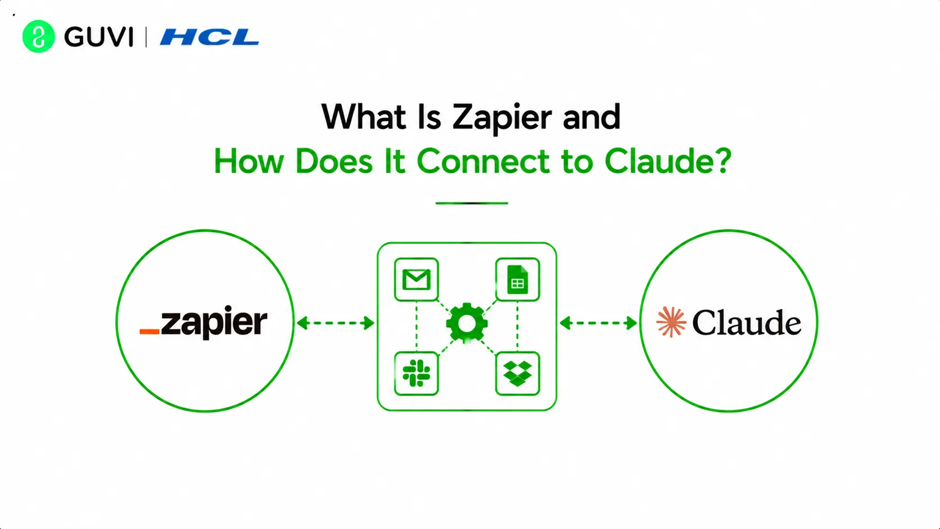
Zapier is a no-code automation platform that connects over 7,000 apps through automated workflows called Zaps. Each Zap consists of a trigger, an event in one app that starts the workflow, and one or more actions, tasks that run automatically in response.
Claude is available in Zapier as a native integration through Anthropic’s API. This means you can add Claude as an action step in any Zap, sending it text input and receiving its response as output that flows into the next step of your workflow.
The basic Claude and Zapier workflow structure looks like:
- Trigger: Something happens in an app, such as a new email arriving, a form being submitted, or a row being added to a spreadsheet
- Claude Action: Claude receives the relevant text and performs a task such as summarizing, classifying, drafting, or extracting information
- Output Action: Claude’s response is sent to another app, such as a CRM field, a Slack message, a Google Doc, or a database row
Read More: Make vs Zapier: Which Automation Tool is Better in 2026
What Tasks Can Claude Handle Inside a Zapier Workflow?
Claude’s language capabilities map directly onto a wide range of repetitive business tasks that teams typically handle manually.
| Task Type | Example Use Case |
| Summarization | Condense long customer emails into one-paragraph summaries for a CRM |
| Classification | Tag incoming support tickets by category and priority level |
| Drafting | Generate a first-draft reply to a customer inquiry |
| Extraction | Pull key details like name, date, and action items from unstructured text |
| Translation | Convert content into another language before storing it |
| Sentiment analysis | Determine whether a review or message is positive, negative, or neutral |
| Content formatting | Reformat raw notes into structured reports or meeting summaries |
Any task where a human is currently reading text and producing a structured output is a strong candidate for a Claude and Zapier automation.
Want to build the skills to design and deploy real AI-powered systems from the ground up? Explore HCL GUVI’s Artificial Intelligence & Machine Learning Course, designed to help you master machine learning, model deployment, and the systems thinking that modern AI development demands.
Setting Up Claude in Zapier: Step by Step
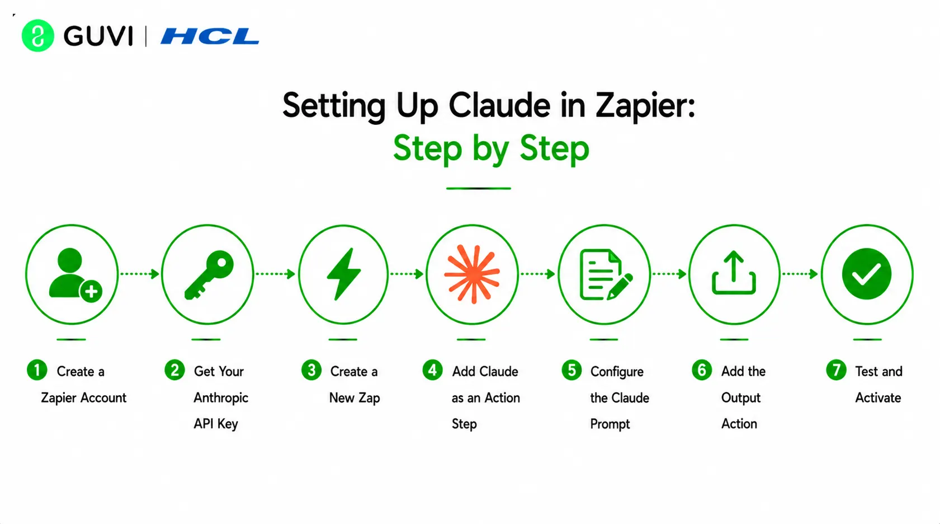
Step 1: Create a Zapier Account
Sign up at zapier.com if you do not already have an account. The free plan supports basic Zaps, while multi-step workflows with Claude require a paid Zapier plan.
Step 2: Get Your Anthropic API Key
Log into your Anthropic account at console.anthropic.com, navigate to API Keys, and generate a new key. Copy and store it securely since you will not be able to view it again after closing the page.
Step 3: Create a New Zap
In Zapier, click Create Zap and select your trigger app. For example, choose Gmail and select the trigger event New Email to start the Zap whenever a new email arrives in a specified label or inbox.
Step 4: Add Claude as an Action Step
Click the plus button to add a new action step. Search for Claude by Anthropic and select it. Connect your Anthropic API key when prompted by pasting it into the authentication field.
Step 5: Configure the Claude Prompt
In the Claude action configuration, you will write the prompt that Claude receives each time the Zap runs. Use Zapier’s variable system to insert dynamic content from the trigger step:
Summarize the following customer email in 2-3 sentences.
Identify the main request or complaint and the urgency level (low, medium, high).

Email content:
{{trigger.body_plain}}
The {{trigger.body_plain}} variable inserts the actual email content at runtime. This is how Zapier passes dynamic data from the trigger into Claude’s prompt.
Step 6: Add the Output Action
Add a final action step that routes Claude’s response to its destination. Common options include:
- Update a CRM record in HubSpot or Salesforce with the summary
- Post the summary to a Slack channel for team visibility
- Add a row to a Google Sheet logging the email and its classification
- Create a task in Asana or Trello with Claude’s extracted action items
Step 7: Test and Activate
Use Zapier’s built-in test function to run the Zap with a real sample and verify Claude’s output looks correct before activating. Once activated, the workflow runs automatically for every new trigger event.
Zapier processes billions of automated tasks every month across thousands of connected applications. Combining Claude with Zapier enables businesses to automate language-intensive workflows such as email summarization, customer support triage, content generation, and data extraction without building custom software.
Practical Claude and Zapier Workflow Examples
Workflow 1: Automated Customer Support Triage
Trigger: New email arrives in a support inbox Claude action: Classify the email by category (billing, technical, general) and urgency (low, medium, high), then draft a one-paragraph suggested reply Output: Create a tagged ticket in Freshdesk or Zendesk with the classification and draft reply attached
This workflow reduces the time a support agent spends reading and routing each ticket before they begin responding.
Workflow 2: Meeting Notes to Action Items
Trigger: A new transcription file is added to a Google Drive folder Claude action: Extract all action items, decisions made, and owners mentioned in the transcript Output: Create tasks in Asana for each action item and post a summary to the relevant Slack channel
This eliminates the manual step of reading through meeting transcripts and distributing follow-ups.
Claude’s large context window allows it to process lengthy documents, meeting transcripts, and long email threads within a single automation. This makes Claude + Zapier especially effective for complex workflows that require summarization, action-item extraction, and structured reporting from large amounts of text.
Conclusion
Building AI workflows with Claude and Zapier turns language-based repetitive tasks into fully automated processes that run reliably in the background while your team focuses on higher-value work.
From customer support triage and meeting note processing to lead enrichment and content repurposing, the combination covers an enormous range of business workflows without requiring any custom code.
FAQ
What is Claude and Zapier used for together?
They are used to build automated AI workflows where Zapier triggers Claude to perform language tasks like summarizing, classifying, or drafting, then routes the output to other apps automatically.
Do I need coding skills to build Claude and Zapier workflows?
No. Zapier is a no-code platform and Claude’s integration is available through Zapier’s standard action step interface, requiring only prompt writing rather than programming.
How do I connect Claude to Zapier?
Generate an API key from your Anthropic account at console.anthropic.com, create a new Zap, add Claude by Anthropic as an action step, and authenticate using your API key.
What apps can I connect Claude to through Zapier?
Claude can be connected to any of Zapier’s 7,000+ supported apps, including Gmail, Slack, HubSpot, Salesforce, Google Sheets, Notion, Asana, Typeform, and WordPress.
Is there a free plan for using Claude with Zapier?
Zapier’s free plan supports basic single-step Zaps, but multi-step workflows that include Claude as a middle action step typically require a paid Zapier plan. Anthropic’s API is billed separately based on token usage.
What kinds of tasks is Claude best suited for in Zapier workflows?
Summarization, classification, information extraction, first-draft generation, sentiment analysis, and content reformatting are the highest-value use cases for Claude inside Zapier automations.
Success Stories

About the Author
Vishalini Devarajan
An Aerospace Engineer turned content writer, I focus on making complex concepts easy to understand through well-structured, reader-friendly blogs. Whether it’s a technical topic or a non-technical one, I love creating content that is clear, engaging, and impactful.
View all posts by Vishalini Devarajan
Connect with me @













Did you enjoy this article?