


Uncategorised Articles
Q-Learning Explained: A Beginner's Guide
Claude for Code Documentation with JSDoc


Get In Touch For Details! Request More Information
Table of contents
- TL;DR Summary Box
- How Claude Becomes a Study Partner
- Getting Started With Claude
- How To Use Claude Learning Mode
- Best Ways To Study With Claude
- A Practical Study Workflow
- Prompt Examples That Work
- What Claude Is Best At
- What Claude Is Not Best At
- Common Mistakes To Avoid
- Conclusion
- FAQs
- How do I use Claude as a study partner?
- Is Claude good for exam preparation?
- What is Claude Learning Mode?
- Should I use Claude Projects for studying?
- Can Claude help with difficult subjects?
- Is it okay to rely on Claude for assignments?
- How do I make Claude ask better questions?
TL;DR Summary Box
- Claude can act like a study partner when you use it for questioning, explaining, and practicing, not just for answers.
- Learning Mode is designed to guide you with Socratic-style prompts, which help you think more deeply.
- Claude Projects are useful when you want one place for notes, syllabus details, and long-term study context.
- The best study results come from active learning: test yourself, then use Claude to find gaps.
- Claude is most helpful when you give it clear goals, your current level, and the exact format you want.
How Claude Becomes a Study Partner
- Claude becomes a real study partner when you stop treating it like a search box and start treating it like a tutor. Instead of asking only for summaries, you can ask it to explain topics, quiz you, compare concepts, and help you fix weak spots.
- Northeastern’s guide on using Claude Learning Mode describes a study approach built around guided questioning, where Claude helps you reason through the answer instead of handing it to you immediately.
- That makes it especially useful for students who want to understand material, not just finish an assignment.
- The big idea is simple: Claude should help you learn, not just respond. When you use it that way, it becomes more like a patient tutor who adjusts to your pace.
Use Claude as a study partner to simplify topics, quiz you, and deepen understanding. Learn AI & ML with HCL GUVI’s Artificial Intelligence and Machine Learning course.
Getting Started With Claude
The best way to start is to be very specific about your goal. If you only say “help me study,” Claude will usually give a broad answer. If you tell it the subject, your level, and the kind of support you want, the output gets much better.
A strong prompt usually includes:
- The subject or chapter.
- Your level, such as beginner, intermediate, or advanced.
- The goal, such as understanding, revision, or exam prep.
- The format you want, such as quiz, explanation, or summary.
- The tone, such as simple, detailed, or Socratic.
For example, you can say: “I’m studying data structures. Explain hash tables like I’m a beginner, then ask me five questions one at a time.” That gives Claude enough structure to act like a real tutor instead of a generic chatbot.
How To Use Claude Learning Mode
Learning Mode is useful when you want Claude to guide you instead of giving away the answer too quickly.
Northeastern describes it as a custom setup that transforms Claude into a personalized learning partner for study tasks, including subject-specific support and guided problem-solving.
This works best for subjects where understanding matters more than memorization. Think math, programming, science, history, economics, or language learning. Claude can ask you what you think first, then help correct your reasoning.
A good learning mode session usually follows this pattern:
- Claude explains the topic briefly.
- Claude asks you a question.
- You answer in your own words.
- Claude points out gaps or mistakes.
- Claude retests you with a similar question.
That loop is powerful because it forces recall, not passive reading. The more often you practice retrieval, the stronger your memory becomes.
Best Ways To Study With Claude
Claude can support many study tasks, but some are much more effective than others. The best use cases are the ones that force you to think, respond, and compare.
Here are the most useful study workflows:
- Ask for simple explanations of hard concepts.
- Turn notes into flashcards.
- Generate short quizzes from a chapter.
- Compare two ideas side by side.
- Ask for examples and counterexamples.
- Get feedback on your written answers.
- Build a revision plan for an exam.
A strong approach is to start with the broad idea, then zoom in. For example, if you are learning machine learning, first ask for a simple overview, then ask about loss functions, then quiz yourself on one specific algorithm. That keeps the session focused and prevents overload.
A Practical Study Workflow
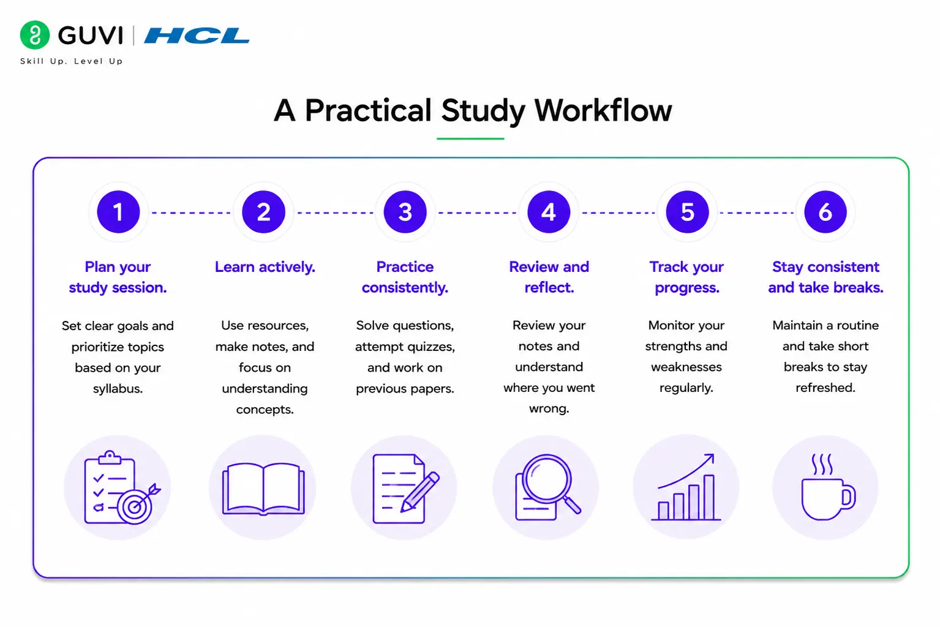
If you want Claude to help you study well, use a repeatable workflow rather than random prompts. A system gives you better results than jumping between unrelated questions.
Here is a simple process:
- Read the chapter or topic once on your own.
- Ask Claude to explain the concept in simple language.
- Ask for three examples and one non-example.
- Try answering five quiz questions without help.
- Compare your response with Claude’s explanation.
- Ask Claude to focus on the part you missed.
- Repeat the hardest question again after a short break.
This works because it combines explanation, recall, correction, and repetition. That is the kind of study loop that actually sticks.
Prompt Examples That Work
Good prompts matter more than people think. A vague prompt gives vague help. A specific prompt gives targeted support.
Try prompts like these:
- “Explain photosynthesis in plain English, then quiz me with 5 questions.”
- “Act like a tutor for JavaScript closures. Don’t give the answer immediately. Ask me what I think first.”
- “Turn these lecture notes into flashcards and focus on the most testable ideas.”
- “Compare mitosis and meiosis in a table, then ask me to summarize the difference.”
- “I’m preparing for an exam in 3 days. Build me a review plan based on these topics.”
💡 Pro Tip: Ask Claude to wait for your answer before explaining. That small instruction changes the whole experience from passive reading to active learning.

What Claude Is Best At
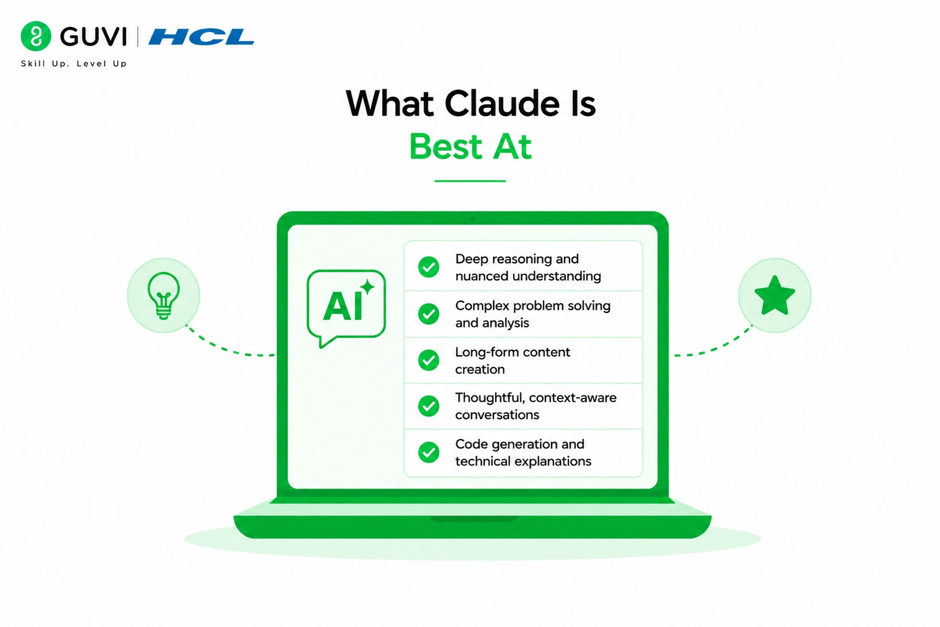
- Claude is best at helping you think clearly. It is strong at summarizing material, simplifying difficult ideas, generating practice questions, and giving feedback on your own reasoning.
- It is also very useful when you are stuck between two similar concepts. For example, if you are confused by overfitting vs underfitting, Claude can compare them in a way that makes the difference obvious. That kind of explanation saves time and reduces frustration.
- Claude is also helpful for writing and communication. You can ask it to improve your essay structure, tighten your argument, or help you organize a presentation outline. That makes it a good tool for both study and coursework support.
What Claude Is Not Best At
- Claude is not a replacement for doing the work yourself. If you copy questions and accept the output without checking, you may feel productive without actually learning.
- It is also not something you should trust blindly for high-stakes content.
- If you are studying for a professional exam or working on graded assignments, always verify facts, formulas, and definitions against your class material. The goal is to improve your understanding, not to outsource it.
⚠️ Warning: If your school has rules about AI use, follow them carefully. Claude should support learning and revision, not help you break academic integrity policies.
Use Claude as a study partner to simplify topics, quiz you, and deepen understanding. Learn AI & ML with HCL GUVI’s Artificial Intelligence and Machine Learning course.
Common Mistakes To Avoid
Many students get weak results because they use Claude too casually. They ask broad questions, paste too much at once, or expect one response to do all the work.
Avoid these mistakes:
- Asking only for summaries.
- Not telling Claude your level.
- Skipping self-testing.
- Using the same prompt for every topic.
- Trusting answers without checking your notes.
- Studying passively instead of actively.
One of the most useful habits is to ask Claude to test you after every explanation. That keeps the session interactive and reveals what you do not yet understand.
Conclusion
Claude can be a strong study partner when you use it to learn actively. It works best as a guided tutor, a quiz generator, and a thinking aid, especially when you give it clear context and ask it to challenge your understanding.
The best results come from structure. If you combine Claude Learning Mode, Projects, and self-testing, you get a study system that is faster, clearer, and much easier to repeat.
FAQs
1. How do I use Claude as a study partner?
Tell Claude what you are studying, your current level, and how you want help. Ask it to explain, quiz, or guide you step by step instead of giving only the final answer.
2. Is Claude good for exam preparation?
Yes. Claude is useful for summaries, flashcards, practice questions, and concept review. It works best when you also test yourself before asking for the explanation.
3. What is Claude Learning Mode?
Learning Mode is a guided study approach that uses Socratic-style questioning. It helps you reason through the topic instead of just receiving a direct answer.
4. Should I use Claude Projects for studying?
Yes, especially if you are working on one class for a long time. Projects help Claude keep track of your syllabus, notes, and study preferences across sessions.
5. Can Claude help with difficult subjects?
Yes. Claude is good at simplifying complex ideas, comparing similar concepts, and asking follow-up questions until the topic makes sense. That makes it useful for technical and academic subjects.
6. Is it okay to rely on Claude for assignments?
Not fully. Claude can help you brainstorm, revise, and understand material, but you should still do your own thinking and follow your school’s AI rules.
7. How do I make Claude ask better questions?
Tell it to act like a tutor and not reveal the final answer too soon. You can also ask it to ask one question at a time and wait for your response before continuing.
Success Stories

About the Author
Vishalini Devarajan
An Aerospace Engineer turned content writer, I focus on making complex concepts easy to understand through well-structured, reader-friendly blogs. Whether it’s a technical topic or a non-technical one, I love creating content that is clear, engaging, and impactful.
View all posts by Vishalini Devarajan
Connect with me @










Did you enjoy this article?