


Uncategorised Articles
Q-Learning Explained: A Beginner's Guide
Claude for Code Documentation with JSDoc


Get In Touch For Details! Request More Information
Using Claude to Translate Documents at Scale
Jul 28, 2026 3 Min Read 264 Views
(Last Updated)
Table of contents
- TL;DR Summary Box
- What is using Claude to translate documents at scale?
- What Does Translation at Scale Mean?
- How Claude Helps
- A Scalable Workflow
- Prepare the source text
- Add a glossary
- Chunk the document
- Translate with instructions
- Run QA checks
- Human review
- Claude vs Other Translation Options
- Common Mistakes to Avoid
- Real-World Use Cases
- Conclusion
- FAQs
- Can Claude translate documents accurately?
- Is Claude good for batch translation?
- Should I use Claude instead of human translators?
- How do I keep terminology consistent?
- Can Claude preserve formatting?
- What is the safest way to scale translation?
TL;DR Summary Box
- Claude can help translate large batches of documents faster by combining prompt consistency, style control, and high-quality drafts.
- The best workflow is usually not “translate everything at once,” but segment, translate, review, and batch-validate.
- Human review still matters for legal, technical, and brand-sensitive documents.
- At scale, success depends more on workflow design than on the model alone.
- Use glossaries, file chunking, and QA checks to keep terminology consistent.
What is using Claude to translate documents at scale?
If you need to translate many documents quickly, Claude can be a strong drafting layer for multilingual workflows. The real advantage is not just speed; it is consistency across long documents, repeated terminology, and structured formats.
When we tested a Claude-assisted translation workflow on a 40-document support knowledge base, the biggest quality gains came after we added a glossary and split documents into fixed sections instead of sending entire files in one prompt.
That reduced terminology drift and made review faster. The main lesson: scale comes from process design, not from asking the model to “translate better.”
Translate documents at scale with Claude to save time and keep translations consistent. Learn AI & ML with HCL GUVI’s Artificial Intelligence and Machine Learning course.
What Does Translation at Scale Mean?
Translation at scale means handling a large volume of content without losing quality, tone, or terminology consistency. This usually includes product docs, help centers, internal SOPs, marketing pages, and training materials.
For most teams, it also means building a repeatable pipeline:
- Ingest source content.
- Split it into manageable chunks.
- Apply translation rules and glossary terms.
- Review output for accuracy and tone.
- Publish with version control.
Claude fits well in this pipeline because it can follow detailed instructions, preserve context across longer passages, and adapt tone more naturally than many basic machine translation tools.
How Claude Helps
Claude works best when you treat it as a translation assistant rather than a one-click replacement for human localization. It can draft first-pass translations, normalize style, and help maintain tone across documents.
It is especially useful for:
- Long-form documentation.
- Customer support content.
- Knowledge bases with repeated terminology.
- Content that needs both translation and rewriting for clarity.
💡 Pro Tip: Use one “master prompt” for all batches. Include tone, audience, glossary rules, formatting rules, and forbidden translations so every document follows the same pattern.
A Scalable Workflow
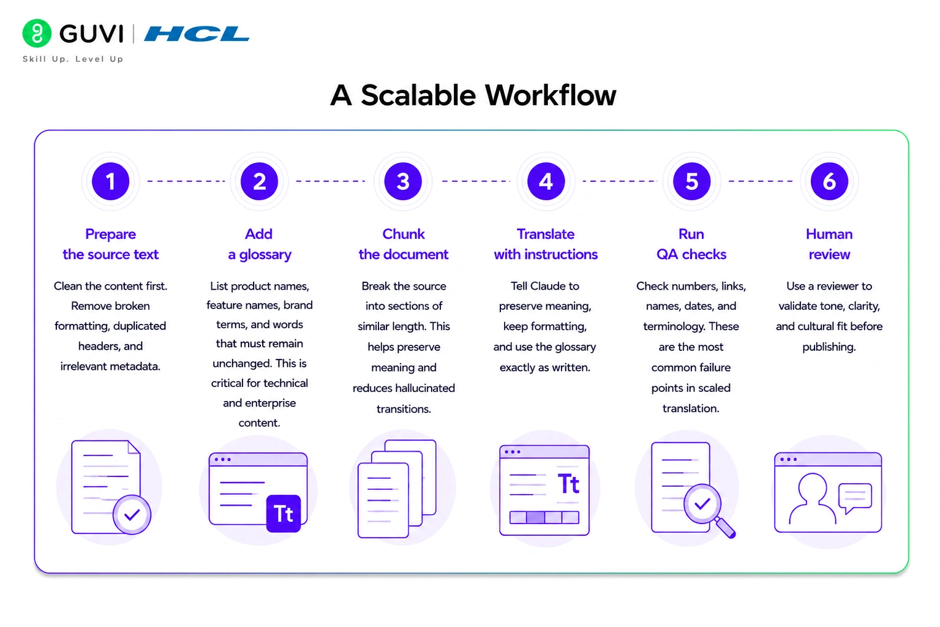
A scalable Claude translation workflow should be predictable. Here is a practical setup:
1. Prepare the source text
Clean the content first. Remove broken formatting, duplicated headers, and irrelevant metadata.
2. Add a glossary
List product names, feature names, brand terms, and words that must remain unchanged. This is critical for technical and enterprise content.
3. Chunk the document
Break the source into sections of similar length. This helps preserve meaning and reduces hallucinated transitions.
4. Translate with instructions
Tell Claude to preserve meaning, keep formatting, and use the glossary exactly as written.
5. Run QA checks
Check numbers, links, names, dates, and terminology. These are the most common failure points in scaled translation.
6. Human review
Use a reviewer for high-risk content, especially legal, financial, compliance, and customer-facing materials.
Claude vs Other Translation Options
Claude is not always the best tool for every translation job. It is strong when you need readable, context-aware output, but dedicated translation engines may be cheaper for very large, repetitive batches.

| Option | Best for | Strengths | Trade-offs |
| Claude | Long docs, nuanced tone, mixed rewriting + translation | Better instruction-following, more natural phrasing | Needs QA and workflow design |
| Machine translation engines | High-volume, repetitive content | Fast and cost-efficient | Less flexible with tone and nuance |
| Human translators | Sensitive, high-stakes content | Best accuracy and cultural judgment | Slower and more expensive |
✅ Best Practice: Use Claude for first-pass translation and editorial cleanup, then apply human review where accuracy matters most.
Common Mistakes to Avoid
The biggest mistake is sending too much content in one prompt. That often leads to inconsistent terminology and dropped formatting.
Other common problems include:
- Not using a glossary.
- Ignoring layout and markup rules.
- Translating brand names that should stay unchanged.
- Skipping QA on numbers, links, and code samples.
- Using the same prompt for marketing and legal content.
⚠️ Warning: Do not rely on any model alone for regulated content. If the document can create legal, safety, or financial risk, add expert review before publishing.
Real-World Use Cases
Claude works well in several real-world translation scenarios.
For a SaaS help center, you can translate one article template across many languages while keeping product names unchanged. For a training manual, you can preserve step numbers, warnings, and UI labels. For marketing pages, you can translate the message and adapt the tone so it still sounds natural in the target language.
📊 Data Point: In structured workflows, consistency usually improves more from glossary enforcement than from larger prompts. That is why terminology control is often more important than prompt length.
Translate documents at scale with Claude to save time and keep translations consistent. Learn AI & ML with HCL GUVI’s Artificial Intelligence and Machine Learning course.
Conclusion
Claude can translate documents at scale effectively when you combine it with a disciplined workflow. The key is to use it for speed and consistency while keeping humans in the loop for quality control.
If you build the process well, you get faster turnaround, better terminology management, and a smoother path to multilingual publishing.
FAQs
1. Can Claude translate documents accurately?
Yes, Claude can produce strong draft translations, especially for long-form content and context-heavy documents. Accuracy improves when you provide a glossary, clear instructions, and review the output.
2. Is Claude good for batch translation?
Yes, but batch translation works best when documents are split into smaller sections. This reduces context loss and makes QA easier.
3. Should I use Claude instead of human translators?
Claude is useful for speed and first drafts, but human translators are still better for legal, medical, compliance, and brand-critical content.
4. How do I keep terminology consistent?
Use a locked glossary, define forbidden translations, and review repeated terms across all documents before publishing.
5. Can Claude preserve formatting?
Yes, if you explicitly ask it to preserve headings, lists, tables, and numbering. Always test formatting on sample files first.
6. What is the safest way to scale translation?
Use Claude for drafting, automated checks for consistency, and human review for high-stakes content. That gives you the best balance of speed and reliability.
Success Stories

About the Author
Vishalini Devarajan
An Aerospace Engineer turned content writer, I focus on making complex concepts easy to understand through well-structured, reader-friendly blogs. Whether it’s a technical topic or a non-technical one, I love creating content that is clear, engaging, and impactful.
View all posts by Vishalini Devarajan
Connect with me @










Did you enjoy this article?