


Python Articles
Go vs Python for Forward Deployed Engineering Workloads
Python for Forward Deployed Engineers: What You Actually Need to Know
Freelancing as a Python Developer: Getting Your First Client


Get In Touch For Details! Request More Information
SQLModel: Combining SQLAlchemy + Pydantic for Cleaner Code
Sep 28, 2026 5 Min Read 915 Views
(Last Updated)
Working with databases in Python usually means maintaining two separate sets of classes: SQLAlchemy models for the database and Pydantic schemas for validation and serialisation. They describe the same data but in two different places, and keeping them in sync adds friction to every change. SQLModel, created by the same developer behind FastAPI, solves this by merging both into one.
Table of contents
- TL;DRSummary
- What Is SQLModel?
- The Problem With Two Separate Models
- SQLAlchemy ORM model
- Pydantic schema duplicating the same fields
- Installing SQLModel
- Defining a Model
- Creating the Database and Table
- CRUD Operations With Sessions
- SQLModel With FastAPI
- Splitting Models for Input and Output
- Shared base, no table
- Table model
- Input schema no id, no is_admin
- The response schema includes id
- SQLModel vs Raw SQL vs SQLAlchemy Alone
- Conclusion
- FAQs
- What is SQLModel in Python?
- Why use SQLModel instead of SQLAlchemy and Pydantic separately?
- Is SQLModel compatible with FastAPI?
- Does SQLModel replace SQLAlchemy?
- How does SQLModel handle CRUD operations?
- Can SQLModel be used with databases other than SQLite?
- Should I create separate models for API input and output?
- What are the advantages of SQLModel over raw SQL?
- Are there situations where SQLModel may not be the best choice?
- Is SQLModel suitable for production applications?
TL;DR Summary
- SQLModel combines SQLAlchemy and Pydantic into a single model layer, eliminating the need to maintain separate ORM and validation classes.
- One class can handle database tables, request validation, and API serialization, reducing boilerplate and keeping schemas consistent across your application.
- Built for seamless integration with FastAPI, SQLModel provides type safety, automatic validation, and simplified CRUD operations while retaining access to SQLAlchemy’s full power when needed.
Simplify Python with SQLModel, combining SQLAlchemy and Pydantic for cleaner code. Master Python backend dev with HCL GUVI’s Python Zero to Hero Course. Start your Python journey here
What Is SQLModel?
SQLModel is a Python library that lets you define a single class that works as both a SQLAlchemy ORM model and a Pydantic validation model. One class defines your table schema, validates incoming data, and serialises outgoing responses. It’s built on top of SQLAlchemy and Pydantic v2, so everything you know from both still applies.
The Problem With Two Separate Models
Here is what a typical FastAPI + SQLAlchemy project looks like before SQLModel:
SQLAlchemy ORM model
from sqlalchemy import Column, Integer, String from database import Base
| class UserORM(Base): tablename = “users” id = Column(Integer, primary_key=True) name = Column(String) email = Column(String, unique=True) |
Pydantic schema duplicating the same fields
from pydantic import BaseModel
class UserSchema(BaseModel): id: int name: str email: str
| class Config: orm_mode = True |
Every field appears twice. Add a new column, update two files. Rename a field, update two files. The models drift apart when someone forgets to keep them in sync — and that inconsistency creates subtle bugs that are difficult to trace.
SQLModel collapses this to one class.
Installing SQLModel
pip install sqlmodel
SQLModel requires Python 3.7+ and installs SQLAlchemy and Pydantic automatically as dependencies. No additional drivers are needed for SQLite, which is ideal for getting started.
Defining a Model
- from sqlmodel import SQLModel, Field from datetime import datetime
- class User(SQLModel, table=True): id: int | None = Field(default=None, primary_key=True) name: str email: str date_joined: datetime = Field(default_factory=datetime.now) is_admin: bool = False
- table=True tells SQLModel to treat this class as a database table, not just a data validation model. Each field maps directly to a column.
- The id field uses Field(default=None, primary_key=True) it’s optional on creation because the database generates it automatically.
- This single class replaces both the ORM model and the Pydantic schema. It validates input, creates the table, and serialises output. Rename a field and you only touch one file.
Creating the Database and Table
- from sqlmodel import SQLModel, create_engine
| DATABASE_URL = “sqlite:///users.db” engine = create_engine(DATABASE_URL, echo=True) SQLModel.metadata.create_all(engine) |
- create_engine() connects to the database. echo=True logs every SQL statement — useful during development to understand exactly what SQLModel generates. create_all() inspects every class with table=True and creates the corresponding table if it doesn’t already exist.
- In production, replace the SQLite URL with your PostgreSQL or MySQL connection string. SQLModel supports any database backed by SQLAlchemy, including PostgreSQL, MySQL, and MariaDB.
CRUD Operations With Sessions
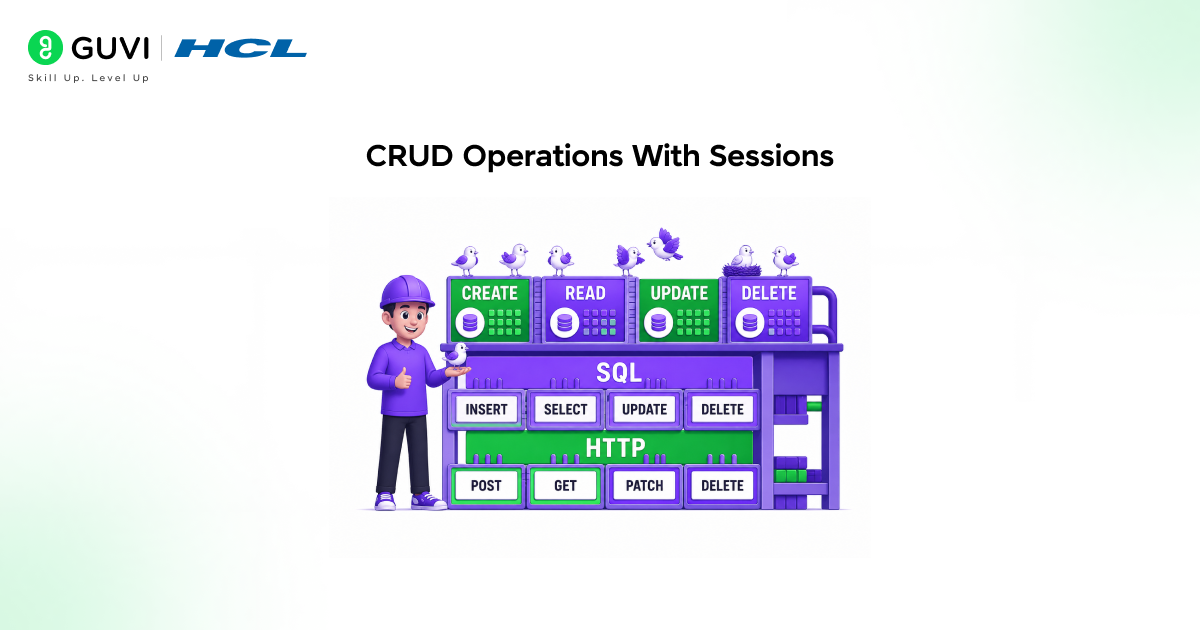
Every database operation in SQLModel goes through a session. A session batches changes in memory and commits them together more efficiently than hitting the database on every individual operation and safer in terms of transaction consistency.
- Create
| from sqlmodel import Session user = User(name=”Alice”, email=”[email protected]”, is_admin=False) with Session(engine) as session: session.add(user) session.commit() session.refresh(user) print(user.id) # Now has the auto-generated ID |
session.add() stages the new user in memory. session.commit() sends the INSERT to the database. session.refresh(user) updates the Python object with the values the database generated — including the auto-incremented id.
- Read
| from sqlmodel import select with Session(engine) as session: users = session.exec(select(User)).all() select(User) builds a SELECT query. session.exec() runs it. .all() returns every row as a list of User instances. Filtering uses .where() with Python expressions — no SQL strings: with Session(engine) as session: admins = session.exec( select(User).where(User.is_admin == True) ).all() |
For a single row, use .first() or .one(). The difference matters: .first() returns None if nothing matches; .one() raises an exception if the result isn’t exactly one row, which makes it useful for primary key lookups where you expect a definite result.
- Update
| with Session(engine) as session: user = session.exec(select(User).where(User.id == 1)).one() user.name = “Alice Smith” session.add(user) session.commit() session.refresh(user) |
Select the row, modify the Python object, add it back, commit. SQLModel generates an UPDATE statement automatically. No SQL update syntax to write.
- Delete
| with Session(engine) as session: user = session.exec(select(User).where(User.id == 1)).one() session.delete(user) session.commit() |
Select, delete, commit. Straightforward and readable.
Simplify Python with SQLModel, combining SQLAlchemy and Pydantic for cleaner code. Master Python backend dev with HCL GUVI’s Python Zero to Hero Course. Start your Python journey here
SQLModel With FastAPI
- SQLModel was designed with FastAPI in mind. The integration is direct because both were built by the same author.
- from fastapi import FastAPI, Depends from sqlmodel import Session, select
- app = FastAPI()
- def get_session(): with Session(engine) as session: yield session
- @app.post(“/users/”, response_model=User) def create_user(user: User, session: Session = Depends(get_session)): session.add(user) session.commit() session.refresh(user) return user
- @app.get(“/users/”, response_model=list[User]) def list_users(session: Session = Depends(get_session)): return session.exec(select(User)).all()
- FastAPI uses the User class for both request body validation and response serialisation. No separate Pydantic schema is needed. The Depends(get_session) injects a database session per request automatically.
- One practical concern: returning the full User model exposes all fields including is_admin. In production you’d create a UserPublic model without sensitive fields. SQLModel supports schema splitting through inheritance see the section below.
SQLModel was created by Sebastián Ramírez, the creator of FastAPI. It was designed to eliminate the need for maintaining separate SQLAlchemy ORM models and Pydantic schemas. By combining data validation and database modeling into a single class, SQLModel helps developers write less code, reduce duplication, and keep their applications more consistent and easier to maintain.

Splitting Models for Input and Output
For real applications, you often need different views of the same data: a creation schema that excludes id, and a response schema that includes it.
SQLModel supports this through inheritance:
Shared base, no table
| class UserBase(SQLModel): name: str email: str |
Table model
| class User(UserBase, table=True): id: int | None = Field(default=None, primary_key=True) is_admin: bool = False |
Input schema no id, no is_admin
| class UserCreate(UserBase): pass |
The response schema includes id
- class UserRead(UserBase): id: int
- UserBase holds the common fields. User is the database table. UserCreate is what the API accepts. UserRead is what the API returns. Each class is a thin layer that adds or excludes specific fields.
- This pattern keeps the model DRY, the field definitions live in one place while giving you the right shape at each layer of the API.
SQLModel vs Raw SQL vs SQLAlchemy Alone
| Approach | Type Safety | Validation | Boilerplate | Flexibility |
| Raw SQL (sqlite3) | None | None | Low | Full |
| SQLAlchemy alone | Partial | No built-in | High (ORM + Pydantic) | Full |
| SQLModel | Full | Pydantic v2 | Low | Most use cases |
- Raw SQL is the most flexible but offers no validation, no type inference, and is vulnerable to SQL injection if not handled carefully.
- SQLAlchemy alone is powerful but requires a separate Pydantic layer for API work. SQLModel covers most production use cases with minimal boilerplate and full type safety.
- The tradeoff: SQLModel is a higher-level abstraction. For complex queries, deeply nested joins, raw SQL performance tuning, or database-specific features, you can always drop down to SQLAlchemy directly.
- SQLModel exposes the underlying SQLAlchemy engine and session, so nothing is locked away.
Conclusion
SQLModel removes the most tedious part of Python database work: maintaining two parallel class hierarchies that describe the same data. One class definition creates the table, validates input, and serialises output. Sessions handle batching and committing cleanly.
The FastAPI integration is natural because both libraries share the same author and design philosophy. For new projects using FastAPI and a relational database, SQLModel is the cleanest starting point available. If you hit its limits, SQLAlchemy’s full API is always one layer beneath it.
FAQs
1. What is SQLModel in Python?
SQLModel is a Python library that combines the functionality of SQLAlchemy and Pydantic into a single model class. It allows developers to define database tables, validate data, and serialize API responses using one unified model.
2. Why use SQLModel instead of SQLAlchemy and Pydantic separately?
SQLModel reduces code duplication by eliminating the need to maintain separate ORM models and validation schemas. This makes applications easier to maintain and reduces the risk of inconsistencies between database and API models.
3. Is SQLModel compatible with FastAPI?
Yes. SQLModel was designed to work seamlessly with FastAPI. The same model can be used for request validation, database operations, and response serialization, significantly reducing development effort.
4. Does SQLModel replace SQLAlchemy?
Not entirely. SQLModel is built on top of SQLAlchemy and uses its ORM capabilities internally. Developers can still access SQLAlchemy’s underlying engine, session management, and advanced query features whenever needed.
5. How does SQLModel handle CRUD operations?
SQLModel uses SQLAlchemy-style sessions for database interactions. Developers can create, read, update, and delete records using familiar session-based workflows while benefiting from Python type hints and automatic validation.
6. Can SQLModel be used with databases other than SQLite?
Yes. SQLModel supports any database compatible with SQLAlchemy, including PostgreSQL, MySQL, and MariaDB, in addition to SQLite.
7. Should I create separate models for API input and output?
Yes, for production applications. While a single SQLModel class can handle multiple roles, creating specialized models such as UserCreate and UserRead helps prevent exposing sensitive fields and provides better control over API behavior.
8. What are the advantages of SQLModel over raw SQL?
SQLModel provides type safety, automatic validation, ORM functionality, and cleaner code while reducing the risk of SQL injection and schema inconsistencies. Raw SQL offers more flexibility but requires significantly more manual work and validation.
9. Are there situations where SQLModel may not be the best choice?
For highly complex database operations, advanced query optimization, database-specific features, or extensive custom ORM behavior, developers may need to work directly with SQLAlchemy’s lower-level APIs.
10. Is SQLModel suitable for production applications?
Yes. SQLModel is well-suited for production applications, especially those built with FastAPI. It provides strong type safety, streamlined development workflows, and access to SQLAlchemy’s mature database ecosystem when advanced functionality is required.
Success Stories

About the Author
Vishalini Devarajan
An Aerospace Engineer turned content writer, I focus on making complex concepts easy to understand through well-structured, reader-friendly blogs. Whether it’s a technical topic or a non-technical one, I love creating content that is clear, engaging, and impactful.
View all posts by Vishalini Devarajan
Connect with me @











Did you enjoy this article?