


Software Development Articles
How to Read and Understand System Design Diagrams?
System Engineer Roles and Responsibilities: 12 Proven Duties for Growth
SAP Consultant Roles and Responsibilities: 12 Proven Duties for Growth and Success
Network Engineer Roles and Responsibilities: 12 Essential Duties for Success


Get In Touch For Details! Request More Information
Postman vs Insomnia vs Thunder Client: Best API Testing Tool
Sep 24, 2026 4 Min Read 846 Views
(Last Updated)
Choosing the right API testing tool can be challenging, with Postman, Insomnia, and Thunder Client each offering different strengths. While Postman excels in advanced testing and collaboration, Insomnia focuses on simplicity and developer productivity, and Thunder Client provides lightweight API testing directly inside VS Code. This comparison helps you find the tool that best matches your workflow and development needs.
Table of contents
- Quick TL;DR
- What is API Testing and Why Does It Matter?
- Postman: The Industry Standard
- Key Features
- Pricing
- Best For
- Insomnia: The Developer-First Alternative
- Key Features
- Thunder Client: The Lightweight VS Code Extension
- Key Features
- Best For
- Postman vs Insomnia vs Thunder Client: Side-by-Side Comparison
- Which is the Best API Testing Tool for You?
- Common Mistakes When Choosing an API Testing Tool
- Conclusion
- FAQs
- What is the best API testing tool in 2026?
- Is Postman free to use?
- What is the difference between Postman and Insomnia?
- Can Thunder Client replace Postman?
- Does Insomnia support GraphQL?
Quick TL;DR
- The best API testing tool depends on your workflow and requirements.
- Postman offers the most comprehensive feature set for teams and enterprise environments, Insomnia provides a streamlined developer-focused experience with strong GraphQL and gRPC support, and Thunder Client delivers lightweight API testing directly within VS Code.
- While all three handle REST APIs effectively, they differ in collaboration features, performance, and development environment integration.
Want to master API development, backend engineering, and full-stack development with real projects and mentorship? Check out HCL GUVI’s Software Automation & Testing Course built for developers who want job-ready skills with hands-on, project-based learning.
What is API Testing and Why Does It Matter?
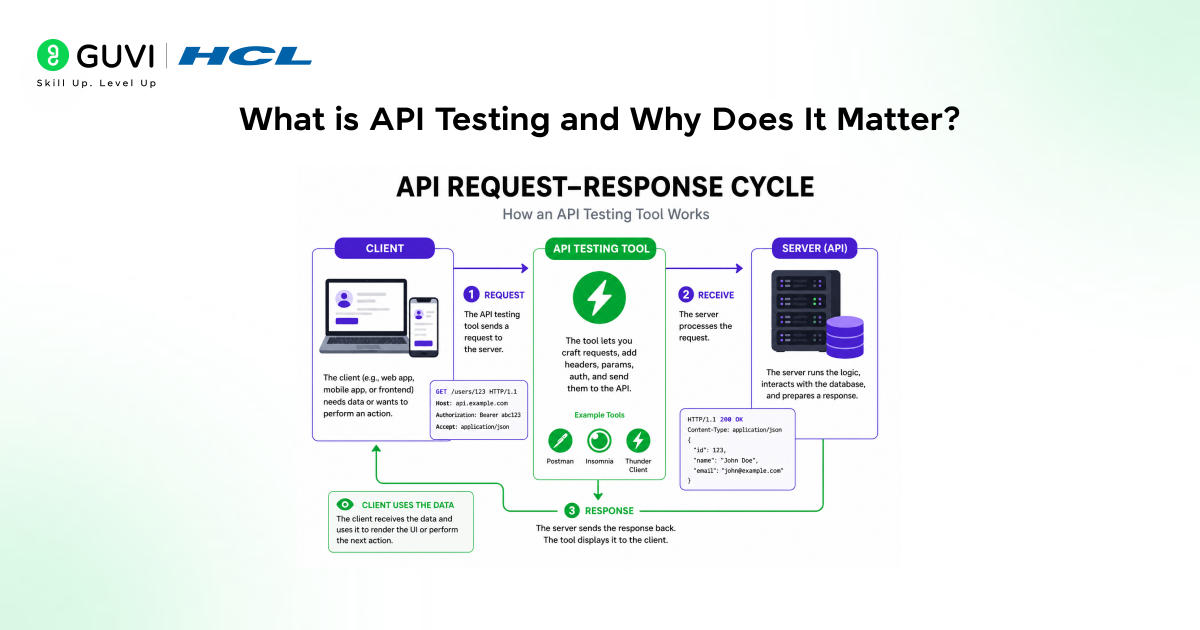
API testing is the process of sending requests to an API endpoint and verifying that the response status code, headers, body, and timing match the expected behaviour. It is a critical step in backend development, frontend integration, and QA workflows.
Without a dedicated API testing tool, developers rely on curl commands or write throwaway scripts that work but are slow, hard to share, and nearly impossible to maintain. A good API testing tool gives you:
• A visual interface to build and send requests without memorising syntax
• The ability to save, organise, and share collections of requests
• Environment variables to switch between dev, staging, and production seamlessly
• Automated test scripts to validate responses programmatically
• History and documentation features that double as API specs
Read More: What is REST API? A Complete Beginner’s Guide
Postman: The Industry Standard
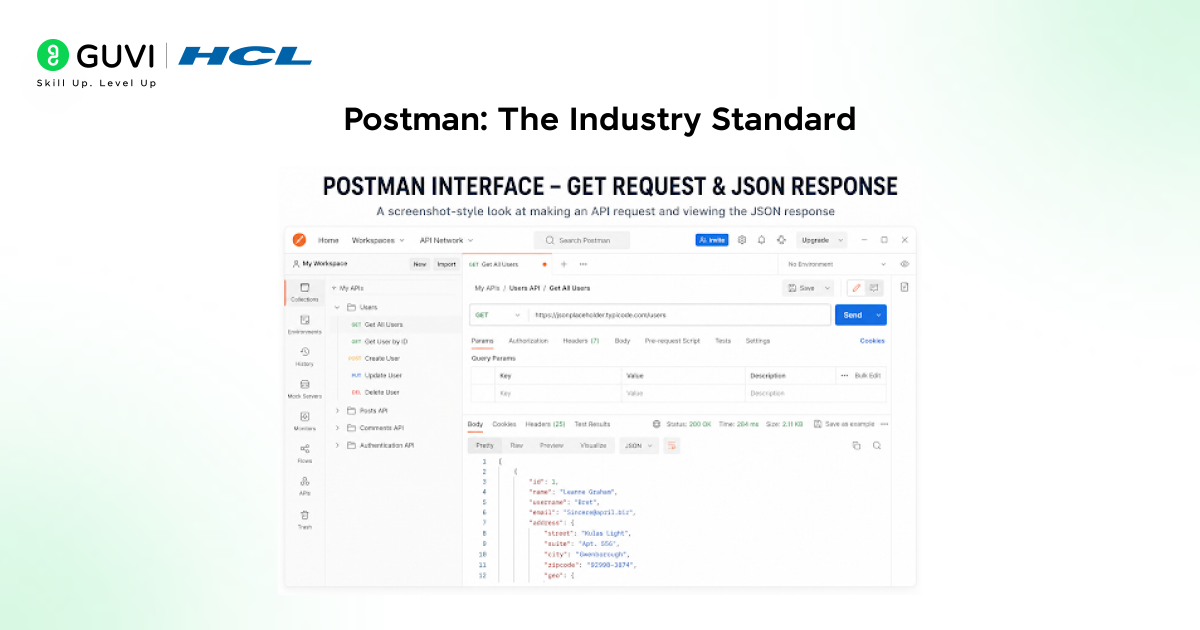
Postman is the most widely used API testing tool in the world, with over 30 million developers on its platform. Originally launched in 2012 as a Chrome extension, it has evolved into a full API development platform with testing, documentation, mocking, monitoring, and team collaboration built in.
Key Features
• Collections: Organise requests into folders and share them with your team
• Environments: Define variables for base URLs, tokens, and config across dev/staging/prod
• Automated testing: Write JavaScript test scripts that run after every request
• Mock servers: Simulate API responses before the backend is built
• API documentation: Auto-generate and publish beautiful API docs from collections
• Postman Flows: Visual no-code tool to chain API calls into workflows
Pricing
Postman’s free tier is generous for individuals. Paid plans (Basic at $14/user/month, Professional at $29/user/month) unlock advanced collaboration, team workspaces, version control, and SSO.
Best For
Teams, enterprises, API-first companies, QA engineers running automated test suites, and developers who need to share collections with colleagues or publish API documentation.
Postman processes over one billion API requests every month through its platform, making it one of the most widely used tools for API development and testing. It is adopted by major organizations such as Microsoft, Stripe, Salesforce, and Twitter to design, test, document, and monitor APIs at scale. By providing a unified workspace for API lifecycle management, Postman has become a critical tool in modern software development, helping teams streamline collaboration, reduce integration issues, and accelerate backend and microservices development workflows.
Insomnia: The Developer-First Alternative
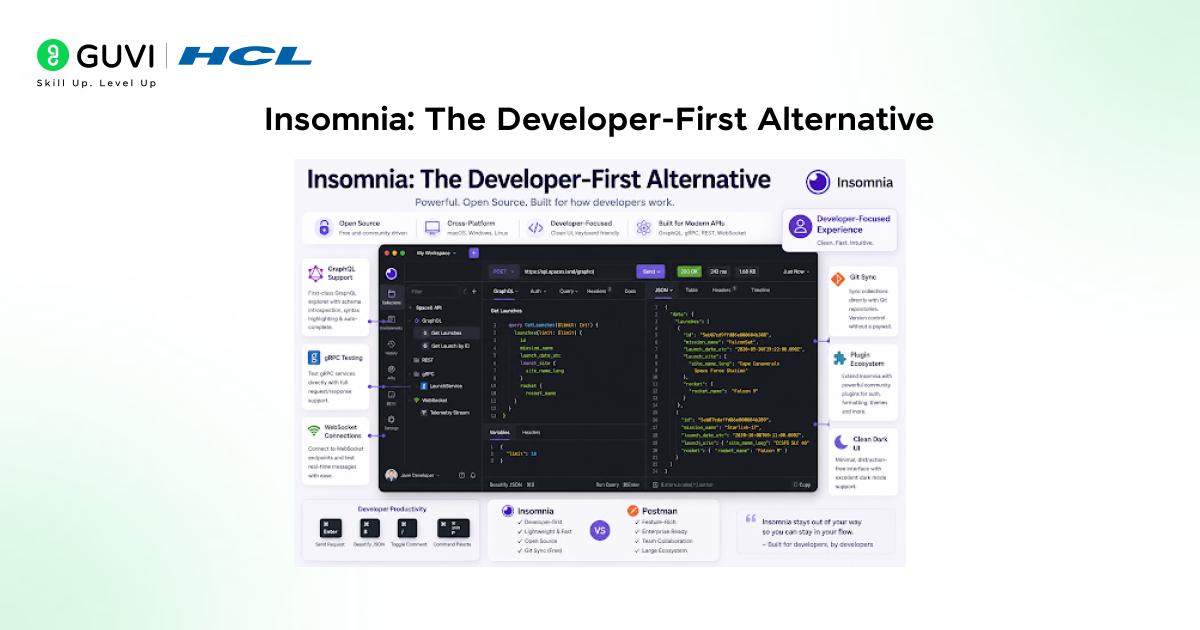
Insomnia is an open-source API testing tool built by Kong, designed with a clean, distraction-free interface and strong support for modern API protocols. Where Postman can feel heavy with enterprise features, Insomnia stays focused on the developer experience.
Key Features
- GraphQL support: First-class GraphQL explorer with schema introspection and query autocomplete
- gRPC support: Test gRPC services directly a clear edge over Postman’s limited gRPC handling
- WebSocket testing: Connect to and test WebSocket endpoints natively
- Plugin ecosystem: Extend functionality with community-built plugins for auth, formatting, and themes
- Git sync: Sync collections directly with a Git repository for version control without a paid plan
- Clean UI: Minimal, keyboard-friendly interface with excellent dark mode support
Best For
Individual developers, teams working with GraphQL or gRPC APIs, open-source projects that need Git-based version control for API collections, and developers who value a clean UI over enterprise feature breadth.E
Want to master API development, backend engineering, and full-stack development with real projects and mentorship? Check out HCL GUVI’s Software Automation & Testing Course built for developers who want job-ready skills with hands-on, project-based learning.
Thunder Client: The Lightweight VS Code Extension
Thunder Client is a REST API testing extension for Visual Studio Code, built as a lightweight alternative to Postman that lives entirely inside your editor. If you spend your day in VS Code and want to test APIs without switching applications, Thunder Client is designed exactly for you.
Key Features
- VS Code native: Runs inside VS Code as a sidebar panel no separate app, no context switching
- Lightweight: Minimal memory footprint compared to Postman’s Electron app
- Collections and environments: Organise requests and manage variables just like Postman, inside your editor
- Git-friendly: Collections are stored as JSON files that can be committed to your repo
- Scripting: Basic pre-request and post-response scripting for variable extraction and assertions
- Free for core use: Most features are free; paid plan adds team sync and advanced collaboration

Best For
Individual developers and small teams who work primarily in VS Code, want zero context-switching while building and testing APIs, and prefer a tool that stays out of the way.
Thunder Client, a lightweight API testing extension for Visual Studio Code, has surpassed 5 million installs and consistently ranks among the top 50 most-used VS Code extensions. Remarkably, it was built by a solo developer, :contentReference[oaicite:0]{index=0}, and became one of the fastest-growing developer tools in 2021, reaching 1 million installs in under six months. Its rapid adoption highlights how simple, focused developer tools can scale globally when they solve a clear and frequent pain point in everyday workflows.
Postman vs Insomnia vs Thunder Client: Side-by-Side Comparison
| Feature | Postman | Insomnia | Thunder Client |
| Type | Standalone app | Standalone app | VS Code extension |
| REST API support | Excellent | Excellent | Excellent |
| GraphQL support | Basic | First-class | Basic |
| gRPC support | Limited | Native | Not supported |
| WebSocket support | Yes | Yes | Limited |
| Automated testing | Full JS test suite | Yes | Basic assertions |
| Team collaboration | Strong (paid) | Good (paid) | Limited (paid) |
| Git/version control | Paid feature | Free Git sync | JSON files in repo |
| Mock servers | Yes | Yes | No |
| API documentation | Auto-generate | Basic | No |
| Performance/memory | Heavy (Electron) | Medium (Electron) | Lightweight |
Which is the Best API Testing Tool for You?
There is no single best API testing tool; the right choice depends on your context. Here is a quick decision guide:
- Choose Postman if: you work in a team, need automated test suites, publish API documentation, or work at a company that uses Postman Workspaces for collaboration. Its ecosystem and community are unmatched.
- Choose Insomnia if: you primarily work with GraphQL or gRPC APIs, want native Git version control without paying for it, or prefer a lighter, cleaner interface for personal or open-source projects.
- Choose Thunder Client if: you live inside VS Code and want to test APIs without ever leaving your editor. It is the fastest to get started, the lightest to run, and more than sufficient for the majority of day-to-day REST API testing.
Common Mistakes When Choosing an API Testing Tool
1. Choosing based on popularity alone: Postman is the most popular, but that does not make it the right choice for every developer. If you work alone in VS Code and only test REST endpoints, Thunder Client may serve you better with far less overhead.
2. Ignoring protocol requirements: If your project uses GraphQL or gRPC heavily, evaluate tool support before committing. Postman’s GraphQL and gRPC support lags behind Insomnia’s, which can become a significant friction point in daily development.
3. Not using environment variables: Hardcoding base URLs, API keys, and tokens directly into request configurations is a common beginner mistake. All three tools support environment variables; use them from day one to switch between dev, staging, and production without editing individual requests.
Conclusion
Postman, Insomnia, and Thunder Client are all excellent tools, each the best API testing tool for a different kind of developer. Postman wins on ecosystem, collaboration, and enterprise features. Insomnia wins on GraphQL and gRPC support, clean design, and free Git sync. Thunder Client wins on simplicity, speed, and VS Code integration. The fastest way to decide is to install all three (they are all free to start) and spend 20 minutes sending the same set of requests through each; you will know which one fits your workflow almost immediately.
FAQs
1. What is the best API testing tool in 2026?
The best API testing tool depends on your needs. Postman is the best choice for teams and enterprise use. Insomnia is best for GraphQL and gRPC. Thunder Client is best for individual developers working inside VS Code. All three handle REST APIs excellently.
2. Is Postman free to use?
Yes, Postman has a free tier that is generous for individual developers, covering unlimited requests, collections, and environments. Paid plans starting at $14/user/month add team workspaces, version control, mock servers beyond the free limit, and advanced collaboration features.
3. What is the difference between Postman and Insomnia?
Postman is a full API platform with richer team collaboration, API documentation generation, and a larger ecosystem. Insomnia is leaner with better native GraphQL and gRPC support, free Git sync, and a cleaner interface. Postman suits teams and enterprises; Insomnia suits individual developers and GraphQL-heavy projects.
4. Can Thunder Client replace Postman?
For individual API testing in VS Code, Thunder Client can effectively replace Postman. However, it lacks advanced features such as mock servers, automated documentation, extensive test scripting, and enterprise collaboration, making Postman a better choice for complex team-based workflows.
5. Does Insomnia support GraphQL?
Yes. Insomnia offers first-class GraphQL support including schema introspection, query autocompletion, variable management, and a dedicated GraphQL explorer. This makes it one of the strongest choices available when your project relies heavily on GraphQL APIs.
Success Stories

About the Author
Vishalini Devarajan
An Aerospace Engineer turned content writer, I focus on making complex concepts easy to understand through well-structured, reader-friendly blogs. Whether it’s a technical topic or a non-technical one, I love creating content that is clear, engaging, and impactful.
View all posts by Vishalini Devarajan
Connect with me @









Did you enjoy this article?