


Artificial Intelligence and Machine Learning Articles
Finance Manager to Data Analytics: Career Growth, Salary and Seniority
How to Evaluate LLM Outputs in Production Deployments
AI/ML Skills Gap 2026: Why Companies Can't Find Job-Ready Talent
20 AI/ML Interview Questions Recruiters Can Use Without a Tech Background - Best Guide


Get In Touch For Details! Request More Information
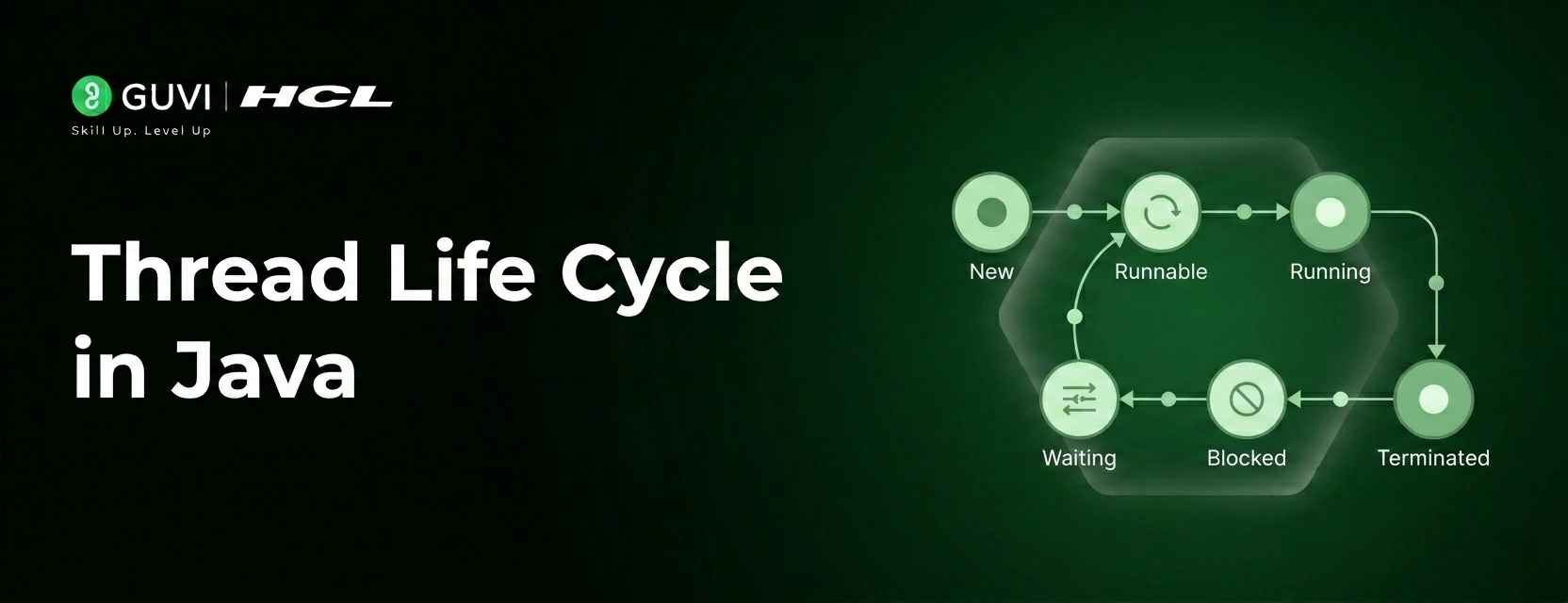
Thread Life Cycle in Java: A Complete Beginner’s Guide
Jun 24, 2026 7 Min Read 1162 Views
(Last Updated)
Ever built an app loading data while the UI stays responsive or downloads files amid inputs? Those are Java threads at work: the smallest execution units enabling true multitasking for snappy apps. But threads follow a rigid life cycle, not just start/stop. Master it to dodge concurrency bugs.
Java’s Thread. State enum locks threads into one state: NEW (created, idle); RUNNABLE (running/queued); BLOCKED (lock-waiting); WAITING (indefinite thread await); TIMED_WAITING (timed await); TERMINATED (finished).
In this article, we will walk through each state in the Java thread life cycle in plain language, explain exactly what causes a thread to enter and leave each state, show simple code examples, and explain the common mistakes beginners make when working with threads.
Table of contents
- Quick TL;DR:
- The Complete Thread State Journey
- State 1: NEW Thread Created but Not Started
- State 2: RUNNABLE Ready to Run or Currently Running
- State 3: BLOCKED Waiting for a Lock
- State 4: WAITING Waiting With No Time Limit
- State 5: TIMED WAITING Waiting for a Specific Duration
- State 6: TERMINATED Thread Has Finished
- Checking Thread State in Code
- Common Mistakes Beginners Make
- Calling start() Multiple Times: The Restart Illusion
- BLOCKED vs WAITING: Confusion: Identical Symptoms, Different Fixes
- Diagnosing with getState() and Thread Dumps: Your Debug Superpowers
- FAQ
- Can I restart a terminated thread?
- RUNNABLE means always executing?
- BLOCKED vs. WAITING, how to tell?
- Why use TIMED_WAITING over an infinite wait?
- How to check thread state in code?
- Thread pools better than raw threads?
Quick TL;DR:
- NEW: Born via new Thread(), idle object, no CPU yet.
- RUNNABLE: start() fired; running or queued for CPU slice.
- BLOCKED: Stuck outside synchronized lock held by rival thread.
- WAITING: wait() or join() awaits notify/termination indefinitely.
- TIMED_WAITING: sleep() and wait(timeout) wake post-deadline.
- TERMINATED: run() done; dead forever, GC eligible.
What Is the Java Thread Life Cycle?
It is the complete sequence of states a Java thread passes through from creation to termination, defined by six states in the Thread.State enum.
The Complete Thread State Journey
The Java thread life cycle traces a thread’s complete journey from creation to death. It starts in NEW, where the thread object sits idle in memory, created but not yet started. Calling start() moves it to RUNNABLE, where it’s either executing on the CPU or queued up, with the JVM scheduler deciding when it gets time slices.
From there, it can hit BLOCKED while waiting for a monitor lock like when another thread holds a synchronized block. Or it might enter WAITING, paused indefinitely until signaled by notify(), join() completion, or similar. For timed pauses, TIMED_WAITING kicks in via sleep() or wait(timeout), auto-resuming after the duration. Finally, TERMINATED marks the end when run() finishes normally or throws an uncaught exception the thread is dead and can’t restart.
Threads mostly progress forward but can loop back (like RUNNABLE → BLOCKED → RUNNABLE). No do-overs after TERMINATED; always create fresh threads. Master these states to dodge concurrency nightmares like deadlocks and resource leaks. In this guide, we’ll unpack each one: entry/exit triggers, real-world examples, code snippets, and beginner pitfalls.
State 1: NEW Thread Created but Not Started
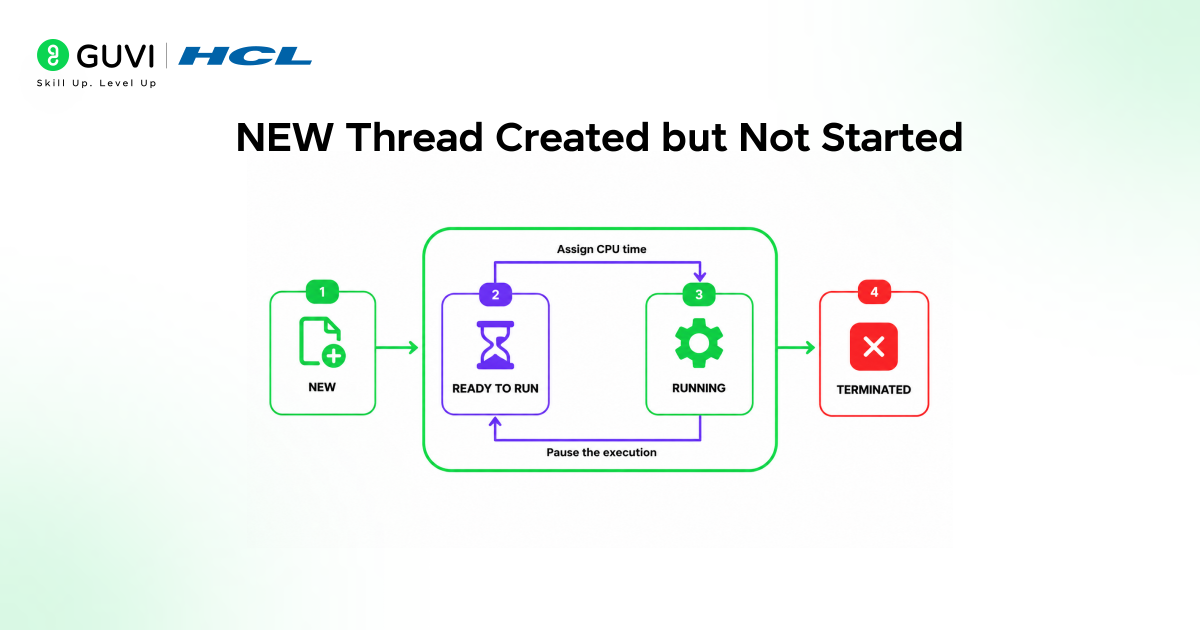
- The NEW state is the starting point of every thread’s life. When you create a Thread object using the new keyword, the thread enters this state immediately. It exists in memory as a Java object, but it has not started doing anything yet.
- When a thread is created in Java, it is in this initial state. At this point, the thread has been instantiated but has not yet started executing.
- This state is represented by the Thread object, and the thread remains in this state until the start() method is invoked on the Thread object.
- In this state, the thread is just an object, like any other in Java. It occupies memory but does not consume any CPU cycles, as it is not yet running.
- This state is crucial as it allows the developer to configure the thread before it starts executing, such as setting its priority or naming it.
A simple example of a thread in the NEW state looks like this:
Thread t = new Thread(new MyTask());
System.out.println(t.getState()); // prints NEW
- The thread stays in NEW until you call t.start(). Calling start() twice on the same thread is illegal in Java; it throws an IllegalThreadStateException.
- Once a thread has been started, you cannot restart it even after it finishes. If you need to run the same task again, you must create a brand-new Thread object.
State 2: RUNNABLE Ready to Run or Currently Running
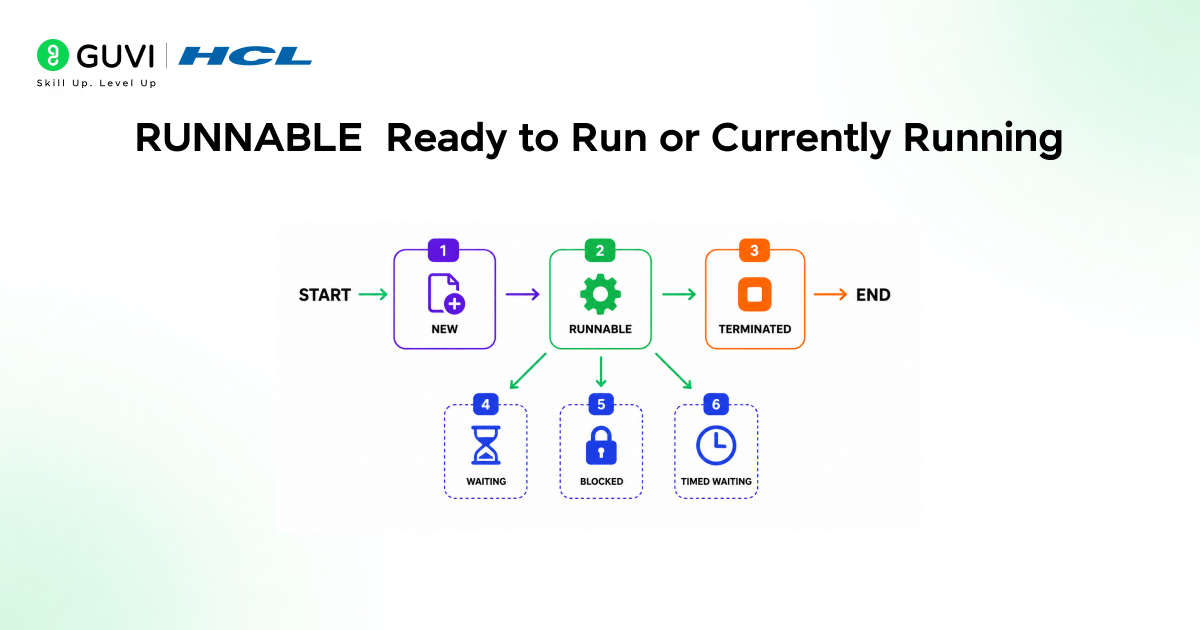
- Once you call start() on a thread, it immediately moves to the RUNNABLE state. This is where threads spend most of their active lifetime, and it is slightly more nuanced than it might appear.
- Threads in the RUNNABLE state are either running or ready to run, but they are waiting for resource allocation from the system.
- In a multi-threaded environment, the thread scheduler, which is part of the JVM, allocates a fixed amount of time to each thread.
- So it runs for a particular amount of time, then relinquishes control to other RUNNABLE threads. The key insight here is that RUNNABLE covers both “currently executing on the CPU” and “ready to execute but waiting for the CPU.”
- The JVM’s thread scheduler decides which RUNNABLE threads actually get CPU time and for how long
- . This is why you cannot make assumptions about the exact order in which threads will run; the scheduler makes that decision, and it varies between operating systems and JVM implementations.
- When the scheduler gives your thread a turn, it runs. When the turn is up, it goes back to RUNNABLE and waits for the next allocation. This back-and-forth happens automatically without any code on your part.
State 3: BLOCKED Waiting for a Lock
The BLOCKED state is where threads go when they want to enter a synchronized block or method, but another thread is already holding the lock for that resource. The blocked thread cannot proceed until the lock becomes available.
- A thread enters the BLOCKED state when it is trying to access a resource that is currently held by another thread. In this state, the blocked thread cannot proceed until the resource it needs becomes available.
- A thread enters BLOCKED in the following scenarios: a synchronized method when threads contend for access to a synchronized method, the JVM allows only one thread to enter at any given time, or a synchronized block when multiple threads contend for access to a synchronized block.
- Only one thread can execute at a time, and with ReentrantLock, if a thread attempts to acquire a ReentrantLock that is already held by another thread, it goes into the BLOCKED state and waits until the lock becomes available.
- Here is a simple example. Imagine two threads both trying to call a synchronized method called getData().
- Thread A gets the lock first and starts executing. Thread B tries to enter the same method but cannot; it moves to BLOCKED and waits.
- The moment Thread When A exits the synchronized method and releases the lock, the JVM picks one of the blocked threads (in this case, Thread B) and moves it back to RUNNABLE.
- Once the lock is released by the owning thread, one of the blocked threads will be chosen to acquire the lock and transition from the BLOCKED state to the RUNNABLE state.
State 4: WAITING Waiting With No Time Limit
The WAITING state is different from BLOCKED in a subtle but important way. In BLOCKED,
- The thread is waiting for a lock that is held by another thread; it will automatically become eligible again when the lock is released.
- In WAITING, the thread has explicitly decided to pause indefinitely until another thread tells it to continue.
- A thread in the WAITING state is waiting for some other thread to perform a particular action without any time limit.
- A thread enters the WAITING state due to calling one of the following methods: Object.wait(): The thread waits for another thread to call Object. notify() or Object. notifyAll() on the same object; Thread. join() the thread waits for a specified thread to terminate.
- A practical example: you have a main thread that starts a background thread to load data. The main thread calls backgroundThread. join(), which puts the main thread into WAITING. It will stay in WAITING until the background thread completes its work.
- Only when the background thread reaches its end and terminates will the main thread automatically move back to RUNNABLE and continue.
- Whenever the join() method is called on a thread instance, the main thread goes to waiting for the joining thread to complete.
- If the thread being waited on never completes, the waiting thread stays in WAITING indefinitely, which is why proper thread design requires careful planning around when and how you use these waiting mechanisms.
State 5: TIMED WAITING Waiting for a Specific Duration
TIMED WAITING is very similar to WAITING, with one critical difference: the thread sets a time limit on how long it will wait. After the specified time expires, the thread automatically moves back to RUNNABLE whether or not the condition it was waiting for has occurred.
- A thread is in the timed waiting state due to calling one of the following methods with a specified positive waiting time: Thread.sleep(), Object. wait() with a timeout parameter, Thread. join() with a timeout parameter, LockSupport. parkNanos() and LockSupport. parkUntil().
- The most common cause of TIMED_WAITING that beginners encounter is a thread. sleep().
- When you write Thread.sleep(2000), the current thread pauses for 2000 milliseconds and enters TIMED_WAITING. It does not consume CPU during this time. After 2 seconds, it automatically wakes up and returns to RUNNABLE.
- In this state, the thread remains idle and does not consume CPU resources, like the waiting state. However, the difference is that the thread will automatically transition back to the runnable state after the specified time elapses, even if the event it was waiting for has not occurred.
- This is particularly useful when you want a thread to wait for a certain amount of time and then proceed regardless of the outcome.
- The practical value of TIMED_WAITING over plain WAITING is exactly this safety net. Rather than a thread that might wait forever if something goes wrong, you get a thread that has a built-in escape hatch; after the timeout, it wakes up and can check conditions, log a warning, or try a different approach.
In Java, Thread.sleep() does not put a thread into WAITING, but into TIMED_WAITING.
This means the thread automatically resumes after the timeout without needing any notification, a subtle distinction that has prevented countless infinite hangs and enabled safer retry mechanisms.

State 6: TERMINATED Thread Has Finished
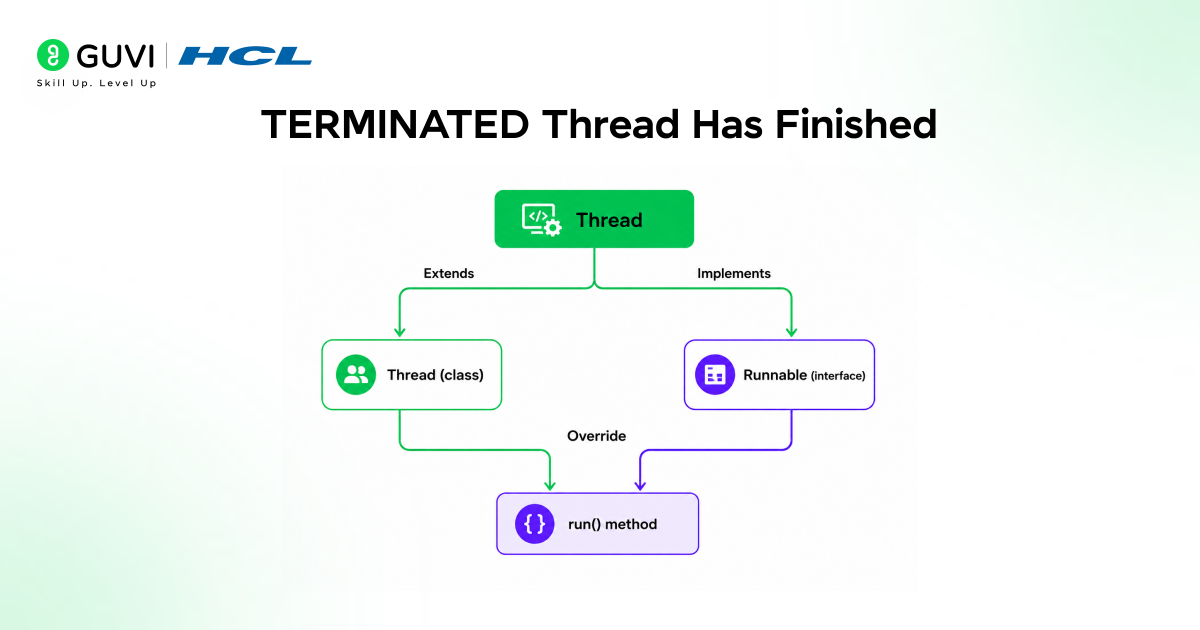
The TERMINATED state is the final stage in a thread’s life. Once a thread enters this state, it is done permanently.
- A thread enters the terminated state when its run method has completed execution, either by returning normally or by throwing an uncaught exception.
- Once a thread is terminated, it is considered dead, and it cannot be restarted. In this state, the thread has completed its task and releases any resources it was holding.
- The memory occupied by the thread object is eligible for garbage collection unless there are other references to it. There are two ways a thread reaches TERMINATED.
- It completes its run() method normally, or it throws an uncaught exception during execution. In both cases, the result is the same: the thread is done and cannot be brought back. Once the thread’s run method completes, its state becomes terminated.
- Handling termination correctly matters for resource management. If your thread opened a database connection, a file, or a network socket, those resources need to be properly closed before the thread ends.
- Using try-finally blocks inside the run() method ensures that cleanup code runs even when the thread terminates due to an exception.
Checking Thread State in Code
The getState() method lets you observe a thread’s current state at any point during execution. Here is a complete example that shows a thread moving through multiple states:
class MyTask implements Runnable {
@Override
public void run() {
try {
Thread.sleep(3000); // TIMED_WAITING
} catch (InterruptedException e) {
e.printStackTrace();
}
}
}
public class ThreadStateDemo {
public static void main(String[] args) throws InterruptedException {
Thread t = new Thread(new MyTask());
System.out.println(t.getState()); // NEW
t.start();
System.out.println(t.getState()); // RUNNABLE
Thread.sleep(1000);
System.out.println(t.getState()); // TIMED_WAITING
t.join();
System.out.println(t.getState()); // TERMINATED
}
}
The state of a thread can be retrieved using the getState() method of the Thread class, which returns one of the values in the State enumeration. Note that because thread scheduling is non-deterministic, there is no guarantee that t.getState() returns exactly RUNNABLE right after t.start(); the thread might have already transitioned to another state by the time you read it.
Common Mistakes Beginners Make
1. Calling start() Multiple Times: The Restart Illusion
The most frequent beginner trap is attempting to call start() more than once on the same thread instance. Java strictly permits only one start() call per thread; any subsequent attempt throws an IllegalThreadState
Exception at runtime. This stems from the thread’s internal flag that flips permanently after the first start, marking it as “alive” and preventing restarts.
Why it happens: Developers often think threads are reusable like objects. After a thread finishes (TERMINATED), they try restarting it to rerun logic. Reality: Once started, a thread follows its one-way lifecycle to TERMINATED, dead forever.
Code trap:
java
Thread t = new Thread(() -> System.out.println(“Run!”));
t.start(); // OK: NEW → RUNNABLE
t.start(); // CRASH: IllegalThreadStateException
Pro fix: Always create fresh new Thread() instances. Better yet, use ExecutorService thread pools they handle reuse automatically without manual restarts.
Impact: Wasted hours chasing runtime exceptions; exposes poor concurrency design early.
2. BLOCKED vs WAITING: Confusion: Identical Symptoms, Different Fixes
Both states pause threads, mimicking “stuck” behavior in logs/monitoring. But mixing them up turns 5-minute fixes into day-long debug marathons. BLOCKED occurs passively during lock contention; your thread hits a synchronized block/method already owned by another thread. WAITING is an active choice; a thread calls wait(), join(), or LockSupport. park() awaiting explicit signals.
| State | Trigger | Exit Condition | Fix Path |
| BLOCKED | synchronized(obj) { … } (lock held) | Owner exits sync block | Reduce contention and use finer locks |
| WAITING | obj.wait(), t.join() | notify()/notifyAll(), target terminates | Ensure signals sent; avoid infinite waits |
Why beginners confuse them: Both show NON-RUNNABLE in getState()/thread dumps. BLOCKED self-resolves on lock release; WAITING starves without your notify/join completion.
Debug ritual:
- thread.getState() → Instant diagnosis
- BLOCKED? jstack for lock owners
- WAITING? Trace wait() callers, verify notifies
Impact: BLOCKED misdiagnosed as WAITING → missed lock optimizations. WAITING as BLOCKED → futile lock tweaks.
3. Diagnosing with getState() and Thread Dumps: Your Debug Superpowers
Never guess; observe. Thread.getState() returns the live thread. State enum, while JVM thread dumps (jstack <pid>, VisualVM, and JConsole) reveal why it’s stuck.
Complete diagnostic code:
java
Thread t = new Thread(yourTask);
System.out.println(“Before start: ” + t.getState()); // NEW
t.start();
try { Thread.sleep(100); } catch (InterruptedException e) { }
System. out.println(“After start: ” + t.getState()); // RUNNABLE/TIMED_WAITING
t.join();
System. out.println(“After join: ” + t.getState()); // TERMINATED
Production debug flow:
- Local: t.getState() in loops/logs
- Prod: kill -3 <pid> → thread dump with stack traces
- Modern: Mission Control / async-profiler for zero-overhead profiling
Pro tip: States change fast; sample repeatedly. RUNNABLE post-start() isn’t guaranteed; the scheduler might preempt immediately.
Master these, and 90% of “my threads hang” tickets vanish. Concurrency bugs become predictable puzzles, not random fires.
Unlock pro tips on mastering the Java thread life cycle from new and runnable states to blocked, waiting, timed waiting, and terminated, plus hands-on multithreading and synchronization techniques by enrolling in HCL GUVI’s Intel & IITM Pravartak Certified Java Full Stack Development Course.
Final Thoughts
Understanding the Java thread life cycle is the foundation of all concurrent programming in Java. By mastering these states, developers can write more efficient, responsive, and error-free applications.
The six states NEW, RUNNABLE, BLOCKED, WAITING, TIMED_WAITING, and TERMINATED cover every moment of a thread’s existence from the line of code that creates it to the moment its task is complete.
Start by building small programs that create threads and print their state at different points. Watch the states change as you call start(), sleep(), and join(). Once the state transitions feel natural, once you can predict what state a thread will be in based on what the code is doing, you are ready to tackle synchronization, thread pools, and the more advanced concurrent utilities that Java’s java. util. concurrent package provides.
FAQ
1. Can I restart a terminated thread?
No, create a fresh new Thread(). start() on terminated throws IllegalThreadStateException.
2. RUNNABLE means always executing?
Nope, it covers “running now” or “ready, awaiting CPU.” The scheduler decides.
3. BLOCKED vs. WAITING, how to tell?
BLOCKED = lock contention (sync blocks). WAITING = explicit pause (wait()/join()). Use getState().
4. Why use TIMED_WAITING over an infinite wait?
Safety net, timeout auto-resumes, preventing eternal hangs if signals fail.
5. How to check thread state in code?
thread.getState() returns Thread.State enum: print it mid-run.
6. Thread pools better than raw threads?
Yes! Reuse via ExecutorService cuts new/terminated overhead.
Success Stories

About the Author
Vishalini Devarajan
An Aerospace Engineer turned content writer, I focus on making complex concepts easy to understand through well-structured, reader-friendly blogs. Whether it’s a technical topic or a non-technical one, I love creating content that is clear, engaging, and impactful.
View all posts by Vishalini Devarajan
Connect with me @













Did you enjoy this article?