


Artificial Intelligence and Machine Learning Articles
Design Mobile App UI with Google Stitch The Complete Guide
The Complete Guide to Context Engineering in AI


Get In Touch For Details! Request More Information

What is DALL-E and Why Are Marketers Paying Attention?
Apr 02, 2026 6 Min Read 20 Views
(Last Updated)
Every marketing team knows the frustration, you have a campaign idea that is clear in your head, but turning it into a polished visual takes days of back-and-forth with designers, stock photo searches that never quite fit, and budget conversations that slow everything down. DALL-E changes that entirely.
Built by OpenAI, DALL-E is a generative AI model that converts plain text descriptions into original, high-quality images, no design background, no software expertise, no photoshoot required. Whether you need a logo concept, a website hero image, a social media graphic, or an ad creative, DALL-E puts the ability to generate and test visual assets directly in your hands.
In this article, you will learn exactly how to use DALL-E for marketing, from writing prompts that actually work to building a post-processing workflow that turns AI outputs into brand-ready assets that convert.
Quick Answer
DALL-E is OpenAI’s AI image generation model that turns plain text descriptions into original, high-quality marketing visuals, including logos, social media graphics, ad creatives, and website hero images. To get started, access DALL-E 3 through ChatGPT Plus, describe your visual using the CORE framework (Context, Objective, Requirements, Example Style), and refine the output iteratively until it is campaign-ready.
Table of contents
- What is DALL-E?
- Graphical Marketing Assets You Can Create Using DALL-E
- Brand Logos
- Business Card Templates
- Website Backgrounds & Heroes
- Social Media Graphics
- Product Mockups
- Infographic Layouts
- The Art and Science of Writing Prompts That Actually Work
- The CORE Framework for Marketing Prompts
- Creating a Brand Logo with DALL-E
- Prompt Pattern for Logo Generation
- Getting More Variations
- The Professional Post-Processing Workflow
- Generate Multiple Variations
- Select and Upscale
- Color Correction and Brand Alignment
- Composite with Brand Elements
- Optimize for Output
- Common Mistakes That Undermine Your Results
- The Brand Consistency Problem
- To Wrap up
- FAQs
- Do I need design skills to create graphical marketing assets using DALL-E?
- Can I use DALL-E images for commercial marketing ads, packaging, merchandise?
- How is DALL-E 3 different from DALL-E 2 for marketing purposes?
- What should I do when DALL-E generates text incorrectly in my image?
- How do I maintain visual consistency across a campaign using DALL-E?
What is DALL-E?
DALL-E is a generative AI model built by OpenAI that converts written text into high-quality, original images. You describe what you want in plain language, and the model produces a visual that matches your description, no design software, no illustration skills, no photo studio required.
For marketers, the practical implication is significant. You no longer need to:
- Wait three days for a designer to produce logo variants
- Pay for stock photo licenses that don’t quite fit your brand
- Run expensive photoshoots every time a campaign change
- Limit your A/B testing because visual production is too slow
What took a week with a traditional workflow can now happen in an afternoon. And more importantly, you can test ten completely different visual directions in the time it previously took to brief a single one.
One of the biggest upgrades in DALL-E 3 is its native connection with ChatGPT. You can describe a marketing goal in plain conversation “I need a social media visual for a summer sale campaign targeting millennial women” and ChatGPT will generate a detailed, production-quality prompt for DALL-E automatically. You don’t need to master prompt writing from day one.
Graphical Marketing Assets You Can Create Using DALL-E
Before diving into technique, it helps to understand the range of visual marketing deliverables that DALL-E can realistically produce. This isn’t a tool for pixel-perfect production files but it’s an extraordinarily powerful tool for ideation, rapid prototyping, and producing campaign-ready visuals that only need light post-processing.
Brand Logos
Symbol concepts, icon marks, and wordmark foundations that can be vectorized and refined by a designer.
Business Card Templates
Styled card layouts that capture your brand’s visual identity, ready for text overlay in Canva or Illustrator.
Website Backgrounds & Heroes
Full-width atmospheric images and hero backgrounds that reinforce your brand aesthetic and messaging.
Social Media Graphics
Platform-native visuals for Instagram, LinkedIn, Facebook, and X — sized and styled for each context.
Product Mockups
Contextual product images placed in aspirational settings — no photoshoot, no studio, no logistics.
Infographic Layouts
Visual frameworks for data and how-to content that a copywriter can populate with real text.
Each of these asset types has its own prompt strategy. We’ll walk through the most important ones in depth starting with the three most common marketing deliverables: logos, business cards, and website visuals.
The Art and Science of Writing Prompts That Actually Work
Here’s the honest truth: most people who try DALL-E for the first time get mediocre results, convince themselves AI isn’t ready yet, and go back to stock photos. The problem isn’t the tool. The problem is the prompt.
Most people prompt DALL-E like they’re texting a friend. Professional results require briefing it like a creative director.
Vague inputs produce generic outputs. “A cool logo” tells DALL-E almost nothing. “A modern minimalist wordmark for a luxury men’s fragrance brand, dark charcoal and gold palette, serif typography, clean vector style” gives the model something to work with.

The CORE Framework for Marketing Prompts
One of the most practical frameworks for structuring DALL-E prompts in a marketing context organizes your input across four dimensions:
C – Context,
O – Objective,
R – Requirements,
E – Example Style
- Context: Where will this asset live, and who is it for? A LinkedIn header and an Instagram Story need completely different treatments. Specify the platform, placement, and target audience.
- Objective: What action should this image drive? Purchase, click, awareness, trust? A conversion-focused ad visual looks very different from a brand-building editorial image.
- Requirements: What are the non-negotiables? Brand colors (use hex codes), dimensions, what should or shouldn’t appear, and any text instructions (like “no text in image”).
- Example Style: What’s the aesthetic reference? Art direction terms like “editorial photography,” “flat vector illustration,” “cyberpunk,” “Bauhaus,” or “luxury annual report” dramatically improve output quality.
Creating a Brand Logo with DALL-E
A logo is the most compact expression of your brand’s identity; it has to work at 16px as a favicon and at 16 feet as a trade show banner. That’s an enormous challenge for any design tool, including an AI.
But DALL-E is remarkably capable as a logo concept generator, and that’s exactly the role it plays best.
Think of it this way: DALL-E gets you to a strong concept direction in 20 minutes instead of 3 rounds of designer briefs over 2 weeks.
The resulting image isn’t your final logo, but it’s a visual prototype that your designer (or your own Illustrator skills) can refine into something production-ready.
If you’re looking to take your visual creativity further and build a strong brand identity, check out this Brand Identity Design Course by HCL GUVI
Prompt Pattern for Logo Generation
DALL-E Prompt Template
A logo concept for [brand name], a [industry + brand personality] brand.
Style: [flat vector / minimalist / emblem / wordmark]
Colors: [palette — use hex codes for precision]
Visual elements: [iconography, symbols, or motifs to include]
Mood: [adjectives: rugged, elegant, playful, authoritative]
Do not include: text / drop shadows / gradients (whatever you want excluded)
// Always add “transparent background” or “white background, isolated” for clean extraction
Worked Example: Fragrance Brand
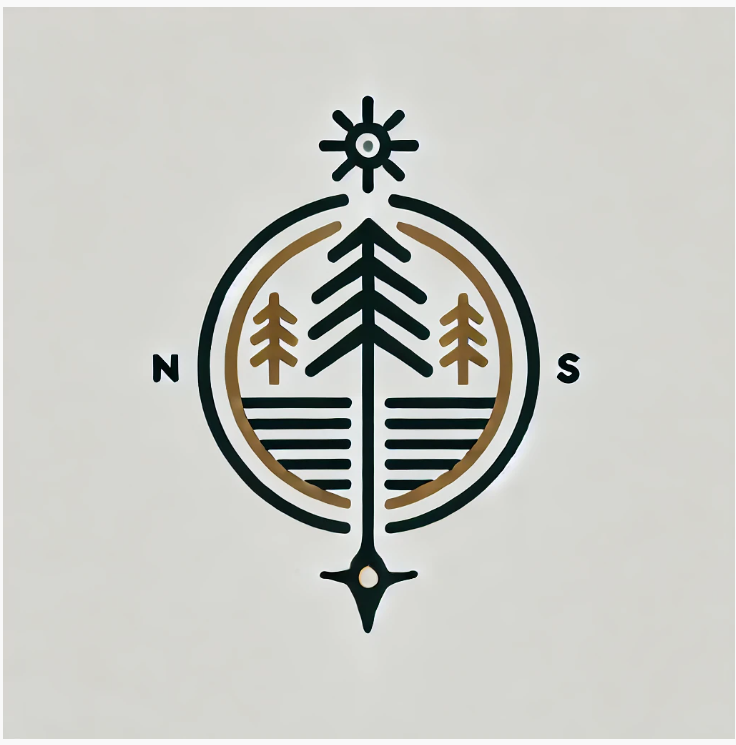
Let’s apply this to a real-world scenario. Suppose you’re building marketing assets for a men’s fragrance brand called Forest Stroll ,a cologne that blends deep woodland pine with modern urban sophistication. Here’s how you’d build a logo prompt:
Example Prompt- Forest Stroll Logo
A minimalist logo concept for ‘Forest Stroll’, a men’s luxury fragrance brand.
The brand blends rugged Nordic forest aesthetics with modern urban sophistication.
// Style direction
Style: flat vector emblem, clean and geometric. Masculine but refined.
// Visual elements
Incorporate a stylized pine tree or forest silhouette, or a compass/trail motif.
// Color and technical
Color palette: deep forest green (#1a3a2a) and burnished gold (#c9a84c).
White background, isolated logo mark. No text. No gradients.
Timeless aesthetic avoid trendy design elements.
Output:
After Generation: The Vectorization Step
DALL-E outputs are raster images (PNG/JPG). For a real logo, you need a vector file. Import your best result into Adobe Illustrator or Inkscape and use the “Image Trace” function to convert it to a scalable vector (SVG).
Then clean up the paths, add your actual brand name in your chosen typeface, and you have a professional logo file ready for all applications.
Getting More Variations
One of DALL-E’s biggest advantages for logo work is volume. Run the same prompt four times and you’ll get four distinct interpretations. Run it ten times and you’ll almost certainly find two or three concepts worth developing.
This replaces the “three logo concepts” stage of the traditional design process except you can do it in twenty minutes instead of two weeks.
The Professional Post-Processing Workflow
Getting a good image from DALL-E is only half the job. The other half is turning that raw AI output into a polished, brand-consistent, production-ready asset. Here’s the workflow that professional creative teams use.
1. Generate Multiple Variations
Run your prompt at least four times. DALL-E introduces controlled randomness in each output. You’ll often find that the third or fourth variation is significantly stronger in composition or lighting. Never settle for the first result.
2. Select and Upscale
Pick your strongest output and run it through an AI upscaler (Topaz Gigapixel AI, Adobe Firefly, or DALL-E’s own outpainting/variation tools). This gets you to print or high-res web quality from DALL-E’s native output size.
3. Color Correction and Brand Alignment
Bring the image into Lightroom, Photoshop, or even Canva’s editor. Adjust white balance, saturation, and contrast to align with your brand color system. This step is what separates a generic AI image from an on-brand asset.
4. Composite with Brand Elements
Layer in your logo, add your headline and CTA text, apply your brand typeface, and integrate the image into your actual template (Figma, Canva, Adobe XD). The AI image becomes one element of a complete branded asset.
5. Optimize for Output
Different outputs need different specs: print needs 300 DPI CMYK files; web needs WebP or optimized JPEG under 300KB; social needs platform-specific cropped versions. One DALL-E image can feed multiple outputs with the right processing.
Important: Copyright and Commercial Use
Under OpenAI’s current terms, images generated via ChatGPT Plus or the API are yours to use commercially. You have full rights to publish, sell, and print them. That said, the legal landscape around AI-generated images is still evolving.
Pro Tip: Document your prompts, add your own design work on top of AI outputs to increase uniqueness, and never use “in the style of [living artist]” prompts; that’s a legal grey area. Consult your legal team for high-stakes commercial use.
Common Mistakes That Undermine Your Results
Most frustrating DALL-E experiences aren’t the tool’s fault, they’re the result of avoidable input errors. Here are the mistakes that show up most often in marketing contexts.
The Brand Consistency Problem
DALL-E doesn’t natively remember your brand. Every new conversation starts fresh. The professional solution is to build a “brand brief” prompt preamble, a short paragraph you paste at the start of every session describing your brand’s colors, aesthetic, target audience, and visual style. This single habit dramatically improves consistency across a campaign’s worth of assets.
If you’re serious about learning AI tools like this and want to apply them in real-world scenarios, don’t miss the chance to enroll in HCL GUVI’s Intel & IITM Pravartak Certified Artificial Intelligence & Machine Learning Course, co-designed by Intel. It covers Python, Machine Learning, Deep Learning, Generative AI, Agentic AI, and MLOps through live online classes, 20+ industry-grade projects, and 1:1 doubt sessions, with placement support from 1000+ hiring partners.
To Wrap up
Creating graphical marketing assets using DALL-E isn’t about replacing the creative professionals on your team. It’s about closing the gap between having an idea and being able to see it, test it, and ship it.
The marketers getting the most out of DALL-E right now aren’t the ones using it to generate pretty images. They’re the ones treating it as a full creative director’s toolkit briefing it precisely, iterating relentlessly, and bringing the outputs into a real post-processing workflow.
And keep building because every campaign is a chance to get better at translating ideas into visuals that actually move people.
FAQs
1. Do I need design skills to create graphical marketing assets using DALL-E?
Not for ideation and concept generation DALL-E handles the image creation entirely from text. However, some familiarity with tools like Canva, Adobe Express, or Photoshop is helpful for the post-processing step, where you add your text, brand elements, and polish the output for actual use.
2. Can I use DALL-E images for commercial marketing ads, packaging, merchandise?
Yes, under OpenAI’s current terms for paid plans (ChatGPT Plus, ChatGPT Pro, and API access), you retain commercial rights to the images you generate. This covers advertising, print, social media, packaging, and merchandise.
3. How is DALL-E 3 different from DALL-E 2 for marketing purposes?
DALL-E 3 represents a substantial improvement in two areas that matter most for marketing: prompt fidelity (it follows complex, detailed instructions much more accurately) and image quality (sharper, more photorealistic, and better at small details).
4. What should I do when DALL-E generates text incorrectly in my image?
The reliable solution is to instruct DALL-E not to include text at all in the generated image, then add all copy in post-production using your actual design tool.
5. How do I maintain visual consistency across a campaign using DALL-E?
Build a “brand brief” preamble that you include at the start of every DALL-E session. This should specify your brand colors (hex codes), core aesthetic adjectives, target audience, and any visual rules (e.g., “always dark background, never lifestyle photography, always include natural textures”).
Success Stories

About the Author
Lukesh S
A professional content writer who has experience in freelancing and now working as a Technical Content Writer at HCL GUVI having sound knowledge in Blog Writing and Creative Writing!
View all posts by Lukesh S
Connect with me @








Did you enjoy this article?