


DevOps Articles
My DevOps Interview Experience at MAANG: From Rejection to Success [2026]
Azure DevOps Lifecycle: 7 Stages from Planning to Deployment


Get In Touch For Details! Request More Information

What is Ansible in DevOps? A Complete Practical Guide
Mar 11, 2026 6 Min Read 537 Views
(Last Updated)
Have you ever wondered why so many DevOps teams choose Ansible even when there are dozens of automation tools available? If provisioning, configuration management, and application deployment can all be automated, what exactly makes Ansible stand out, and when does it actually make sense to use it?
Understanding Ansible is not just about learning another tool. It is about knowing how modern teams reduce manual work, avoid configuration drift, and ship changes faster without breaking production.
If you already understand the basics of DevOps and infrastructure concepts, this guide will help you clearly understand what Ansible is, why it matters, and how it seamlessly works in DevOps. So, without further ado, let us get started!
Quick Answer:
Ansible is an open-source automation tool in DevOps used to configure systems, deploy applications, and manage infrastructure consistently using simple, human-readable playbooks, without installing agents on target machines.
Table of contents
- What is Ansible?
- Why Ansible Matters in DevOps?
- Core Problems Ansible Solves
- Manual Configuration Says “Hello” to Errors
- Inconsistent Environments Slow Down Teams
- Shell Scripts Become Hard to Maintain
- How Ansible Works?
- Ansible Architecture Explained Simply
- Key Components of Ansible
- Control Node
- Managed Nodes
- Inventory
- Playbooks
- Tasks and Modules
- Roles
- Limitations of Ansible
- Best Practices for Using Ansible
- When Should You Use Ansible?
- MCQs to Test Your Understanding of Ansible
- Conclusion
- FAQs
- What is Ansible mainly used for in DevOps?
- Is Ansible a configuration management tool or a deployment tool?
- Why is Ansible considered easy to learn?
- Can Ansible replace Terraform?
- Is Ansible still relevant in modern DevOps?
What is Ansible?
Ansible is an open-source automation tool used for configuration management, application deployment, orchestration, and infrastructure provisioning. In DevOps workflows, Ansible helps you automate repetitive IT tasks so systems are configured consistently and reliably across environments.
Instead of manually logging into servers and running commands, you describe the desired state of your systems in simple, human-readable files. Ansible then ensures that your infrastructure matches that state.
What makes Ansible stand out is its agentless architecture and simple YAML-based syntax, which lowers the learning curve while remaining powerful enough for complex automation needs.
Why Ansible Matters in DevOps?
DevOps aims to reduce friction between development and operations. Ansible supports this goal by making infrastructure automation predictable and scalable.
Here’s why teams adopt Ansible in real-world DevOps setups:
- It eliminates configuration drift across environments
- It enables faster and repeatable deployments
- It reduces manual errors caused by ad-hoc scripting
- It integrates cleanly with CI/CD pipelines
- It works across cloud, on-prem, and hybrid infrastructure
In short, Ansible helps you move from “it works on my machine” to “it works everywhere”.
Core Problems Ansible Solves
Before understanding how Ansible works, it helps to see the problems it’s designed to fix.
1. Manual Configuration Says “Hello” to Errors
Manually configuring servers might work for a few systems, but it doesn’t scale. Even small inconsistencies can cause production failures.
2. Inconsistent Environments Slow Down Teams
Development, staging, and production environments often drift apart over time. Ansible enforces consistency by defining infrastructure as code.
3. Shell Scripts Become Hard to Maintain
As automation grows, shell scripts become fragile, complex, and difficult to debug. Ansible offers structure and readability instead.
Did you know that Ansible was originally created to make automation readable enough for operations teams, not just developers? That design choice is why Ansible uses YAML instead of a programming-heavy language and why it avoids agents on managed nodes. Another interesting fact is that many large enterprises don’t use Ansible alone. They pair it with tools like Terraform, Kubernetes, and CI/CD pipelines, letting Ansible focus purely on configuration and deployment.
How Ansible Works?
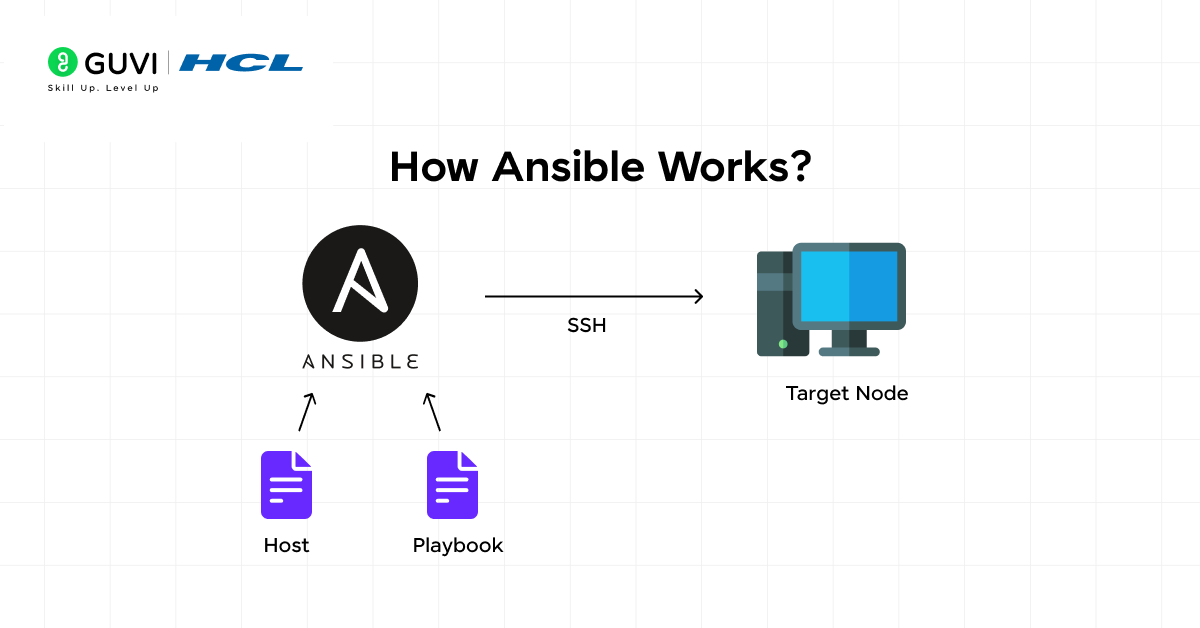
At its core, Ansible works on a simple idea: you define the desired state of your systems, and Ansible makes sure reality matches that definition. You are not scripting step-by-step commands like in shell scripts. Instead, you describe what should exist, and Ansible handles the how.
Ansible follows a push-based execution model. This means all automation is initiated from a central machine called the control node. When you run an Ansible command or playbook, it connects to the target machines, executes the required tasks, and then disconnects. Nothing runs continuously in the background.
One of the most important aspects of how Ansible works is that it is agentless. Managed nodes do not require any Ansible software to be installed. As long as the machine has SSH access (and Python, which most systems already have), Ansible can manage it. This significantly reduces setup effort and ongoing maintenance.
Ansible automation is driven by playbooks, which are written in YAML. These playbooks define:
- Which hosts to target
- What tasks should be executed
- In what order the tasks should run
When a playbook runs, Ansible performs the following sequence:
- Reads the inventory to determine target hosts
- Establishes a secure SSH connection to each host
- Gathers system facts if required
- Executes tasks using appropriate modules
- Ensures each task reaches the desired state
Ansible uses the concept of idempotency, which means running the same playbook multiple times will not change the system if it is already configured correctly. This is critical in DevOps environments where automation may run repeatedly as part of CI/CD pipelines.
If you want to read more about how Ansible works effectively in DevOps and makes life easier, consider reading HCL GUVI’s Free DevOps eBook for Beginners: A Step-by-Step Guide, which covers the basic fundamentals of DevOps like version control, CI/CD, containerization, orchestration, and many more.

Ansible Architecture Explained Simply
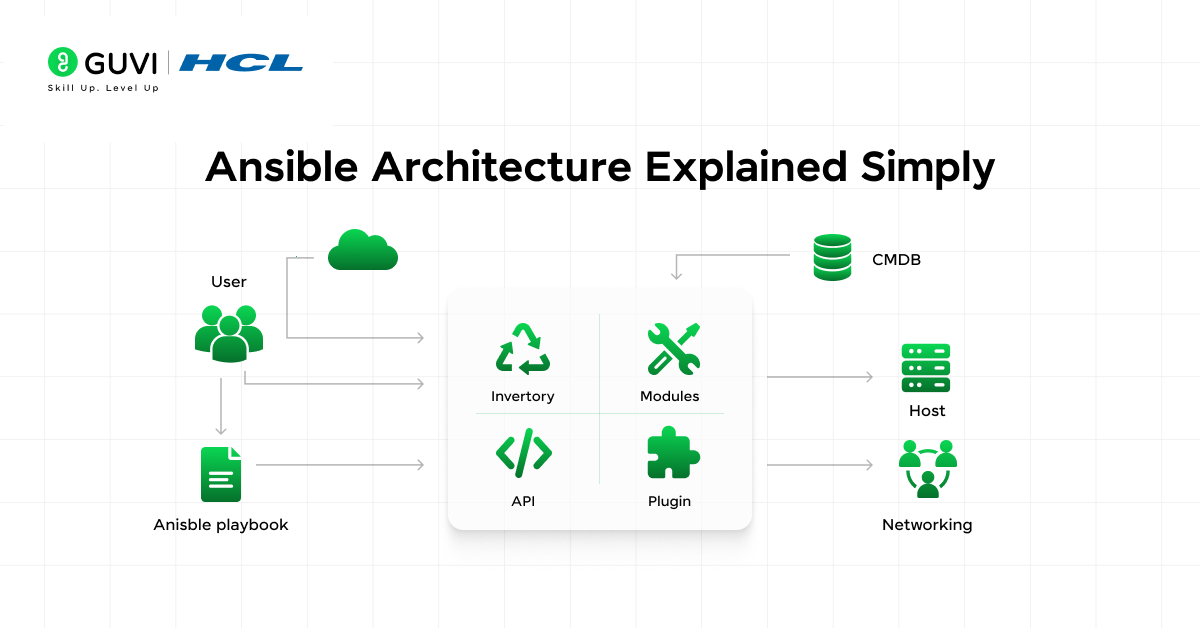
Ansible’s architecture is intentionally minimal. This simplicity is what makes it easy to adopt and scale.
At a high level, Ansible consists of:
- A control node
- One or more managed nodes
- Secure communication using SSH
When you execute a playbook, Ansible does not maintain persistent connections. Instead, it:
- Connects to the target node
- Executes the required tasks
- Disconnects immediately after completion
This stateless execution model improves reliability and security. If a system goes down, no agent needs to recover or resync.
Another key architectural feature is fact gathering. Ansible can automatically collect system information such as OS type, IP addresses, memory, and CPU details. These facts allow playbooks to make decisions dynamically, enabling conditional execution based on the target system’s state.
From an architectural standpoint, Ansible is also highly extensible. You can:
- Add custom modules
- Integrate with external tools
- Use plugins for inventory, logging, and callbacks
This makes Ansible adaptable to a wide range of DevOps workflows.
Key Components of Ansible
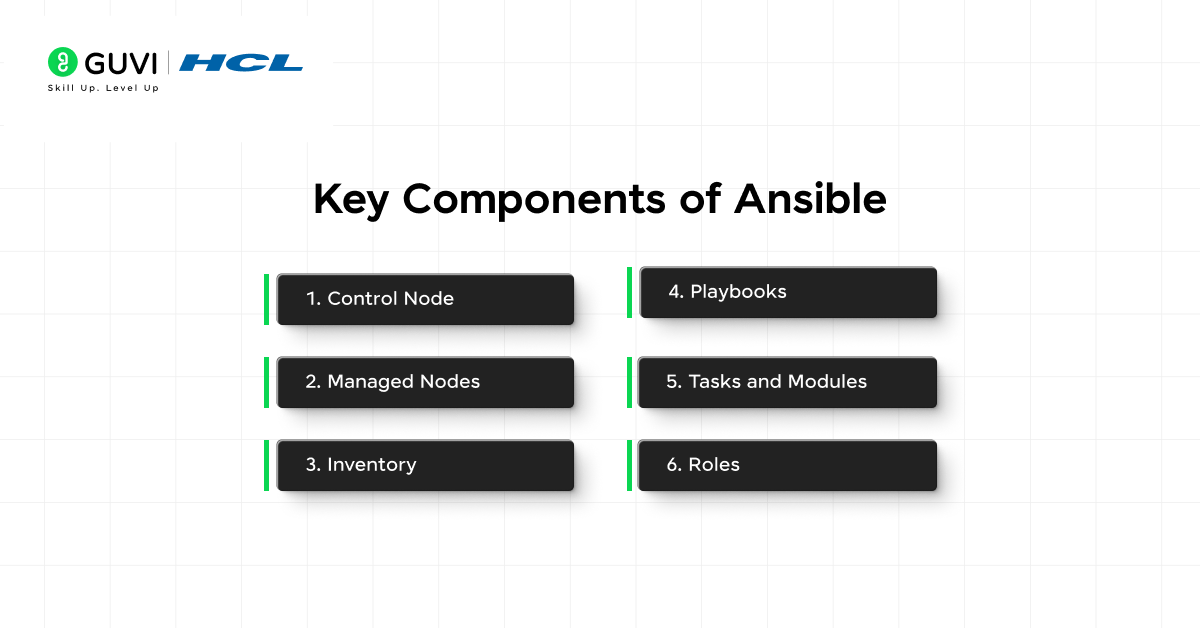
To use Ansible effectively, you need to understand the components that make up its automation engine. Each component plays a specific role, and together they form a clean, predictable workflow.
1. Control Node
The control node is the machine where Ansible is installed and executed. This is where playbooks, inventories, and configuration files live. It can be a developer’s local system, a build server, or a dedicated automation host.
From the control node, you initiate all automation. No configuration changes originate from managed machines themselves.
2. Managed Nodes
Managed nodes are the systems Ansible configures and controls. These could be:
- Linux servers
- Windows machines
- Cloud instances
- Network devices
Managed nodes do not need Ansible installed. They only need:
- SSH (or WinRM for Windows)
- Python (for most Linux-based systems)
This lightweight requirement is one of Ansible’s biggest advantages.
3. Inventory
The inventory defines which machines Ansible manages. It acts as a source of truth for your infrastructure.
Inventories can include:
- Hostnames or IP addresses
- Group definitions (for example, web servers, database servers)
- Environment separation (dev, staging, production)
Inventories can be static files or dynamically generated from cloud providers. This flexibility makes Ansible suitable for both traditional data centers and modern cloud environments.
4. Playbooks
Playbooks are YAML files that define automation workflows. Each playbook consists of one or more plays, and each play targets a specific group of hosts.
Playbooks describe:
- The target systems
- The sequence of tasks to execute
- Variables and conditions
Because YAML is human-readable, playbooks are easy to understand, review, and version-control. This readability is a major reason Ansible is popular among DevOps teams.
5. Tasks and Modules
Tasks are individual actions defined inside a playbook. Each task uses a module to perform a specific operation.
Modules handle things like:
- Installing packages
- Managing services
- Creating users
- Copying files
- Managing cloud resources
You rarely need to write custom code. Ansible’s module ecosystem covers most infrastructure and deployment needs.
6. Roles
As automation grows, managing everything in a single playbook becomes impractical. Roles solve this problem by enforcing structure.
A role organizes automation into logical components such as:
- Tasks
- Variables
- Templates
- Handlers
Roles make playbooks reusable, scalable, and easier to maintain in large environments.
Limitations of Ansible
While Ansible is powerful and flexible, it’s not a silver bullet. Understanding its limitations helps you design better automation strategies.
- One of the main limitations is performance at very large scale. Because Ansible connects over SSH and executes tasks sequentially (with configurable parallelism), it can be slower than agent-based tools when managing tens of thousands of nodes simultaneously.
- Another challenge is error handling complexity. While Ansible provides retries, conditionals, and handlers, debugging failed playbooks can still be tricky in complex workflows. Errors often surface at runtime rather than being caught earlier.
- Ansible is also not event-driven by default. It executes when triggered, not continuously. If you need real-time state enforcement or immediate reactions to system changes, Ansible alone may not be sufficient.
- There’s also the issue of YAML sensitivity. Indentation mistakes or poorly structured playbooks can lead to subtle errors. While YAML improves readability, it requires discipline and consistency.
- Finally, Ansible is not ideal for low-level infrastructure orchestration or high-frequency changes. It’s best used where predictability and clarity matter more than constant reactivity.
Best Practices for Using Ansible
Using Ansible effectively is less about writing playbooks and more about how you structure and maintain them over time.
- One of the most important best practices is to use roles early. Even for moderately sized projects, roles help keep automation organized and reusable. They prevent playbooks from becoming large, unreadable files.
- Always design playbooks to be idempotent. A good Ansible playbook should be safe to run multiple times without causing unintended changes. This is critical when automation is triggered automatically through CI/CD pipelines.
- Secrets management is another area where teams often make mistakes. Sensitive data such as passwords, tokens, and keys should never be stored in plain text. Using encrypted vaults or external secret managers is essential for production-grade automation.
- Version control everything. Playbooks, roles, inventories, and variables should all live in a repository. This enables collaboration, auditing, rollback, and traceability.
- Testing is equally important. Before running playbooks in production, validate them in staging or test environments. Syntax checks and dry runs help catch errors early and reduce risk.
- Finally, keep automation simple and explicit. Avoid overengineering playbooks with unnecessary conditionals or abstractions. Clear automation is easier to debug, review, and maintain than clever but opaque logic.
When Should You Use Ansible?
Ansible is a good fit when:
- You want fast automation without heavy setup
- Your team values readability and simplicity
- You manage multiple environments
- You need reliable configuration management
It’s especially effective for small to medium teams and scales well with proper design.
MCQs to Test Your Understanding of Ansible
Now that we come to the end of the article, let us test whether you got a full understanding of Ansible or not!
1. What is the primary reason Ansible is described as an agentless tool?
A. It does not support plugins
B. It does not require any software installation on managed nodes
C. It cannot run continuously
D. It only works on Linux systems
Correct Answer: B
2. Which file in Ansible defines the list of systems that automation should target?
A. Playbook
B. Role
C. Inventory
D. Module
Correct Answer: C
3. What does idempotency in Ansible ensure?
A. Tasks run faster on repeated execution
B. Playbooks execute only once
C. Systems remain unchanged if already in the desired state
D. Errors are automatically fixed
Correct Answer: C
4. In a typical DevOps workflow, how is Ansible most commonly used alongside Terraform?
A. Ansible provisions infrastructure and Terraform configures it
B. Both tools perform the same function
C. Terraform handles configuration while Ansible manages state
D. Terraform provisions infrastructure and Ansible configures it
Correct Answer: D
5. Which scenario best suits Ansible over shell scripts?
A. One-time system debugging
B. Real-time event-driven monitoring
C. Reusable, repeatable configuration across environments
D. Low-level kernel optimization
Correct Answers: 1. B, 2 .C, 3. C, 4. D, 5 .C
If you are serious about mastering DevOps and want to make a career out of it, consider enrolling in HCL GUVI’s DevOps Course with NSDC Certification that lets you start from scratch with Mentor guidance and helps you build an enriched Portfolio that resonates with recruiters.
Conclusion
In conclusion, Ansible works best when you treat it as a practical automation layer, not a one-size-fits-all solution. It simplifies configuration management, strengthens application deployment workflows, and integrates naturally with the rest of the DevOps toolchain.
When used with the right practices and alongside complementary tools, Ansible becomes a reliable backbone for infrastructure automation. The real value lies not in how many playbooks you write, but in how consistently and clearly your systems behave because of them.
FAQs
1. What is Ansible mainly used for in DevOps?
Ansible is mainly used for configuration management, application deployment, and infrastructure automation. It helps teams manage systems consistently across environments without manual intervention.
2. Is Ansible a configuration management tool or a deployment tool?
Ansible is both. It manages system configurations and also automates application deployments, which is why it fits naturally into DevOps workflows.
3. Why is Ansible considered easy to learn?
Ansible uses simple YAML files and follows an agentless architecture. This makes it easier to understand and set up compared to tools that require custom languages or agents.
4. Can Ansible replace Terraform?
No, Ansible cannot fully replace Terraform. Terraform is better for infrastructure provisioning, while Ansible excels at configuration management and application deployment.
5. Is Ansible still relevant in modern DevOps?
Yes, Ansible is highly relevant. It integrates with cloud platforms, CI/CD pipelines, containers, and Kubernetes, making it useful even in modern DevOps environments.
Success Stories

About the Author
Lukesh S
A professional content writer who has experience in freelancing and now working as a Technical Content Writer at HCL GUVI having sound knowledge in Blog Writing and Creative Writing!
View all posts by Lukesh S
Connect with me @
















Did you enjoy this article?