


Artificial Intelligence and Machine Learning Articles
How to Build Agentic AI with LangChain and LangGraph in 2026
Google ADK Visual Agent Builder: Build Your First AI Agent


Get In Touch For Details! Request More Information
Getting Started with DALL-E for AI Image Generation
Mar 17, 2026 6 Min Read 31 Views
(Last Updated)
What if you could bring any idea in your head to life visually, without touching a single design tool, hiring a graphic designer, or spending hours on stock photo websites? That’s exactly what DALL-E makes possible.
Whether you’re an educator looking to create compelling course visuals, a content creator tired of generic stock imagery, or simply someone who’s heard the buzz around AI image generation and wants to understand what it’s actually about, this article is your starting point.
In this article, we’re breaking down everything you need to know about DALL-E, from how it works to how to write prompts that get you results worth using. So, without further ado, let’s get started!
Quick Answer:
DALL-E is an AI-powered text-to-image tool developed by OpenAI that generates high-quality visuals from simple text descriptions, called prompts, in seconds. You don’t need any design skills or technical background to use it; all you need is the right words.
Table of contents
- What is DALL-E?
- Writing Your First Prompt: The Core Skill
- What Makes a Good Prompt?
- Examples for DALL-E Image Generation
- The Universal Prompt Template:
- Prompt 1: Nature/Landscape
- Prompt 2: Technology/Business
- Prompt 3: People/Lifestyle
- Swappable Keywords Cheat Sheet
- Types of Images and Art Styles You Can Generate with DALL-E
- Photorealistic Images
- Digital Illustration
- Oil Painting and Classical Art Styles
- Watercolor and Soft Art Styles
- Concept Art and Sci-Fi / Fantasy Styles
- Minimalist and Flat Design
- Anime and Studio Ghibli-Inspired Styles
- Vintage and Retro Styles
- 3D Render and Isometric Design
- Ethical Considerations: Using AI Art Responsibly
- Conclusion
- FAQs
- Is DALL-E free to use?
- Can I use DALL-E images commercially?
- What's the difference between DALL-E and Midjourney?
- Do I need coding skills to use DALL-E?
What is DALL-E?
DALL-E is a text-to-image model developed by OpenAI that uses deep learning to generate digital images from natural language descriptions, commonly called “prompts.” In plain terms: you type what you want to see, and DALL-E creates it.
At its core, DALL-E is a multimodal AI model, which means it processes and generates different types of data, in this case, both text and images. You describe something in words, and DALL-E creates a picture of it.
When it comes to costs, DALL-E is accessible on a free tier, but the limitations kick in quickly. Free users are capped at around 2 to 3 image generations per day, with no visible quota counter to tell you how many you have left. You’ll only know you’ve hit the limit when the tool stops responding.
For anyone using it regularly, ChatGPT Plus at $20(1900 INR)/month is the practical upgrade; it bumps your limit to 50 generations per day and includes priority access during peak hours. Developers who want to build DALL-E into their own tools can access it via the OpenAI API on a pay-per-use model.
If you are just starting out with this whole AI trend and are confused about these tools, don’t worry, we’ve got you covered with this blog – What is ChatGPT, DALL-E, and Generative AI? [Updated]
Writing Your First Prompt: The Core Skill
Here’s something that often surprises beginners: the quality of the image you get is directly tied to the quality of your prompt. DALL-E is powerful, but it works best only when you give it enough context to work with.
What Makes a Good Prompt?
Be as detailed and descriptive as possible in your prompts. The more information you provide, the clearer the image DALL-E 3 can produce. A vague prompt like “a dog” will give you a generic result. But “a golden retriever sitting in a rain-soaked London street, oil painting style, warm amber tones” gives DALL-E something real to work with.
Here are some practical principles for crafting strong prompts:
- Set the scene: Describe the environment or setting, not just the subject. A character standing in front of a mountain tells a very different story from one in a busy marketplace.
- Specify a style: Photography, watercolor, digital art, pencil sketch. Naming a style dramatically changes the visual outcome.
- Use specific numbers: If you want three birds, say three birds. DALL-E takes those details seriously.
- Mention mood or lighting: Words like “golden hour,” “overcast,” “dramatic shadows,” or “soft diffused light” give the model tonal cues that elevate the final image.
- Limit ambiguity: While DALL-E 3 is great at interpreting prompts, overly ambiguous instructions can lead to unexpected results.
In case you are looking for a properly structured course to get started with DALL-E and be a pro at it, consider enrolling for HCL GUVI’s DALL-E Course, where you will master real-time speech transcription with Whisper API, generate captivating art using the DALL·E model, seamlessly integrate AI into your creative process and much more.
DALL-E gets its name from a blend of two cultural icons, the surrealist artist Salvador Dalí and the beloved Pixar robot WALL-E. The name was chosen to reflect DALL-E’s creative, imaginative capabilities.

Examples for DALL-E Image Generation
This is the one universal prompt structure you can reuse endlessly, just swap out the bracketed keywords:
The Universal Prompt Template:
“A [type of image] of [main subject], set in [environment/background], with [color palette/lighting], in a [art style] style, conveying a [mood/emotion] atmosphere, [additional detail or focal point].”
Using this prompt, let us now create images and see for yourself how powerful DALL-E is.
Prompt 1: Nature/Landscape
Prompt:
“A watercolor painting of a misty mountain valley at sunrise, set in a dense pine forest with a winding river below, with warm golden and soft purple lighting, in a impressionist watercolor style, conveying a peaceful and serene atmosphere, with emphasis on the reflection of the mountains in the river.”
Output:
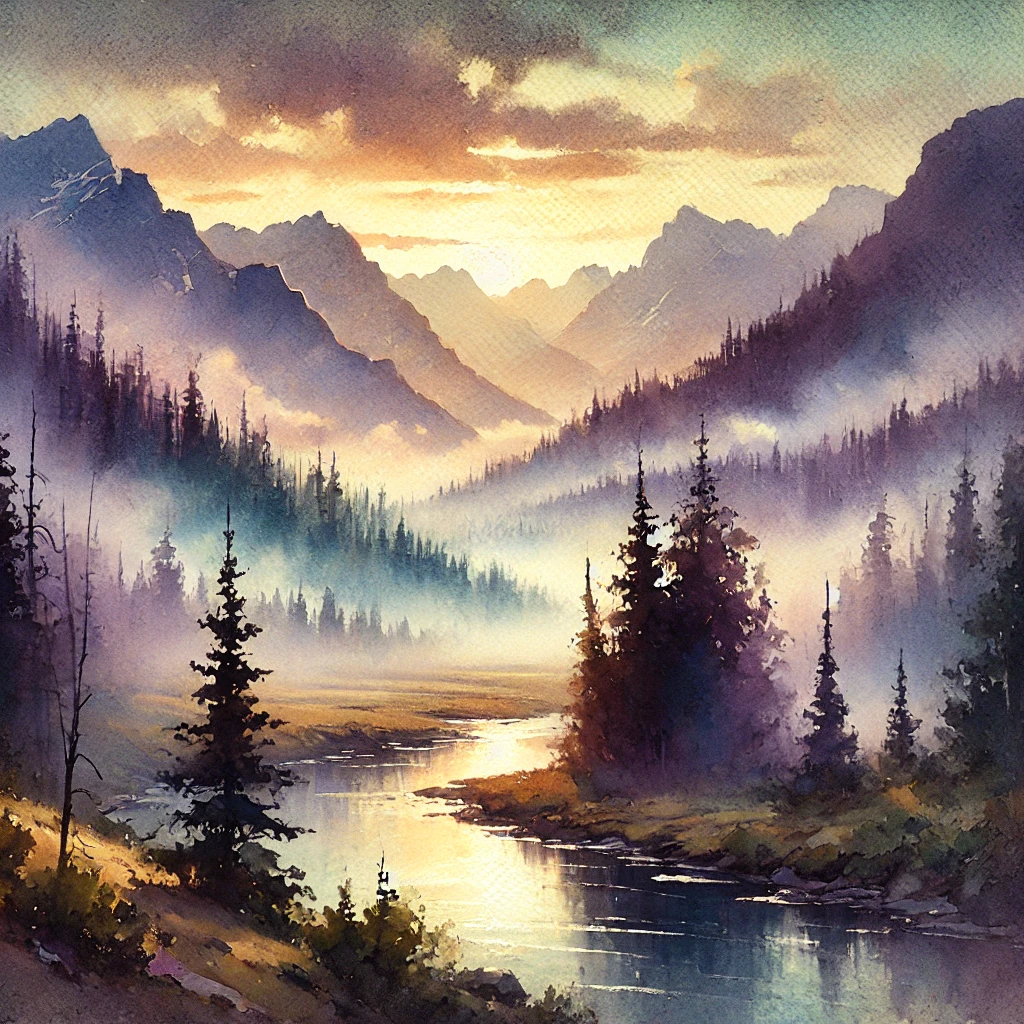
[AI Image generated using DALL-E]
Prompt 2: Technology/Business
Prompt:
“A 3D render of a futuristic robot assistant, set in a sleek modern office environment with floor-to-ceiling glass windows, with cool silver and electric blue lighting, in a cinematic realism style, conveying a professional and innovative atmosphere, with emphasis on the robot’s expressive facial features and glowing core.”
Output:

[AI Image generated using DALL-E]
Prompt 3: People/Lifestyle
Prompt:
“A digital illustration of a young woman reading a book under a tree, set in a vibrant autumn park with falling leaves around her, with warm amber and burnt orange lighting, in a Studio Ghibli-inspired style, conveying a nostalgic and cozy atmosphere, with emphasis on the detailed texture of the fallen leaves and her relaxed expression.”
Output:
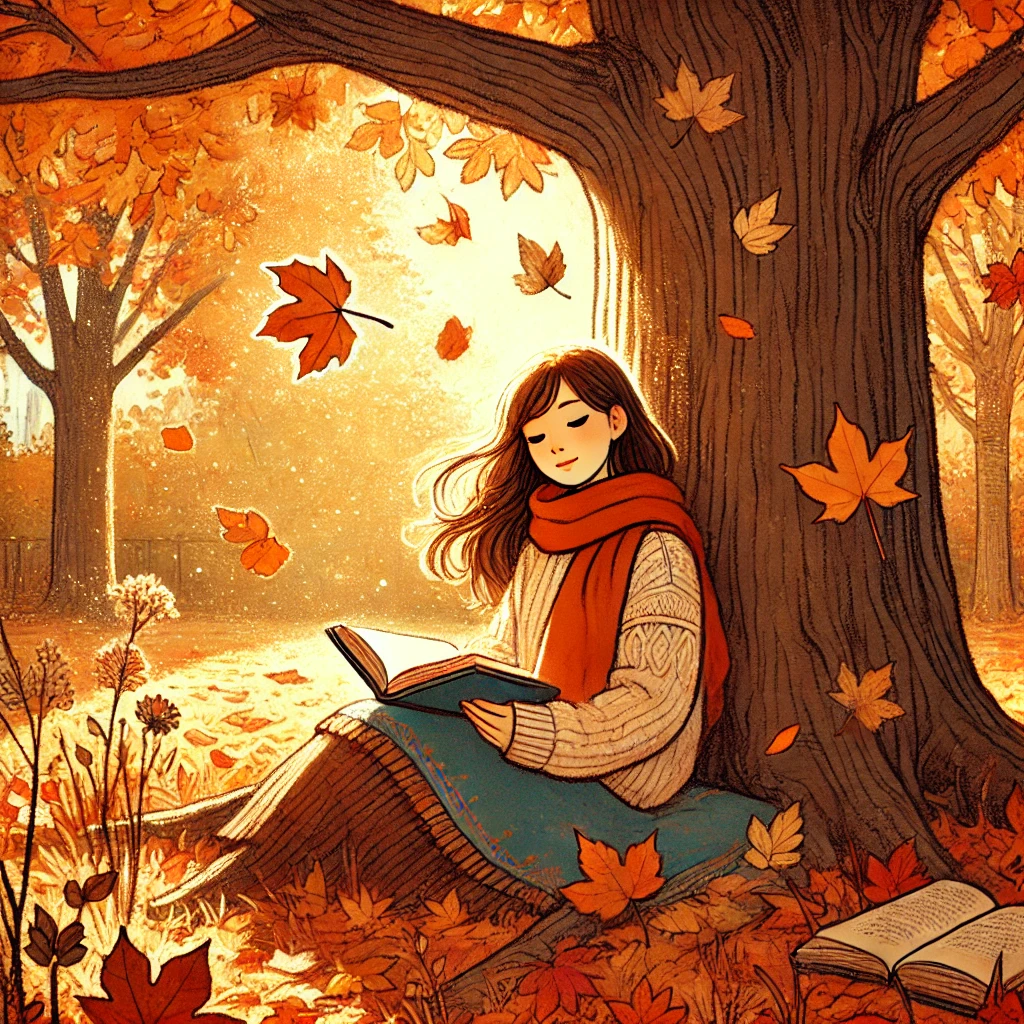
[AI Image generated using DALL-E]
Swappable Keywords Cheat Sheet
You can use the following keywords in the universal prompt template to generate high quality images!
| Category | Options to Try |
| Type of image | photorealistic, digital illustration, oil painting, watercolor, 3D render, pencil sketch |
| Art style | Studio Ghibli, Bauhaus, minimalist, cyberpunk, vintage poster, comic book, isometric |
| Lighting | golden hour, soft diffused, dramatic shadows, neon glow, candlelight, overcast daylight |
| Mood | serene, energetic, mysterious, playful, professional, nostalgic, futuristic |
| Additional detail | aerial view, close-up, wide-angle shot, bokeh background, no text, high contrast |
DALL-E is a perfect example of Generative AI in action. If you are curious to learn Generative AI and want to read all about it, then get HCL GUVI’s Free Generative AI Ebook where you will understand the basic mechanism of GenAI and its real-world applications in the field of game, coding, entertainment, and many mor
Types of Images and Art Styles You Can Generate with DALL-E
One of the most impressive things about DALL-E is just how wide its creative range is. It isn’t locked into one visual language; it can shift from a hyper-realistic photograph to a hand-drawn sketch to a cinematic movie poster, all based on how you word your prompt.
Here’s a breakdown of the major categories worth knowing about:
1. Photorealistic Images
If you want your generated image to look like it was taken by a camera rather than painted or illustrated, photorealism is your go-to style. These images mimic real-world lighting, texture, depth, and detail with remarkable accuracy.
Best used for: Product mockups, scene visualization, educational content that needs to feel grounded and real.
Keywords to use in your prompt: photorealistic, DSLR quality, 4K, cinematic lighting, shallow depth of field, bokeh background, natural lighting
2. Digital Illustration
Digital illustration sits comfortably between realism and art; it looks crafted and intentional, but not photographic. Think of it as the visual language of modern apps, websites, and online courses. Clean, purposeful, and versatile.
Best used for: Blog headers, course thumbnails, explainer visuals, and infographics.
Keywords to use in your prompt: digital illustration, flat design, vector art, clean lines, bold colors, modern illustration style
3. Oil Painting and Classical Art Styles
DALL-E can convincingly replicate the look of traditional fine art, thick brushstrokes, rich color depth, and the unmistakable texture of oil on canvas. You can even reference specific art movements to get more precise results.
Best used for: Creative projects, artistic experimentation, historical or cultural educational content.
Keywords to use in your prompt: oil painting, Renaissance style, Baroque, Impressionist, Rembrandt lighting, visible brushstrokes, rich color palette
4. Watercolor and Soft Art Styles
Watercolor-style images have a dreamy, hand-crafted quality that feels warm and approachable. They work especially well for storytelling content, children’s educational material, or anything where you want the visual to feel gentle rather than sharp.
Best used for: Storytelling visuals, children’s learning content, lifestyle, and wellness topics.
Keywords to use in your prompt: watercolor illustration, soft edges, pastel tones, hand-painted, delicate washes, translucent layers
5. Concept Art and Sci-Fi / Fantasy Styles
If your content deals with futuristic technology, imaginative worlds, or speculative ideas, concept art style is incredibly effective. It has the polished, dramatic quality you’d associate with video game art or movie production design.
Best used for: Tech and AI topics, gaming content, futuristic scenario visualization, and creative writing projects.
Keywords to use in your prompt: concept art, sci-fi, fantasy illustration, cinematic, dramatic lighting, detailed environment, matte painting
6. Minimalist and Flat Design
Sometimes less is more. Minimalist and flat design styles strip away all unnecessary detail, leaving you with clean shapes, limited color palettes, and a modern, professional aesthetic. This style is incredibly popular in the tech and education space.
Best used for: Presentations, UI mockups, corporate content, modern educational platforms.
Keywords to use in your prompt: minimalist, flat design, geometric shapes, limited color palette, clean white background, simple iconography, Bauhaus style
7. Anime and Studio Ghibli-Inspired Styles
Anime-style image generation has become one of the most popular use cases for DALL-E, and for good reason; the outputs can be strikingly detailed and emotionally expressive. Referencing specific studios or directors gives the model a very clear aesthetic target.
Best used for: Creative storytelling, character design concepts, and engaging social media content.
Keywords to use in your prompt: anime style, Studio Ghibli-inspired, cel shading, soft lighting, expressive characters, hand-drawn aesthetic, pastel sky
8. Vintage and Retro Styles
Want something that feels like it was pulled from a 1970s travel poster or a 1950s advertisement? DALL-E handles retro aesthetics surprisingly well, right down to the grain, faded tones, and period-specific typography feel.
Best used for: Nostalgic content, brand storytelling, heritage-themed educational material, and creative campaigns.
Keywords to use in your prompt: vintage poster, retro aesthetic, aged texture, muted tones, 1950s advertisement style, grainy film effect, art deco
9. 3D Render and Isometric Design
3D rendered images have a sharp, dimensional quality that feels modern and technical. Isometric design, where objects are drawn at a consistent angle to create a pseudo-3D effect, is especially popular in tech education and infographic-style content.
Best used for: Tech explainers, product visualization, data-driven content, and modern educational platforms.
Keywords to use in your prompt: 3D render, isometric illustration, clean shadows, soft ambient occlusion, modern product design, Blender-style render
The key takeaway here is that your chosen art style isn’t just a visual preference; it directly shapes how your audience feels about the content.
Ethical Considerations: Using AI Art Responsibly
As DALL-E becomes more widely adopted, it’s worth pausing to think about the ethical dimensions of AI image generation.
AI models are trained on vast datasets, and these datasets inevitably reflect the biases present in society. As a result, models like DALL-E can sometimes generate images that reinforce stereotypes related to gender, race, and culture. Being mindful of this when crafting prompts and critically reviewing the outputs you use matters publicly.
There’s also an ongoing conversation about AI’s relationship with human artists. It’s worth acknowledging that the world of art, with its vast traditions, techniques, and emotions, is a realm that machines can mimic but never truly replicate. Image generator tools like DALL-E work best when they’re seen as a complement to human creativity, not a replacement for it.
In February 2024, OpenAI began adding watermarks to DALL-E generated images, containing metadata in the C2PA standard promoted by the Content Authenticity Initiative, a step toward greater transparency around AI-generated content. This is worth knowing, especially if you’re using generated images in professional or published contexts.
If you’re serious about learning AI tools like this and want to apply them in real-world scenarios, don’t miss the chance to enroll in HCL GUVI’s Intel & IITM Pravartak Certified Artificial Intelligence & Machine Learning course, co-designed by Intel. It covers Python, Machine Learning, Deep Learning, Generative AI, Agentic AI, and MLOps through live online classes, 20+ industry-grade projects, and 1:1 doubt sessions, with placement support from 1000+ hiring partners.
Conclusion
In conclusion, DALL-E is one of the most accessible entry points into the world of generative AI, and it rewards curiosity. The best way to get better is simply to use it, experiment with different prompt styles, push the creative boundaries, and pay attention to what works and what doesn’t.
As AI image generation continues to evolve rapidly, tools like DALL-E are steadily becoming a standard part of the creative and educational toolkit. Getting familiar with them now puts you ahead of the curve, whether you’re building curriculum, developing content, or exploring AI-driven design for the first time.
The blank canvas is no longer blank; all you need is the right words.
FAQs
1. Is DALL-E free to use?
You can access DALL-E 3 for free via Microsoft Copilot (Bing Image Creator). ChatGPT’s free tier also offers limited image generation. A ChatGPT Plus subscription gives you more generous usage limits and full integration within the chat.
2. Can I use DALL-E images commercially?
OpenAI’s current terms allow users to use, reproduce, and publish images generated through their platforms, including for commercial use. That said, policies can evolve, so always verify current terms before publishing commercially.
3. What’s the difference between DALL-E and Midjourney?
Both are AI image generators, but they differ in style, access, and interface. Midjourney tends to produce more stylized, aesthetic-first outputs and is accessed via Discord. DALL-E 3 is better integrated into a conversational workflow (via ChatGPT), making it more beginner-friendly and flexible for functional, real-world use cases.
4. Do I need coding skills to use DALL-E?
Not at all, for most users, DALL-E is accessible entirely through ChatGPT’s chat interface. If you want to build applications using DALL-E, then working with the OpenAI API does involve some programming knowledge.
Success Stories

About the Author
Lukesh S
A professional content writer who has experience in freelancing and now working as a Technical Content Writer at HCL GUVI having sound knowledge in Blog Writing and Creative Writing!
View all posts by Lukesh S
Connect with me @








Did you enjoy this article?