


Artificial Intelligence and Machine Learning Articles
AI/ML Skills Gap 2026: Why Companies Can't Find Job-Ready Talent
20 AI/ML Interview Questions Recruiters Can Use Without a Tech Background - Best Guide
How Industry-Backed AI/ML Bootcamps Are Changing the AI/ML Hiring Pipeline - Best Guide 2026
From IT Support to AI Engineer: A Realistic Career Switch Guide 2026


Get In Touch For Details! Request More Information
AWS CodeWhisperer: AI Code Generation for Developers
Aug 19, 2026 6 Min Read 723 Views
(Last Updated)
Writing code has always demanded precision, consistency, and deep familiarity with frameworks, APIs, and language syntax. Even experienced developers spend a significant portion of their time on repetitive tasks writing boilerplate, looking up documentation, and crafting unit tests for logic they already understand.
Generative AI is changing that equation.
AWS CodeWhisperer is Amazon’s AI-powered coding companion, designed to accelerate developer productivity by suggesting entire lines, functions, and logical blocks of code in real time directly inside the developer’s existing editor. Unlike generic code completion tools, CodeWhisperer is deeply integrated with the AWS ecosystem, making it particularly powerful for developers building cloud-native applications on Amazon Web Services.
This article explains what AWS CodeWhisperer is, how it works, what makes it distinct from other AI coding tools, and how developers can use it effectively to build better software faster.
Table of contents
- TL;DR
- The Problem AWS CodeWhisperer Solves
- The AWS-Specific Gap
- How AWS CodeWhisperer Works
- Context-Aware Code Suggestions
- Training Data and Model Foundation
- Reference Tracking and Open-Source Attribution
- IDE Integration and Supported Languages
- Supported IDEs
- Supported Programming Languages
- Built-In Security Scanning: A Key Differentiator
- What the Security Scanner Detects
- Suggested Remediations
- AWS API Optimisation: CodeWhisperer's Core Strength
- AWS SDK Code Generation
- Infrastructure as Code Support
- Pricing: Individual vs. Professional Tier
- Individual Tier (Free)
- Professional Tier (Paid)
- AWS CodeWhisperer vs. GitHub Copilot
- Where CodeWhisperer Excels
- Where GitHub Copilot Excels
- Best Practices for Using AWS CodeWhisperer Effectively
- Conclusion
- FAQs
- Is AWS CodeWhisperer free to use?
- How is AWS CodeWhisperer different from GitHub Copilot?
- Which programming languages does CodeWhisperer support?
- Does CodeWhisperer share my code with Amazon?
- What IDEs support AWS CodeWhisperer?
TL;DR
- AWS CodeWhisperer is Amazon’s AI code generation tool, now integrated into Amazon Q Developer.
- It provides real-time code suggestions for 15+ programming languages directly inside popular IDEs.
- Its built-in security scanner detects vulnerabilities aligned with OWASP standards and suggests fixes.
- It is optimised for AWS APIs, making it especially powerful for cloud-native development.
- The Individual tier is free; the Professional tier adds enterprise controls, SSO, and higher usage limits.
What Is AWS CodeWhisperer?
AWS CodeWhisperer, now integrated into Amazon Q Developer, is an AI-powered coding assistant from Amazon Web Services that provides real-time code suggestions, complete function generation, and built-in security vulnerability scanning directly within popular IDEs. Trained on billions of lines of code from open-source projects and Amazon’s internal codebases, it is optimized for AWS development workflows and helps developers write cloud applications faster, more efficiently, and with improved security.
The Problem AWS CodeWhisperer Solves
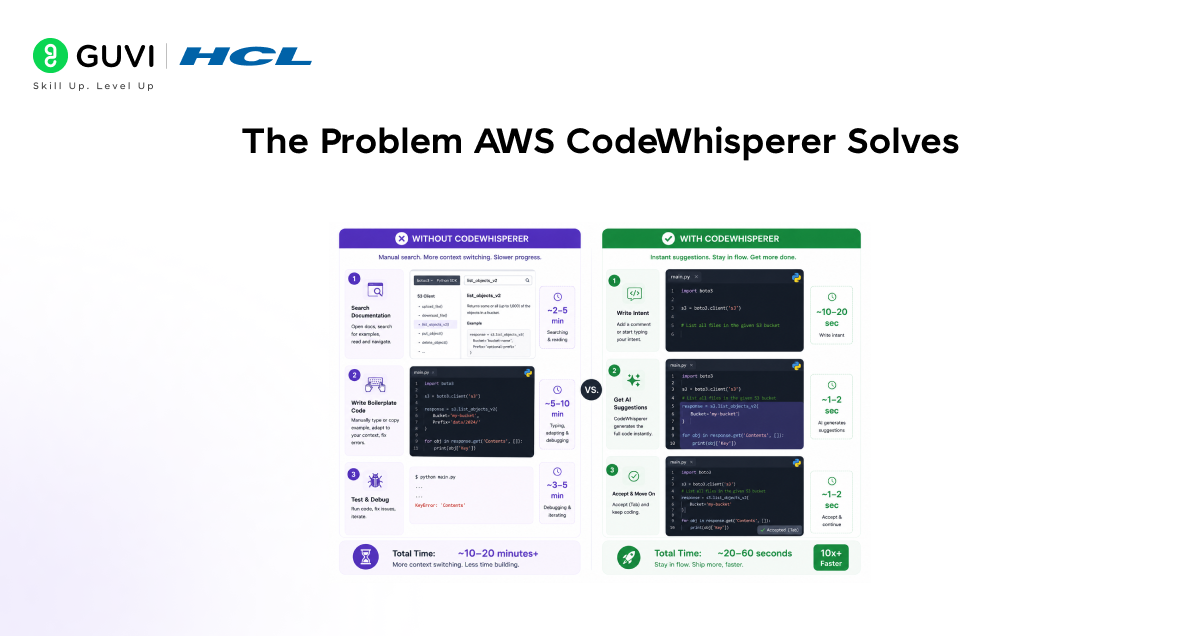
Modern software development involves far more than writing application logic. A typical developer workflow includes searching documentation, writing repetitive boilerplate, implementing common patterns from memory, crafting unit tests, and reviewing code for security issues, often before the core feature work even begins.
Studies consistently show that developers spend between 30 and 50 percent of their time on tasks that are repetitive, mechanical, and do not require deep creative thinking. This is where AI code generation delivers its highest value.
The AWS-Specific Gap
For developers building on AWS, the challenge is compounded by the breadth of the platform. AWS offers over 200 services, each with its own SDKs, API patterns, IAM permission requirements, and best practices. Remembering the correct method signatures for an S3 bucket operation, or the right way to configure a Lambda function handler, requires constant reference to documentation.
This is precisely the gap CodeWhisperer was designed to fill. By being trained on AWS’s own internal codebase and documentation in addition to public code, it has deep, first-party knowledge of AWS APIs that generic tools like GitHub Copilot do not possess at the same depth.
How AWS CodeWhisperer Works
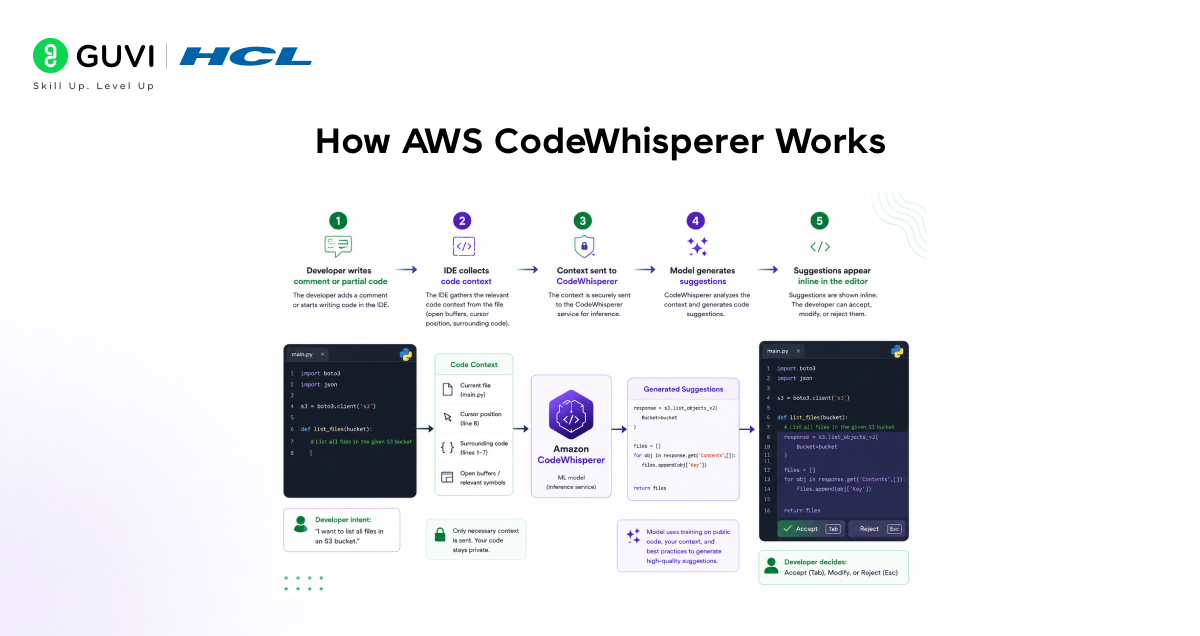
CodeWhisperer functions as an IDE extension that operates in the background as you write code. Understanding its underlying mechanism helps developers use it more effectively.
Context-Aware Code Suggestions
When a developer writes code, whether a comment describing intent, a function signature, or a partial implementation, CodeWhisperer analyses the surrounding context: the current file, the programming language, the libraries imported, and the code already written. It then generates one or more suggestions for what should come next.
Suggestions range from single-line completions to entire function implementations spanning dozens of lines. The developer can accept a suggestion with a single keystroke, cycle through alternative suggestions, or dismiss them entirely and continue writing manually.
Training Data and Model Foundation
CodeWhisperer is trained on a diverse dataset that includes:
- Open-source code: Billions of lines from public repositories across GitHub and other sources.
- Amazon’s internal codebase: Proprietary Amazon code, giving it first-party knowledge of AWS service patterns and best practices.
- Amazon documentation: AWS API references, tutorials, and SDK guides that inform how services should be called correctly.
This training corpus means CodeWhisperer does not just know how to write syntactically correct code; it knows how to write code that follows AWS conventions, uses the recommended API patterns, and handles common edge cases correctly.
Reference Tracking and Open-Source Attribution
When a CodeWhisperer suggestion closely resembles code from a specific open-source project, it flags the suggestion with a reference identifying the source repository and the applicable licence. This transparency helps developers maintain compliance with open-source licensing requirements and avoid inadvertently incorporating proprietary or copyleft code into their projects.
AWS CodeWhisperer was officially integrated into Amazon Q Developer in 2024 as part of Amazon’s broader push toward AI-powered software engineering assistants. While CodeWhisperer originally focused mainly on AI code completion and generation, Amazon Q Developer expanded the scope to include debugging, code transformation, documentation generation, and AWS architecture guidance. This shift reflected a larger industry trend where AI coding tools evolved from simple autocomplete systems into full development workflow assistants capable of supporting engineers across the entire software lifecycle.
IDE Integration and Supported Languages
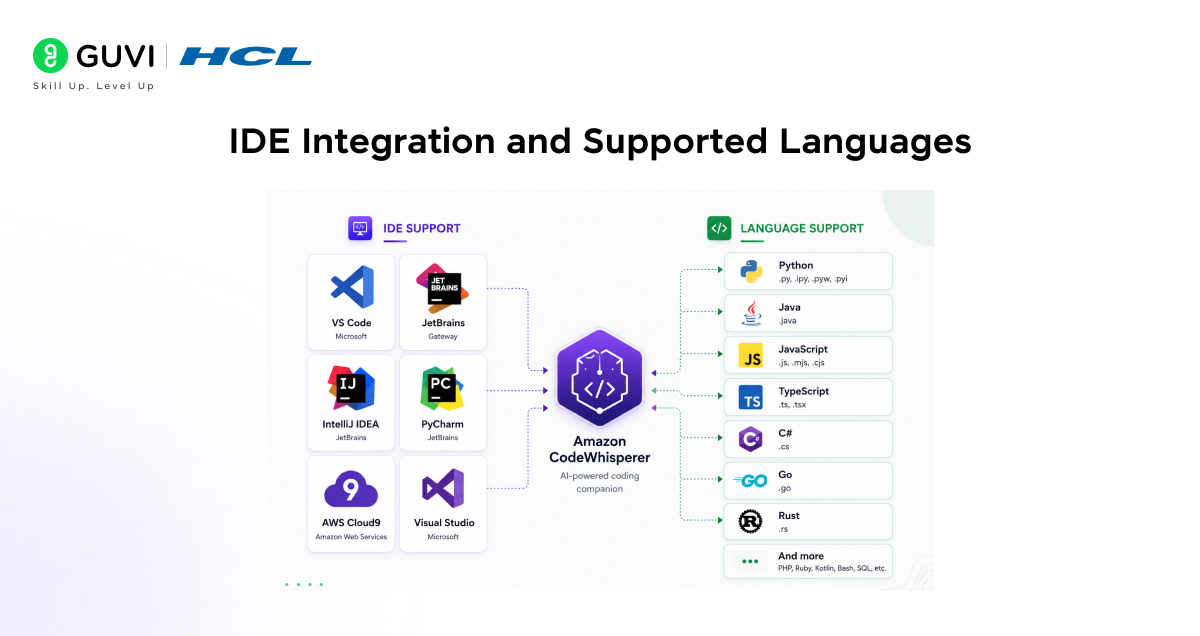
One of CodeWhisperer’s key strengths is its broad IDE support. Developers do not need to change their working environment to access its capabilities.
Supported IDEs
- Visual Studio Code: The most widely used code editor, supported via the Amazon Q extension for VS Code.
- JetBrains IDEs: IntelliJ IDEA, PyCharm, WebStorm, GoLand, Rider, and other JetBrains tools are supported via the Amazon Q plugin.
- AWS Cloud9: Amazon’s browser-based IDE with native CodeWhisperer integration, no extension installation required.
- AWS Lambda console: Code suggestions are available directly inside the Lambda function editor in the AWS Management Console.
- Visual Studio: Microsoft’s full-featured IDE for .NET development, supported for C# and other languages.
- Amazon SageMaker Studio: CodeWhisperer is available inside SageMaker notebooks for machine learning development.
Supported Programming Languages
CodeWhisperer supports over 15 programming languages, with the strongest performance in the languages most commonly used in cloud development:
• Primary languages: Python, Java, JavaScript, TypeScript.
• Systems and backend: C, C++, Go, Rust.
• Web and scripting: Ruby, PHP, Kotlin, Scala, Shell scripting.
• Infrastructure and data: SQL, JSON, YAML, HCL (Terraform).
Python receives the strongest optimisation given its dominance in AWS Lambda functions, data engineering, and machine learning workflows on AWS.
Built-In Security Scanning: A Key Differentiator
Security is where AWS CodeWhisperer distinguishes itself most clearly from competing AI coding tools. While tools like GitHub Copilot focus almost exclusively on code generation, CodeWhisperer includes a built-in security scanning engine that can detect vulnerabilities in code, whether AI-generated or human-written.
What the Security Scanner Detects
CodeWhisperer’s security scanner analyses code files and flags issues aligned with common vulnerability frameworks, including:
- OWASP Top 10: SQL injection, cross-site scripting (XSS), insecure deserialization, broken access control, and other critical web application vulnerabilities.
- Cryptographic weaknesses: Use of deprecated or insecure cryptographic algorithms, weak random number generation, and hardcoded secrets.
- AWS-specific security issues: Overly permissive IAM policies, publicly exposed S3 buckets, unencrypted data at rest, and misconfigured security groups.
- Injection vulnerabilities: Command injection, path traversal, and other input validation failures.
Suggested Remediations
For each detected vulnerability, CodeWhisperer does not just flag the issue; it suggests a specific code fix. The developer can review the suggested remediation and apply it directly, dramatically reducing the time between vulnerability discovery and resolution.
This shift-left approach to security, catching vulnerabilities during development rather than after deployment, is one of the most valuable capabilities CodeWhisperer provides, particularly for organisations operating under compliance requirements.
AWS API Optimisation: CodeWhisperer’s Core Strength
For developers building on AWS, CodeWhisperer’s most distinctive capability is its deep knowledge of the AWS SDK and service APIs. This is where the tool’s first-party training data pays off most clearly.
AWS SDK Code Generation
When a developer writes a comment or partial code describing an AWS operation — connecting to DynamoDB, invoking a Lambda function, processing an SQS queue, or configuring an SNS topic CodeWhisperer generates complete, correctly structured SDK calls using the appropriate library for the target language.
For Python developers, this means correctly structured boto3 calls with proper client initialisation, parameter naming, error handling, and response parsing. For Java developers, this means correct usage of the AWS SDK for Java v2, with the appropriate builder patterns and exception types.

Infrastructure as Code Support
CodeWhisperer extends beyond application code to infrastructure definitions. It provides intelligent suggestions for:
• AWS CloudFormation: Generating resource definitions, property configurations, and cross-stack references.
• AWS CDK: Suggesting constructs, stack configurations, and IAM policy definitions in Python, TypeScript, or Java.
• Terraform: Generating HCL resource blocks for AWS services with correct attribute names and values.
This infrastructure-as-code support is particularly valuable for DevOps engineers and platform teams who spend significant time translating architecture decisions into configuration files.
Pricing: Individual vs. Professional Tier
AWS CodeWhisperer is now accessible through Amazon Q Developer and offers two pricing tiers designed for different user profiles and organisational needs.
Individual Tier (Free)
The Individual tier is available at no cost to any developer with an AWS Builder ID or AWS account. It includes:
• Unlimited code suggestions across all supported languages and IDEs.
• 50 security scans per user per month.
• Reference tracking for open-source code suggestions.
• Support for all supported IDEs and languages.
For individual developers, freelancers, and small teams, the free tier provides access to the full code generation capability, with only the security scan frequency limited.
Professional Tier (Paid)
The Professional tier is designed for enterprise teams and organisations with compliance, security, and administrative requirements. It adds:
- 500 security scans per user per month.
- Single Sign-On (SSO) integration for centralised identity management.
- Administrator controls to manage which users have access and configure organisational policies.
- Option to disable inclusion of CodeWhisperer suggestions in model training, addressing data privacy concerns for proprietary codebases.
- Higher limits on Amazon Q Developer chat and feature usage.
AWS CodeWhisperer vs. GitHub Copilot
AWS CodeWhisperer and GitHub Copilot are the two most prominent AI code generation tools for professional developers. Each has distinct strengths that make it the better choice for specific contexts.
Where CodeWhisperer Excels
- AWS ecosystem depth: First-party training on AWS internal code gives CodeWhisperer superior knowledge of AWS APIs, SDK patterns, and service-specific best practices.
- Built-in security scanning: CodeWhisperer includes vulnerability detection out of the box. Copilot does not have a comparable native security scanning feature.
- Free individual tier: The Individual tier provides unlimited code suggestions at no cost. Copilot requires a paid subscription for all users.
- AWS service integration: Native availability in the Lambda console, Cloud9, and SageMaker Studio, without extension installation.
Where GitHub Copilot Excels
- Breadth of language and framework coverage: Copilot has been trained on a broader public codebase and may perform better for less common languages and frameworks.
- GitHub integration: Deep integration with GitHub repositories, pull request review, and GitHub Actions workflows.
- Copilot Chat: Conversational AI assistance within the IDE for code explanation, refactoring suggestions, and debugging support.
The choice between the two often reduces to a single question: Is the primary development target AWS? If yes, CodeWhisperer’s AWS-optimised suggestions, free pricing, and built-in security scanning make it the stronger choice.
Best Practices for Using AWS CodeWhisperer Effectively
Getting the most from CodeWhisperer requires understanding how to communicate intent clearly and how to evaluate its suggestions critically.
- Write descriptive comments before coding: CodeWhisperer generates significantly better suggestions when given a clear natural language description of intent. A comment like “Create a DynamoDB table with a partition key of userId and a sort key of timestamp, with TTL enabled” produces a much more accurate suggestion than writing the code directly.
- Review every suggestion before accepting: AI-generated code should always be treated as a first draft. Review suggestions for correctness, edge case handling, and adherence to your project’s coding standards before accepting them.
- Run security scans regularly: Do not wait until pre-deployment code review to scan for vulnerabilities. Run CodeWhisperer’s security scanner as a routine part of the development workflow to catch issues early when they are cheapest to fix.
- Use it for tests and documentation: CodeWhisperer excels at generating unit tests and docstrings. After writing a function, prompt it to generate tests or documentation. This is one of its highest-value use cases and most reliable outputs.
- Verify AWS API suggestions against documentation: While CodeWhisperer has strong AWS API knowledge, AWS services evolve rapidly. Always verify that suggested API calls use current method signatures and are consistent with the latest SDK version for your project.
If you want practical experience working with activation functions, neural networks, and deep learning models, HCL GUVI’s AI and ML Course can help you understand how concepts like sigmoid, backpropagation, and gradient descent are implemented using frameworks such as TensorFlow and PyTorch through hands-on projects.
Conclusion
AWS CodeWhisperer represents Amazon’s answer to the growing demand for AI-assisted developer productivity built specifically for the context where Amazon has the deepest knowledge and the greatest stake: cloud development on AWS.
Its combination of real-time code generation, first-party AWS API optimisation, built-in security vulnerability scanning, and a generous free individual tier makes it a compelling choice for any developer building on Amazon Web Services. For enterprise teams with compliance requirements and administrative needs, the Professional tier adds the controls and integrations that make it suitable for production-grade environments.
As the tool continues to evolve under the Amazon Q Developer umbrella with expanding capabilities in code transformation, debugging, and architectural guidance, CodeWhisperer is becoming less of a code completion tool and more of a full-spectrum AI development assistant. For AWS developers, it is a tool worth integrating into every workflow today.
FAQs
1. Is AWS CodeWhisperer free to use?
Yes. The Individual tier is completely free, offering unlimited code suggestions and 50 security scans per month with no subscription required. The Professional tier is a paid plan that adds enterprise SSO, admin controls, and higher security scan limits.
2. How is AWS CodeWhisperer different from GitHub Copilot?
CodeWhisperer is optimised for AWS APIs with first-party training data from Amazon’s internal codebase, includes built-in security vulnerability scanning, and offers a free individual tier. Copilot has broader language coverage and deeper GitHub integration, but lacks native security scanning and requires a paid subscription.
3. Which programming languages does CodeWhisperer support?
CodeWhisperer supports 15+ languages, including Python, Java, JavaScript, TypeScript, C, C++, Go, Rust, Ruby, PHP, Kotlin, Scala, SQL, and infrastructure formats like HCL and YAML. Python and Java receive the strongest AWS-specific optimisation.
4. Does CodeWhisperer share my code with Amazon?
On the Individual tier, code context may be used to improve the model. Professional tier users can opt out of having their code included in training data, a an important control for organisations with proprietary codebases or strict data governance requirements.
5. What IDEs support AWS CodeWhisperer?
CodeWhisperer is available in Visual Studio Code, all major JetBrains IDEs (IntelliJ, PyCharm, WebStorm, GoLand), AWS Cloud9, the AWS Lambda console, Visual Studio, and Amazon SageMaker Studio, covering the most common development environments for cloud and backend development.
Success Stories

About the Author
Vishalini Devarajan
An Aerospace Engineer turned content writer, I focus on making complex concepts easy to understand through well-structured, reader-friendly blogs. Whether it’s a technical topic or a non-technical one, I love creating content that is clear, engaging, and impactful.
View all posts by Vishalini Devarajan
Connect with me @











Did you enjoy this article?