


Artificial Intelligence and Machine Learning Articles
Finance Manager to Data Analytics: Career Growth, Salary and Seniority
How to Evaluate LLM Outputs in Production Deployments
AI/ML Skills Gap 2026: Why Companies Can't Find Job-Ready Talent
20 AI/ML Interview Questions Recruiters Can Use Without a Tech Background - Best Guide


Get In Touch For Details! Request More Information

How to Use the FHIR Developer Agent Skill with Claude Code
Jun 24, 2026 6 Min Read 725 Views
(Last Updated)
Healthcare software development is one of the most complex fields in tech. Developers working with patient data, medical records, and healthcare systems have to deal with strict standards, complicated APIs, and enormous amounts of structured data. One wrong move and you are dealing with compliance issues, broken integrations, or worse, incorrect patient information.
This is where Claude Code changes the game.
Claude Code is Anthropic’s command line tool built for developers who want AI assistance directly in their development workflow. When paired with the FHIR Developer Agent Skill and connected to tools like the NPI Registry connector, it becomes a genuinely powerful environment for building, testing, and debugging healthcare applications.
This guide walks you through exactly how to use the FHIR Developer Agent Skill with Claude Code, how the NPI Registry connector Claude integration fits into that workflow, and how to get real, practical results from this setup.
Quick TL;DR Summary
- This guide explains what the FHIR Developer Agent Skill is and how it helps healthcare developers work faster and more accurately with Claude Code.
- You will learn how the NPI Registry connector Claude integration works and why it matters for healthcare application development.
- The guide covers how FHIR resources, APIs, and patient data structures are handled inside a Claude Code workflow.
- A step by step walkthrough shows you how to set up and use the FHIR Developer Agent Skill with Claude Code from scratch.
- Real world examples demonstrate how developers use this setup for provider lookups, patient record handling, and API integration tasks.
- Practical tips help you avoid common mistakes and build more reliable healthcare applications using Claude Code.
Table of contents
- What Is FHIR and Why Does It Matter?
- What Is the FHIR Developer Agent Skill?
- What Is the NPI Registry and Why Does It Connect to This?
- How the NPI Registry Connector Claude Integration Works
- Setting Up the FHIR Developer Agent Skill with Claude Code
- Step 1: Install Claude Code
- Step 2: Authenticate Your Claude Account
- Step 3: Navigate to Your Project Directory
- Step 4: Start a Claude Code Session
- Step 5: Enable the FHIR Developer Agent Skill
- Step 6: Connect the NPI Registry Connector
- Step 7: Run Your First NPI Lookup
- Real World Use Cases
- Use Case 1: Provider Directory Application
- Use Case 2: Insurance Claim Validation
- Use Case 3: Referral Management System
- Common Mistakes to Avoid
- Pros and Cons of This Setup
- Pros
- Cons
- Conclusion
- FAQs
- Do I need a paid Anthropic plan to use Claude Code with the FHIR Developer Agent Skill?
- Is the NPI Registry API free to use?
- Does this setup work for non US healthcare applications?
- Can Claude Code validate FHIR resources against a specific implementation guide?
- How do I handle sensitive patient data when using Claude Code?
What Is FHIR and Why Does It Matter?
FHIR stands for Fast Healthcare Interoperability Resources. It is a standard developed by HL7 International that defines how healthcare information can be exchanged between different computer systems.
Think of FHIR as the common language that hospitals, clinics, insurance companies, and health apps all agree to speak. Without it, a patient record from one hospital system might be completely unreadable by another.
For developers, FHIR means working with structured data resources like Patient, Practitioner, Observation, Medication, and dozens of others. Each resource has a defined format, a set of required fields, and rules about how it connects to other resources.
This is powerful but also incredibly complex. A single patient encounter can involve ten or more linked FHIR resources. Keeping track of all of them while writing clean, compliant code is exactly the kind of task where Claude Code becomes valuable.
What Is the FHIR Developer Agent Skill?
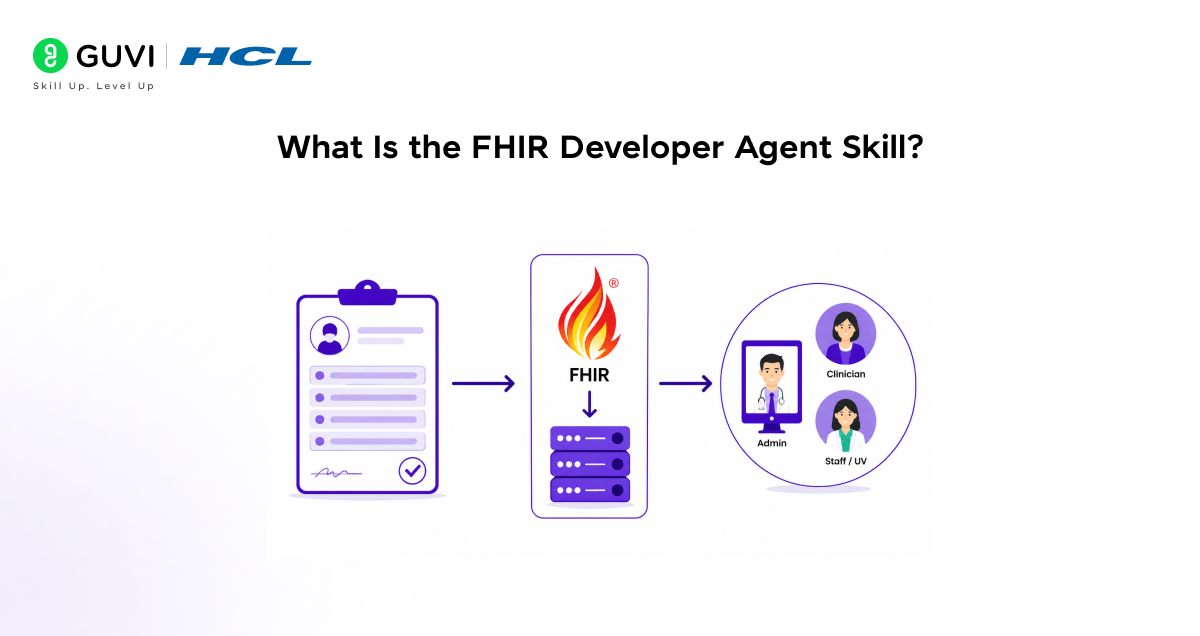
The FHIR Developer Agent Skill is a specialised capability that allows Claude Code to function as an intelligent development assistant specifically tuned for FHIR based healthcare projects.
When this skill is active, Claude Code can:
- Read and interpret FHIR resource structures and schemas
- Write and validate FHIR compliant code across languages like Python, JavaScript, and Java
- Help you query FHIR servers using RESTful API calls
- Identify missing or incorrectly formatted fields in FHIR resources
- Suggest fixes for common FHIR implementation errors
- Help you navigate complex relationships between linked resources
This is not a generic coding assistant. The FHIR Developer Agent Skill means Claude Code understands the healthcare context behind the code it is helping you write. It knows what a Practitioner resource should look like, what fields are mandatory, and how it connects to an Organization or Location resource.
What Is the NPI Registry and Why Does It Connect to This?
The National Provider Identifier Registry, commonly called the NPI Registry, is a publicly available database maintained by the Centers for Medicare and Medicaid Services in the United States. Every healthcare provider, whether an individual doctor or a large hospital, has a unique ten digit NPI number registered in this database.
For developers building healthcare applications, the NPI Registry is essential. Here is why:
- When you create a Practitioner resource in FHIR, you need to reference a valid NPI number
- Applications that verify provider credentials need to query the NPI Registry in real time
- Insurance claim systems, referral platforms, and patient portals all rely on accurate provider data pulled from the NPI Registry
- Matching provider records across different systems almost always involves NPI lookups
The NPI Registry connector Claude integration brings this database directly into your Claude Code workflow. Instead of switching between your code editor, the NPI Registry API documentation, and a browser to manually look up providers, everything happens in one place.
Read More: How to Use Claude Code: A Beginner’s Guide
How the NPI Registry Connector Claude Integration Works
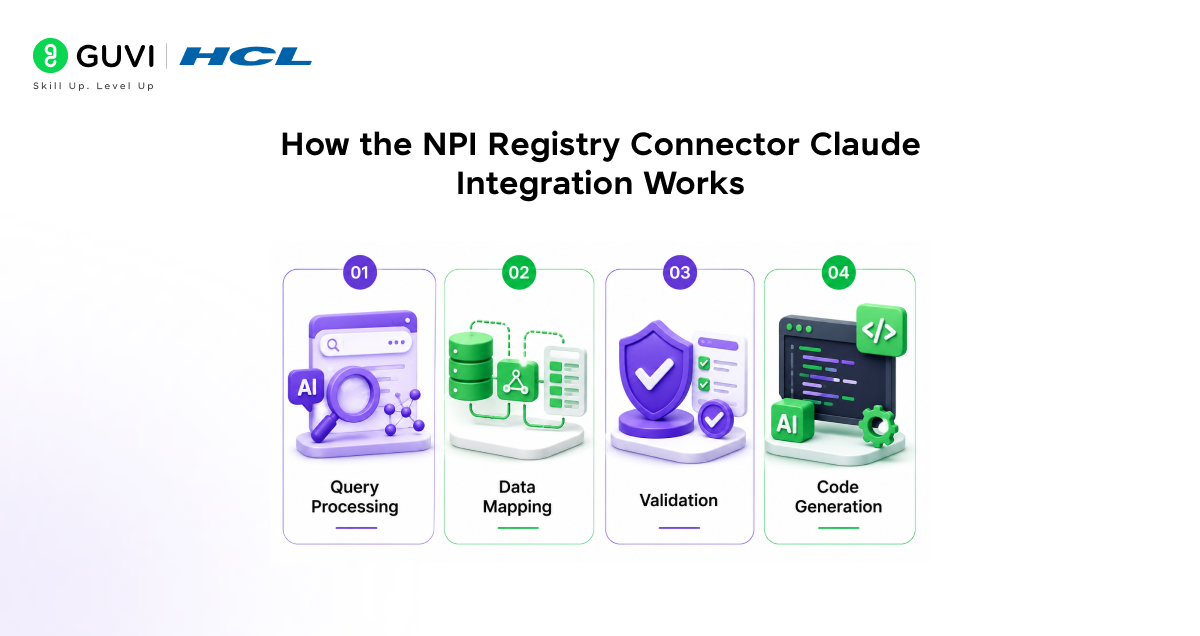
The NPI Registry connector Claude setup works by giving Claude Code access to the NPI Registry API through a configured connector. Once connected, Claude Code can query provider information, validate NPI numbers, and pull structured provider data directly into your development workflow.
Here is what happens under the hood:
- Query Processing
When you ask Claude Code to look up a provider, it sends a structured query to the NPI Registry API using the connector. The API returns provider data including name, specialty, practice address, taxonomy codes, and other details.
- Data Mapping
Claude Code then maps the returned data to the appropriate FHIR Practitioner resource fields. This saves enormous amounts of time because manually mapping NPI Registry fields to FHIR fields is tedious and error prone.
- Validation
The connector also helps Claude Code validate that the NPI number you are using in your code actually exists and matches the provider details in your application.
- Code Generation
Once the data is retrieved and mapped, Claude Code can generate the actual code you need, whether that is a FHIR resource object, an API call, or a database entry.
FHIR R4, the current stable version of the standard, defines over 140 resource types. Most healthcare applications only use a small subset of these, but understanding how these resources connect and interact is critical. The FHIR Developer Agent Skill inside Claude Code helps developers navigate these relationships without needing to memorise the entire specification.
Setting Up the FHIR Developer Agent Skill with Claude Code
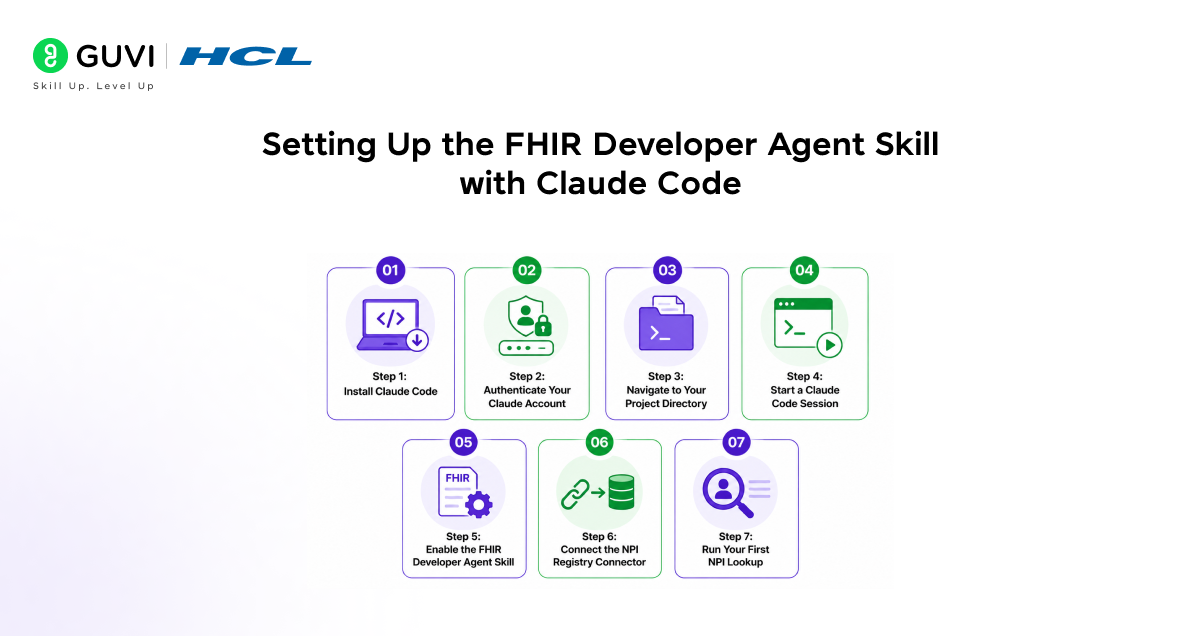
Here is a step by step guide to getting this workflow running.
Step 1: Install Claude Code
Open your terminal and install Claude Code using npm.
npm install -g @anthropic-ai/claude-code
Once installed, run the following to confirm it is working.
claude –version
Step 2: Authenticate Your Claude Account
Run the login command and follow the prompts to connect Claude Code to your Anthropic account.
claude login
Step 3: Navigate to Your Project Directory
Move into the directory where your FHIR project lives.
cd your-fhir-project
Step 4: Start a Claude Code Session
Launch Claude Code inside your project folder.
Claude
Claude Code will scan your project structure and load context about your codebase automatically.
Step 5: Enable the FHIR Developer Agent Skill
Inside the Claude Code session, tell Claude what you are working on and what skill context you need.
I am building a FHIR R4 application. I need help working with Practitioner and Organization resources and querying the NPI Registry API.
Claude Code will activate the relevant FHIR context and begin responding with healthcare specific guidance.
Step 6: Connect the NPI Registry Connector
Configure the NPI Registry connector by telling Claude Code the base API endpoint you are working with.
Connect to the NPI Registry API at https://npiregistry.cms.hhs.gov/api and help me query provider data.

Claude Code will help you set up the API calls and handle the response structure.
Step 7: Run Your First NPI Lookup
Ask Claude Code to perform a provider lookup and map the result to a FHIR Practitioner resource.
Look up NPI number 1234567890 and generate a FHIR R4 Practitioner resource from the result.
Claude Code will query the NPI Registry, retrieve the provider data, and generate a properly structured FHIR resource for you.
Real World Use Cases
Use Case 1: Provider Directory Application
A health tech startup is building a provider directory that lets patients find doctors by specialty and location. The development team uses the NPI Registry connector Claude integration to pull verified provider data and automatically generate FHIR Practitioner resources. What used to take hours of manual data mapping now takes minutes.
Use Case 2: Insurance Claim Validation
An insurance platform needs to validate that every provider listed on a submitted claim has a valid NPI number. Using Claude Code with the NPI Registry connector, the team builds a validation function that checks each NPI in real time before a claim is processed. Claude Code writes the validation logic, handles error cases, and maps the response to the existing data model.
Use Case 3: Referral Management System
A hospital network is building a referral management system that needs to match referring physicians to receiving specialists. The team uses Claude Code to write the matching logic, query the NPI Registry for provider details, and generate the FHIR ServiceRequest resources that document each referral. The entire workflow is built and tested inside Claude Code without leaving the terminal.
The NPI Registry contains records for over 7 million healthcare providers across the United States. Every time a developer hardcodes provider information instead of querying the registry directly, they risk working with outdated or incorrect data. Provider addresses, specialties, and practice affiliations change frequently, and the NPI Registry is updated in real time to reflect those changes.
Best Practices When Using This Setup
- Always specify which version of FHIR you are working with at the start of each Claude Code session, whether that is DSTU2, STU3, or R4
- When querying the NPI Registry, always validate the returned data before mapping it to a FHIR resource
- Use Claude Code to generate unit tests for every FHIR resource your application creates or consumes
- Ask Claude Code to check your resources against the official FHIR validation rules before pushing to production
- Keep your NPI Registry queries specific by including taxonomy codes or state filters to reduce response time and improve accuracy
- Document the NPI numbers your application depends on so Claude Code has context when helping you debug issues
Common Mistakes to Avoid
- Assuming NPI numbers are permanent without verifying against the registry, providers can have their NPI deactivated or reassigned
- Skipping FHIR resource validation because the code runs without errors, invalid resources can still break downstream systems
- Using outdated FHIR resource schemas because the specification version was not specified clearly at the start of the session
- Ignoring taxonomy codes in NPI Registry responses, these codes are essential for correctly categorising providers in your application
- Building without error handling for NPI Registry API timeouts or rate limits, the API has usage constraints that need to be accounted for
Pros and Cons of This Setup
Pros
- Dramatically speeds up FHIR resource creation and validation
- Eliminates manual cross referencing between NPI Registry documentation and FHIR specifications
- Works directly in the terminal without switching between multiple tools
- Generates production ready code with proper error handling
- Reduces the risk of compliance issues caused by incorrectly structured FHIR resources
- Makes onboarding new developers to FHIR projects significantly faster
Cons
- Requires familiarity with command line tools, which may be a barrier for some developers
- Claude Code does not have real time access to the very latest FHIR specification updates
- NPI Registry API has rate limits that need to be managed carefully in production environments
- Complex multi resource FHIR workflows may still require significant manual review
- Works best when the developer already has a basic understanding of FHIR concepts
If you want to learn more on how to use the FHIR Developer agent skill with Claude Code, do not miss the chance to enroll in HCL GUVI’s Intel & IITM Pravartak Certified Artificial Intelligence & Machine Learning course. Endorsed with Intel certification, this course adds a globally recognized credential to your resume, a powerful edge that sets you apart in the competitive AI job market.
Conclusion
Healthcare application development does not have to be as painful as it has traditionally been. The combination of Claude Code, the FHIR Developer Agent Skill, and the NPI Registry connector Claude integration gives developers a genuinely powerful workflow for building compliant, accurate, and well structured healthcare applications.
Whether you are building a provider directory, a claims validation system, or a referral management platform, this setup removes the friction that slows most healthcare development teams down. You spend less time reading documentation and manually mapping data, and more time building things that actually work.
Set up Claude Code today, connect it to the NPI Registry, and see how much faster your FHIR development workflow becomes.
FAQs
1. Do I need a paid Anthropic plan to use Claude Code with the FHIR Developer Agent Skill?
Claude Code is available on paid Anthropic plans. Check the latest plan details on the Anthropic website to find the option that suits your team size and usage needs.
2. Is the NPI Registry API free to use?
Yes, the NPI Registry API is publicly available and free to query. There are rate limits in place, so production applications should implement appropriate throttling and caching strategies.
3. Does this setup work for non US healthcare applications?
The NPI Registry is specific to the United States. However, the FHIR Developer Agent Skill works with FHIR implementations globally. Developers outside the US can replace the NPI Registry connector with their country’s relevant provider registry.
4. Can Claude Code validate FHIR resources against a specific implementation guide?
Yes. If you provide Claude Code with the relevant implementation guide details at the start of your session, it can factor those constraints into the code and validation advice it provides.
5. How do I handle sensitive patient data when using Claude Code?
Never paste real patient data into a Claude Code session. Use synthetic or anonymised test data during development. For production environments, follow your organisation’s data governance and HIPAA compliance policies.
Success Stories

About the Author
Vishalini Devarajan
An Aerospace Engineer turned content writer, I focus on making complex concepts easy to understand through well-structured, reader-friendly blogs. Whether it’s a technical topic or a non-technical one, I love creating content that is clear, engaging, and impactful.
View all posts by Vishalini Devarajan
Connect with me @


















Did you enjoy this article?