


Data Science Articles
My Data Scientist Interview Experience: From Rejection to 6-Figure Offer
My Data Analyst Interview Experience: From Rejection to Success Story
Validation and Metrics: Are They Being Ignored in Modern Data Science?


Get In Touch For Details! Request More Information

How to Rename a Column in SQL: A Beginner’s Step-by-Step Guide
Jan 27, 2026 4 Min Read 3029 Views
(Last Updated)
When working with databases, you might need to rename a column in SQL to keep your database organized and up-to-date. Renaming columns is a common task that doesn’t change the stored data but updates the column name in your table schema.
The good news is that SQL provides the ALTER TABLE statement to help you efficiently rename columns without affecting your existing data. However, it’s worth noting that the exact syntax varies across different database systems. While PostgreSQL, Oracle SQL, and SQLite support the direct ALTER TABLE RENAME COLUMN syntax, MySQL requires the CHANGE keyword, and SQL Server uses a stored procedure called sp_rename.
This beginner-friendly guide will walk you through how to rename a column in SQL step by step. You’ll learn the general syntax, specific approaches for different database systems, and even discover how GUI tools can make this task even simpler. Let’s begin!
Quick Answer:
The simplest way to rename a column in SQL is by using the ALTER TABLE command, but the exact syntax depends on your database—for example, PostgreSQL supports RENAME COLUMN, MySQL may require CHANGE, and SQL Server uses sp_rename.
Table of contents
- General Syntax to Rename a Column in SQL
- Step-by-Step: How to Rename a Column in SQL
- Step 1: Back Up Your Data
- Step 2: Execute the Rename Command
- Step 3: Verify the Change
- Step 4: Update Dependencies
- Using GUI Tools to Rename Columns Easily
- Concluding Thoughts…
- FAQs
- Q1. How to rename a column in SQL?
- Q2. Can I rename a column without affecting the data in the table?
- Q3. Do I need special permissions to rename a column in SQL?
- Q4. Are there any risks involved in renaming a column?
- Q5. Can I use GUI tools to rename columns instead of writing SQL commands?
General Syntax to Rename a Column in SQL
Unlike many SQL operations, there’s no universal standard for renaming columns. The syntax varies significantly across different database systems.
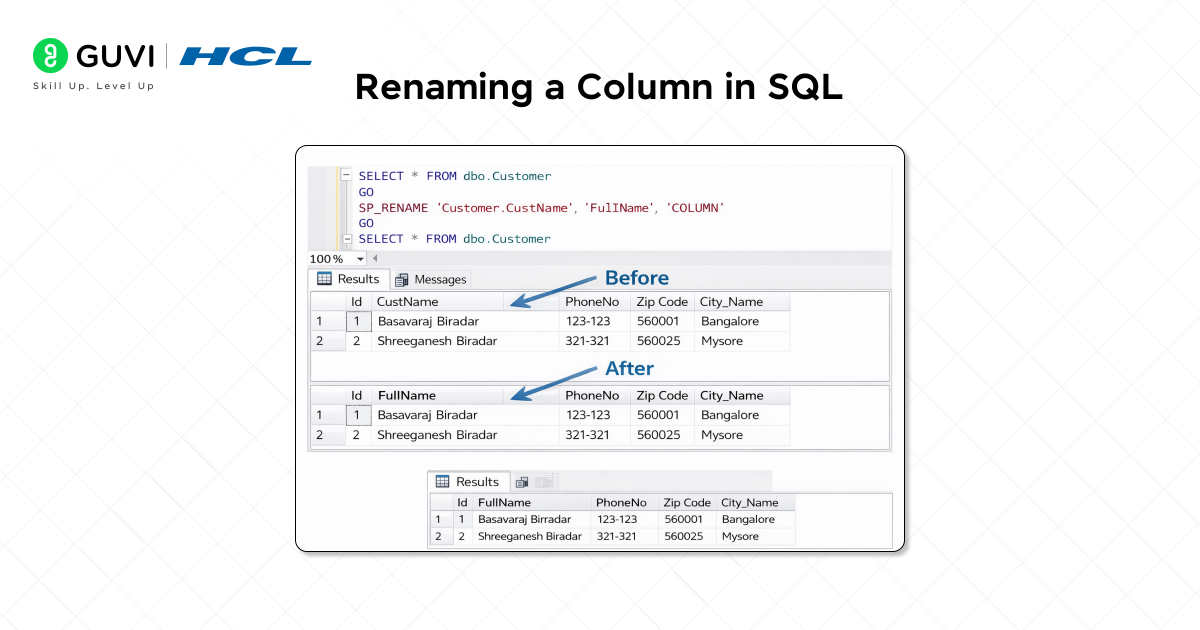
For PostgreSQL and Oracle:
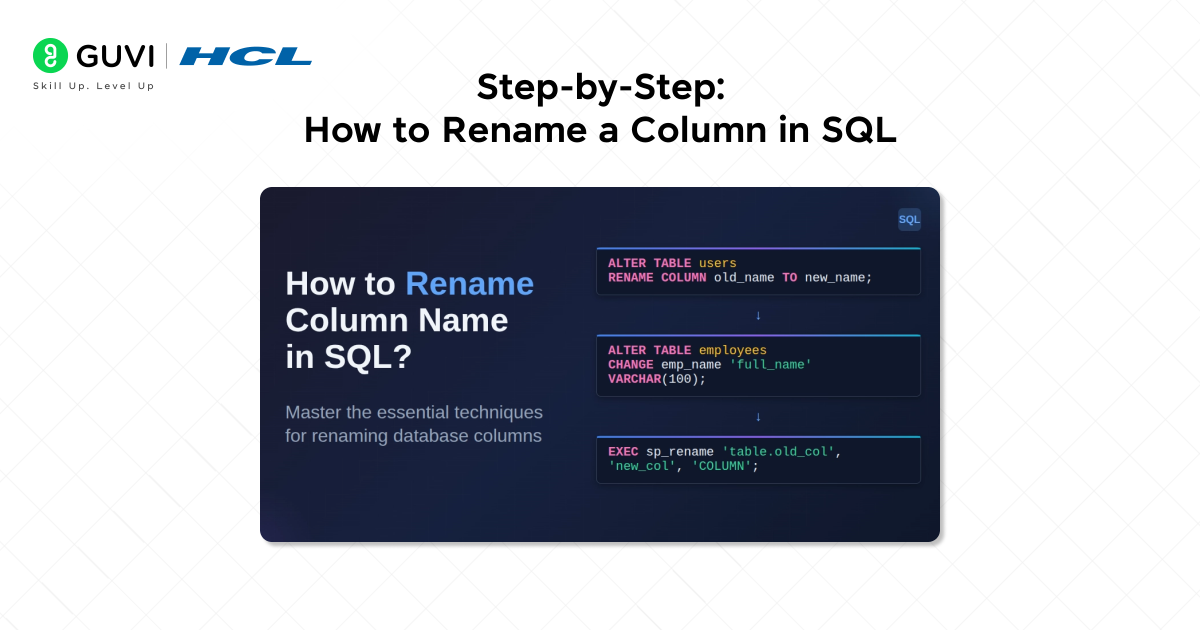
ALTER TABLE table_name RENAME COLUMN old_name TO new_name;
For MySQL: MySQL 8.0 and later support the same syntax as PostgreSQL. For earlier versions:
ALTER TABLE table_name CHANGE COLUMN old_name new_name datatype;
Note: With MySQL’s CHANGE COLUMN, you must specify the full column definition, including data type.
For SQL Server: SQL Server uses a stored procedure instead:
EXEC sp_rename ‘table_name.old_name’, ‘new_name’, ‘COLUMN’;
Important considerations:
- Renaming a column doesn’t automatically update references to that column in other objects
- Before renaming, check dependencies using sys.sql_expression_dependencies
- Objects that use wildcard selects (SELECT *) will need metadata refreshing
- Always test column renames in a development environment first
- Column renaming requires ALTER permission on the table
This basic understanding of syntax differences forms the foundation for successfully renaming columns across various database platforms. In the next section, we’ll walk through the process step-by-step.
Step-by-Step: How to Rename a Column in SQL
Let’s dive into the practical steps for renaming columns in your SQL database. Following these steps will help you safely make changes without losing data.
Step 1: Back Up Your Data
First, create a backup of your database or at least the table you’ll be modifying. This safety measure protects against accidental data loss during the renaming process.

Step 2: Execute the Rename Command
Run the appropriate command for your specific database system:
- PostgreSQL and Oracle:
ALTER TABLE table_name RENAME COLUMN old_column_name TO new_column_name; - MySQL:
ALTER TABLE table_name CHANGE old_name new_name datatype;
Note: You must specify the data type even if it remains unchanged. - SQL Server:
EXEC sp_rename ‘table_name.old_column_name’, ‘new_column_name’, ‘COLUMN’;
Step 3: Verify the Change
After executing the command, run a simple query to confirm the column has been renamed successfully:
SELECT * FROM table_name LIMIT 5;
Step 4: Update Dependencies
Finally, modify any stored procedures, views, or application code that reference the old column name. In SQL Server, use sys.sql_expression_dependencies to identify dependencies beforehand.
Remember that renaming columns doesn’t automatically update references to that column in other database objects.
Renaming columns might seem like a simple operation, but there are some surprising historical and technical quirks behind it:
ColumnWhy Syntax Differs Across Databases: Column SQL has no universal standard for renaming columns, which is why PostgreSQL uses RENAME COLUMN, MySQL historically required CHANGE, and SQL Server relies on the sp_rename procedure. These differences stem from how each database vendor interpreted the SQL standards over time.
Column Renaming Wasn’t Always Possible:Column Earlier database versions required creating a new column, copying data, and dropping the old one because native rename support did not exist. Modern systems added rename capabilities to improve schema evolution without data migration.
These facts reveal how database systems evolved to make schema management easier and more flexible for developers.
Using GUI Tools to Rename Columns Easily
If typing SQL commands feels intimidating, several GUI (Graphical User Interface) tools offer a more visual approach to renaming columns in SQL databases.
SQL Server Management Studio (SSMS) provides two simple methods to rename columns:
Through Object Explorer:
- Connect to your database instance
- Right-click the table with the column you want to rename
- Select “Design”
- Under Column Name, select and change the name
- Save the table
Beekeeper Studio makes the process even more straightforward:
- Launch Beekeeper Studio and connect to your database
- Right-click a table in the sidebar and select “View Structure.”
- Double-click any column name to modify it
- Click “Apply” to save changes
TablePlus offers a similar intuitive interface for managing databases, including Oracle, MySQL, SQL Server, and PostgreSQL simultaneously.
DbVisualizer users can access columns through the Columns section of a specific table and rename them with a right-click, although this feature isn’t available in all SQL clients.
These GUI tools handle the underlying SQL code automatically, which prevents syntax errors and saves time, especially for beginners. Additionally, they provide visual feedback, making it easier to verify your changes before applying them.
If you’re getting comfortable with basic SQL operations like renaming a column and wondering what to learn next, then dive into HCL GUVI’s Data Science Course — it’s a full-blown upskilling path where you’ll master Python, ML, deep analytics, and real-world projects to become career-ready.
Concluding Thoughts…
Renaming columns in SQL might seem daunting at first, but now you have multiple approaches to accomplish this task effectively. Throughout this guide, we’ve explored the specific syntax required for different database systems – from PostgreSQL’s straightforward ALTER TABLE command to SQL Server’s sp_rename procedure. Additionally, we’ve highlighted the importance of backing up your data, verifying changes, and updating dependencies after renaming columns.
Armed with this knowledge, you can now maintain cleaner, more intuitive database structures without disrupting your data. The next time your database needs reorganizing, you’ll tackle column renaming with confidence!
FAQs
Q1. How to rename a column in SQL?
To rename a column in SQL, use the ALTER TABLE statement. The exact syntax varies by database system. For PostgreSQL and Oracle, use “ALTER TABLE table_name RENAME COLUMN old_name TO new_name”. For MySQL, use “ALTER TABLE table_name CHANGE old_name new_name datatype”. For SQL Server, use the sp_rename stored procedure.
Q2. Can I rename a column without affecting the data in the table?
Yes, renaming a column does not affect the data stored in the table. It only changes the column name in the table schema. However, it’s important to update any dependencies that reference the old column name in other database objects or application code.
Q3. Do I need special permissions to rename a column in SQL?
Yes, you typically need ALTER permission on the table to rename a column. It’s always a good practice to ensure you have the necessary permissions before attempting to modify database structures.
Q4. Are there any risks involved in renaming a column?
While renaming a column doesn’t directly affect the data, it can impact dependencies. References to the old column name in views, stored procedures, or application code won’t automatically update. It’s crucial to identify and update these dependencies to avoid errors.
Q5. Can I use GUI tools to rename columns instead of writing SQL commands?
Absolutely. Many GUI tools like SQL Server Management Studio, Beekeeper Studio, and TablePlus offer user-friendly interfaces for renaming columns. These tools handle the underlying SQL syntax, making the process easier and reducing the chance of errors, especially for beginners.
Success Stories

About the Author
Jaishree Tomar
A recent CS Graduate with a quirk for writing and coding, a Data Science and Machine Learning enthusiast trying to pave my own way with tech. I have worked as a freelancer with a UK-based Digital Marketing firm writing various tech blogs, articles, and code snippets. Now, working as a Technical Writer at GUVI writing to my heart’s content!
View all posts by Jaishree Tomar
Connect with me @











Did you enjoy this article?